
For individual owners and families managing two or more properties, the strongest Hospitable alternatives are Mypropertycommandcenter, OwnerRez, Hostfully, iGMS, Tokeet, and Lodgify. Mypropertycommandcenter leads this shortlist for owners who want a single, clutter-free dashboard covering property status, task tracking, vendor contacts, and document storage without wading through enterprise-grade complexity. The others earn their spots on specific strengths: OwnerRez on direct-booking and payment depth, Hostfully on guest messaging templates, iGMS on channel sync, Tokeet on multi-calendar management, and Lodgify on building a direct-booking website fast.
All six offer a free trial or demo, and verified user reviews on GetApp confirm that buyers in this category weigh onboarding ease and automation quality above raw feature count. If you manage fewer than ten properties and want to stop juggling spreadsheets, start with Mypropertycommandcenter's free trial (no credit card required) and use the others as benchmarks during your evaluation.
Table of Contents
- How do the top Hospitable alternatives compare for small owners?
- How to pick the right Hospitable alternative for your situation
- What does switching to a new tool actually involve?
- Key Takeaways
- Why simplicity wins for multi-home owners
- Mypropertycommandcenter: a purpose-built option for families managing multiple homes
- Useful sources and migration resources
How do the top Hospitable alternatives compare for small owners?
GetApp's alternatives index groups these tools by shared feature clusters: messaging automation, channel managers, calendar sync, task and cleaning management, direct-booking sites, and payment handling. The table below maps each option against those dimensions so you can shortlist in one pass.
| Dimension | Mypropertycommandcenter | OwnerRez | Hostfully | iGMS | Tokeet | Lodgify |
|---|---|---|---|---|---|---|
| Best for | Multi-home owners wanting a unified dashboard | Direct-booking + payment depth | Guest messaging & guidebooks | Channel sync focus | Multi-calendar management | Building a direct-booking site |
| Starting price / trial | Tiered by property count; 14-day free trial, no card | Per-property pricing; free trial | Per-property pricing; demo available | Per-property pricing; free trial | Per-property pricing; free trial | Per-website pricing; free trial |
| Messaging automation | Smart alerts and reminders | Template-based auto-replies | Strong template library | Auto-messaging | Auto-messaging | Basic auto-messaging |
| Channel manager / calendar sync | Calendar sync across homes | Airbnb, Vrbo, Booking.com | Airbnb, Vrbo, Booking.com | Airbnb, Vrbo, Booking.com | Airbnb, Vrbo, Booking.com | Airbnb, Vrbo, Booking.com |
| Task & cleaning management | Full task tracking with reminders | Basic task tools | Cleaning scheduler | Cleaning automation | Task management | Basic tasks |
| Direct-booking site & payments | Not primary focus | Strong (Stripe/PayPal) | Guidebook + booking page | Direct booking | Direct booking | Full website builder |
| Ease of onboarding / migration | Guided onboarding resources | CSV import; self-serve | CSV import; 1:1 support | CSV import | CSV import | Guided setup |
| Mobile app / US support | Mobile-friendly; US support | Mobile app; US support | Mobile app; US support | Mobile app; US support | Mobile app; US support | Mobile app; US support |
| Security & privacy basics | Data privacy policy; secure login | Standard SSL/data policy | Standard SSL/data policy | Standard SSL/data policy | Standard SSL/data policy | Standard SSL/data policy |
Pricing across this category follows two shapes: per-property monthly fees (common with OwnerRez, iGMS, Tokeet, and Hostfully) or tiered plans that bundle a property count into a flat monthly rate. For a family managing three to five homes, per-property pricing can add up faster than a tiered plan. Always confirm whether the "starting price" covers channel sync and messaging automation or locks those behind a higher tier.
How to pick the right Hospitable alternative for your situation
Prioritize tools that centralize property status, task management, and simple automation over platforms built for enterprise portfolios. A multi-home owner does not need revenue-management algorithms; they need to know which property has a maintenance request open and which vendor to call.
The six criteria that matter most, in order:
- Dashboard clarity — Can you see all properties' status at a glance without clicking through sub-menus?
- Task and vendor management — Does it track open repairs, assign vendors, and send reminders?
- Calendar sync reliability — Does it pull from Airbnb, Vrbo, and Booking.com without double-booking gaps?
- Messaging automation — Can you set up auto-replies and templates without a developer?
- Direct-booking and payments — Does it support Stripe or PayPal if you want to take bookings off-platform?
- Clear per-property pricing — Is the cost transparent before you commit?
Verified reviews on GetApp consistently show that small owners abandon tools not because of missing features but because onboarding is painful or support is slow. That pattern should shape what you test first.
Questions to ask during any free trial or demo:
- Can I import two properties and see them both on the dashboard within 30 minutes?
- How does the tool notify me when a maintenance task is overdue?
- What happens to my data if I cancel — can I export everything as a CSV?
- Is there a 1:1 onboarding call, or is setup entirely self-serve?
- Does the mobile app show task status and vendor contacts, or just bookings?
Red flags to watch for:
- Per-unit fees that only appear after you add your third property
- No clear data-export path before you cancel
- A mobile app that shows bookings but not tasks or alerts
- US support that routes to a ticketing queue with multi-day response times
Pro Tip: During your free trial, import exactly two properties and trigger one maintenance task on each. Then check whether the alert fires correctly on mobile. This single test surfaces more onboarding friction than any feature demo.
What does switching to a new tool actually involve?
Switching is manageable when you prepare specific exports and verify your core workflows — messaging, calendar sync, and task tracking — before you cut over.
Start with your data export. Before you touch a new platform, pull these items from your current tool:
- Full property list (addresses, unit details, access codes)
- Active and upcoming bookings with guest contact info
- Guest message history
- Task and repair history
- Vendor contacts and notes
- Invoices and payment records
Most platforms accept CSV imports for properties and bookings. Vendor contacts and task history often require manual entry or a custom CSV template, so budget time for that step.
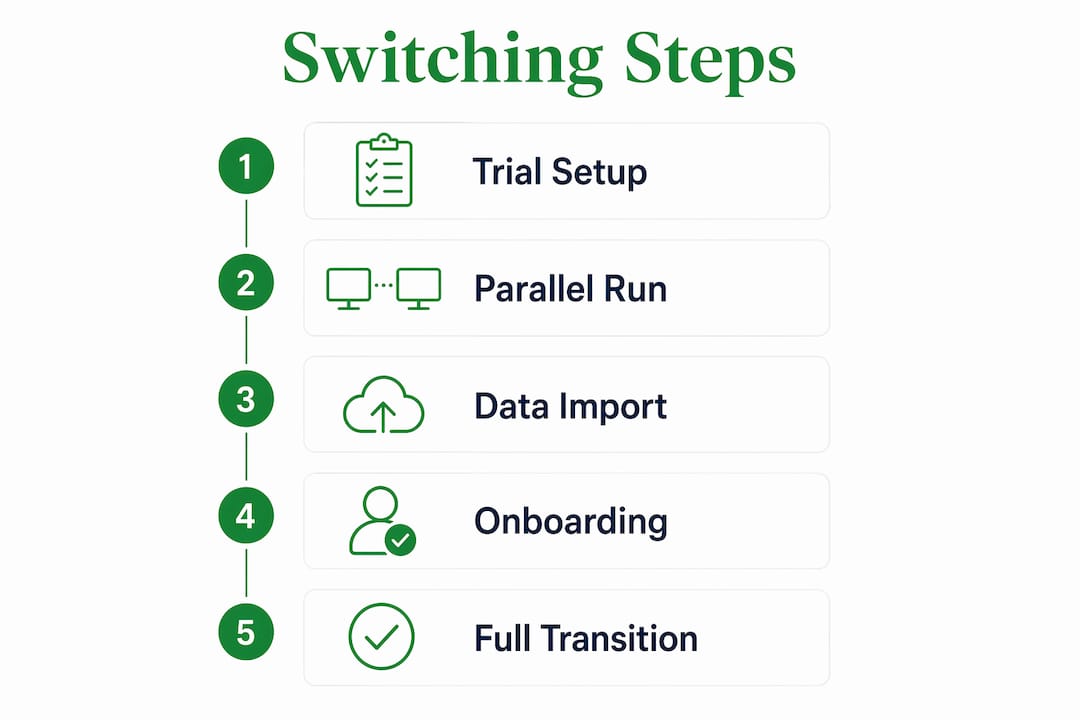
The trial-to-cutover sequence for 1–5 properties runs roughly like this:
| Phase | Timeline | What to verify |
|---|---|---|
| Trial setup | Initial days | Import multiple properties; confirm dashboard view |
| Channel / calendar sync | Following days | Connect Airbnb and Vrbo; check for sync gaps |
| Task and vendor mapping | Following days | Add vendors; create one task per property |
| Parallel run | About two weeks | Run old and new tools side by side |
| Cutover | End of month | Disable old tool; confirm all alerts are live |
A parallel run of 10–14 days catches the edge cases a demo never shows: a booking that syncs late, a task reminder that fires at the wrong time, a vendor contact that didn't import cleanly.
For onboarding assistance, Mypropertycommandcenter provides guided onboarding resources that walk you through the setup sequence. Other platforms in this category offer a mix of self-serve CSV templates and, at higher tiers, 1:1 migration support. If you manage five or more properties, ask explicitly whether a migration call is included before you sign up.
For owners thinking about broader operational integrations alongside their switch, the ancillary income property management guide covers how to layer additional revenue streams into your property admin workflow.
Key Takeaways
For individual owners and families, the best Hospitable alternatives prioritize a centralized dashboard, clear task tracking, and simple onboarding over enterprise feature depth.
| Point | Details |
|---|---|
| Start with the right shortlist | Mypropertycommandcenter, OwnerRez, Hostfully, iGMS, Tokeet, and Lodgify are the strongest options for small multi-home owners. |
| Onboarding ease beats feature count | Verified reviews show buyers leave tools because setup is painful, not because features are missing. |
| Run a parallel migration | A 10–14 day parallel run catches sync gaps and task-reminder errors before you fully cut over. |
| Export data before you switch | Pull your property list, bookings, vendor contacts, task history, and invoices as CSVs first. |
| Mypropertycommandcenter fits small owners | Its tiered dashboard, task tracking, vendor directory, and 14-day free trial make it a practical starting point. |
Why simplicity wins for multi-home owners
The conventional wisdom in property-management software circles is that more integrations equal more value. For individual owners and families, that logic breaks down fast. A family managing three vacation homes does not need a revenue-management engine or a 40-step onboarding flow. They need to know, right now, whether the plumber showed up at the lake house and whether the cleaning crew is confirmed for Saturday.
What actually matters for this audience is a centralized property view, a vendor list you can reach in two taps, and maintenance reminders that fire before a small repair becomes an expensive one. A document vault for warranties and insurance policies sounds like a minor feature until you're standing in a hardware store trying to remember which HVAC model is in which unit. These are the tools that reduce the mental load of ownership, and they are consistently underweighted in comparison articles that benchmark enterprise platforms against each other.
The hosts who switch tools and regret it almost always made the same mistake: they chose the platform with the longest feature list instead of the one that matched their actual daily workflow. Simplicity, in this category, is not a limitation. It is the product.
Mypropertycommandcenter: a purpose-built option for families managing multiple homes
If you manage two or more properties and want one place to track everything without a learning curve, Mypropertycommandcenter is built for exactly that. Where channel-sync-heavy platforms optimize for booking volume, Mypropertycommandcenter focuses on the operational side: what needs fixing, who handles it, and where the paperwork lives.


Key features for multi-home owners:
- Centralized dashboard showing status across all properties at a glance
- Task and maintenance tracking with reminders so nothing falls through the cracks
- Vendor directory with contacts organized by property
- Document vault for warranties, manuals, and insurance records
- Smart alerts across homes so you catch issues before guests do
- Tiered pricing by property count with no credit card required for the 14-day trial
Getting started takes less than a day. The onboarding resources walk you through importing your properties and setting up your first tasks and alerts. If you have questions during setup, the platform's support team is US-based.
Useful sources and migration resources
These are the most useful references to check before you commit to a new platform.
| Source | What it provides |
|---|---|
| GetApp Hospitable alternatives index | Verified user reviews and feature comparisons across the top alternatives |
| ADATA — ADA accommodation guidance | Principles for accessible listings and guest-facing accommodation details |
| JAN A–Z accessibility resource | Practical accessibility documentation guidance for direct-booking site listings |
| Roads & Ridges host guide | Host-focused perspective on messaging, guest experience, and workflow priorities |
| Terranea accessible listing example | Real-world example of concrete accessibility details owners can adopt on listing pages |
| Property Command Center onboarding | Step-by-step setup resources for new users |
Migration resources to bookmark:
- Tasks feature overview — how task and maintenance tracking works after import
- Vendor directory setup — importing and organizing vendor contacts
- Smart alerts configuration — setting up cross-property reminders
- Ancillary income property management guide — broader operational context for property admin decisions