
The fastest way to start is to pick a template matched to your asset type and download the format you already use. All four formats are covered below.
Core template groups:
- Equipment logs (single machine or fleet): track service history, parts, and next-due dates. Available in Excel and Google Sheets.
- Vehicle logs (service history, mileage, cost): ideal for personal vehicles, work trucks, or small fleets. Excel, Google Sheets, and printable PDF.
- Building and property logs (unit-level repairs, building systems): captures work orders, contractor visits, and recurring upkeep. Word, Excel, and Google Sheets.
- Preventive maintenance schedules (recurring PM calendar): time-based and meter-based intervals in one view. Excel and Google Sheets.
- Daily and weekly checklists: quick printer-friendly PDFs for field use or walk-throughs.
A ready-made template cuts setup time to minutes and gives you a consistent record from day one, which matters when an insurer or buyer asks for maintenance history.
Key Takeaways
A maintenance log is only useful if it captures findings, not just completions, and if every entry includes the next-due date and an attachment reference from day one.
| Point | Details |
|---|---|
| Pick by use case | Choose equipment, vehicle, property, or PM schedule templates to match your asset type before customizing. |
| Standardize fields with drop-downs | Drop-downs for work type, technician, and status keep data clean and make future migration far simpler. |
| Log findings, not just completion | Record what was observed at service time; a blank findings field is a data hole, not a record. |
| Keep attachments tied to entries | Receipts and warranties attached to each log entry support insurance claims and resale documentation. |
| Mypropertycommandcenter for scaling | Owners managing multiple properties can import existing CSV logs and get automated alerts and a document vault in one dashboard. |
Table of Contents
- What maintenance log templates are available to download?
- Where can you find reliable maintenance log templates?
- What fields does every maintenance log need to include?
- How do you create or customize a maintenance log template?
- What do sample maintenance schedules look like?
- When should you move from a spreadsheet to a dashboard?
- What do experts say about keeping a reliable maintenance log?
- An editorial note on templates in real homeowner workflows
- Property Command Center takes you beyond the spreadsheet
- Sources
What maintenance log templates are available to download?
The table below maps each use case to its file formats and the best scenario for each.
ProjectManager's free equipment maintenance log recommends keeping a separate log per asset rather than cramming multiple machines into one sheet. That advice holds for property owners too: one log per property or major system keeps records clean and searchable.
Pro Tip: Name your files with the asset ID and year (e.g., HVAC-Unit-2A_2026.xlsx) before you fill in a single row. Consistent filenames make it far easier to pull the right record when a contractor or insurer calls.
Editable versions (Excel and Google Sheets) let you add drop-downs, formulas, and conditional formatting. PDFs are better for field sign-off or when you need a printer-friendly record that cannot be accidentally edited. The Tradify building maintenance log PDF is a solid example of a clean, printable checklist designed for trade businesses doing quick field checks.
Where can you find reliable maintenance log templates?
Not all template sources are equal. Some give you a locked PDF with no room to customize; others hand you a live Google Sheet you can copy and edit in two minutes. Here is where to look and what to expect from each.
- Microsoft Office template gallery: search "maintenance log" in Word or Excel's built-in gallery. Templates download directly into the app, already formatted. Best for users who live in Microsoft 365 and want offline access.
- Google Sheets template gallery: open Google Sheets, click "Template Gallery," and search for maintenance or inspection logs. Copies land in your Drive instantly. The EPA's guidance on electronic preventive maintenance logs supports digital record-keeping as the more reliable option for regulatory and operational needs, and a Google Sheets log satisfies that standard for most small owners.
- Template.net: hosts a large library of Word, Excel, and PDF maintenance templates. Most are free with a basic account. Check the "editable" label before downloading, since some are PDF-only.
- WHO equipment maintenance log: the World Health Organization's Template Equipment Maintenance Log Sheet was built for health-sector equipment but its structured field layout works as a strong base for any asset-level log. Download it, strip the health-specific columns, and you have a clean starting point.
- Jotform: rather than a file download, Jotform's building maintenance log template is a hosted form that captures repairs, routine upkeep, and service requests with optional photo uploads. Best when you want mobile capture and automatic submission to a spreadsheet or inbox, without managing a file.
- Fiix template library: Fiix's free downloadable maintenance templates cover equipment-based businesses and include asset history forms and standardized checklists, useful if you manage a small fleet or multiple systems.
Hosted form vs. downloadable file: A hosted form (Jotform, Google Forms) is faster for mobile entry and automatically timestamps submissions. A downloaded Excel or PDF gives you offline access and a printable record. For most property owners, the answer is both: a Google Form for field capture, a Google Sheet as the running log.
Before downloading anything, open the file and confirm you can edit the column headers. A template locked to its original field names is only useful if those names match your workflow exactly.
What fields does every maintenance log need to include?
A maintenance log entry is only as useful as the fields it captures. Miss the technician name and you cannot follow up on a warranty claim. Skip the part number and your next order takes twice as long. The ProcessNavigation maintenance log guide identifies these as the core fields for a complete, structured log:
Minimum-fields checklist:
- Asset ID: a unique identifier tied to one machine, unit, or system. Without it, records from different assets blur together.
- Date and time: exact timestamp, not just the date. Useful for warranty windows and insurance documentation.
- Work type: PM (preventive), reactive (repair), or inspection. Categorizing entries lets you filter and analyze later.
- Findings: what you actually observed, not just "done." A blank findings field is the most common data hole in maintenance records.
- Actions taken: the specific repair, adjustment, or service performed.
- Parts used with part numbers: part numbers matter for reordering and warranty tracking.
- Labor hours: tracks cost and helps you spot which assets consume the most time.
- Technician name: accountability and follow-up contact.
- Cost: parts plus labor. Useful for budget planning and resale documentation.
- Next scheduled maintenance or meter reading: the field that turns a log into a schedule.
- Location (for property logs): unit number, building, or address.
- Attachments reference: receipt number, warranty document, or photo filename.
Here is what a filled example row looks like for a home furnace PM:
Attaching receipts and warranty documents to each entry pays off in two specific situations: an insurance claim after a system failure, and a home sale where buyers want documented service history. A document vault tied to your log, whether a shared Drive folder or a purpose-built dashboard, keeps those files findable years later. For water heater maintenance in particular, a dated flush record with the technician's name can support a warranty claim that manufacturers otherwise deny.
How do you create or customize a maintenance log template?
Downloading a template is step one. Getting it to actually work for your assets takes about 20 minutes of setup.
- Pick your base template from the sources above. Choose Excel or Google Sheets if you want formulas; PDF if you only need a printable sign-off sheet.
- Add your asset IDs and locations as the first two columns. Every row needs these before anything else is filled in.
- Set up drop-downs for standardized fields. In Excel, use Data Validation (Data → Data Validation → List) for Work Type, Technician, and Status. In Google Sheets, use Data → Data Validation → Dropdown. Drop-downs prevent free-text variations ("PM", "Prev Maint", "preventive") that break filters later.
- Add a next-due calculation. For time-based intervals, use
=EDATE(B2,3)to add three months to the date in column B. For meter-based intervals, use=C2+5000to add 5,000 miles or hours to the last reading. In Google Sheets, the same EDATE formula works identically. - Apply conditional formatting to flag overdue items. In Excel or Google Sheets, highlight the Next Due column and set a rule: if the date is less than TODAY(), fill the cell red. Overdue items become impossible to miss.
- Protect your header row. In Excel, select row 1, go to Review → Protect Sheet, and lock the header. In Google Sheets, right-click the row → Protect Range. This prevents accidental edits to column names.
- Test with one asset. Fill in five rows for a single machine or unit, run the filters, and confirm the next-due formula calculates correctly before you add all your assets.
For mobile entry, connect a Google Form to your Google Sheet. Each form submission appends a new row automatically, with a timestamp. Jotform's mobile-ready building maintenance log works the same way and adds optional photo uploads, which is useful for documenting damage before and after a repair.
Pro Tip: Keep every categorical field (work type, technician, status) as a drop-down from day one. Free-text entries feel faster in the moment but create a data-cleaning problem the first time you try to filter or export. Standardized fields also make migrating to a dashboard or CMMS far simpler, since the import mapping is already clean.
What do sample maintenance schedules look like?
Frequency guidance varies by asset type and manufacturer, but these common tasks give you a practical starting point. Time-based intervals suit seasonal building checks; meter-based intervals suit vehicles and equipment where usage drives wear more than calendar time.
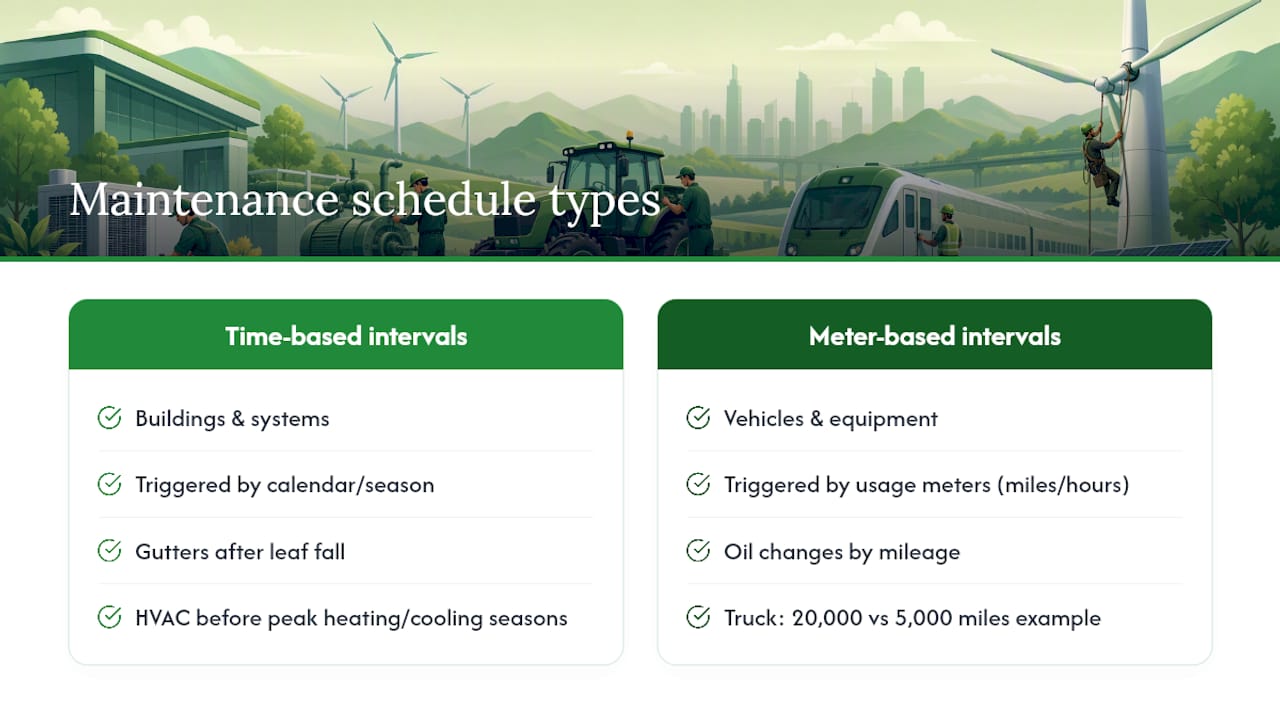
For vehicles and equipment, meter-based scheduling is more accurate because a truck driven 20,000 miles a year needs oil changes more often than one driven 5,000, regardless of the calendar. For building systems, time-based scheduling aligns with seasonal conditions: gutters after leaf fall, HVAC before peak heating and cooling seasons.
Always default to the manufacturer's recommended interval and check local safety codes for regulated assets like fire suppression systems or elevators. The schedule above is a general reference, not a substitute for the documentation that came with your equipment.
When should you move from a spreadsheet to a dashboard?
Spreadsheets work well for one to three properties or a handful of assets. The Fiix template library notes that when concurrency, mobile capture, or reporting needs rise, a dashboard with attachments and alerts becomes materially better for owners. Here are the signals that you have hit that ceiling:
- More than three properties or 15+ assets: the number of open tabs and files becomes its own management problem.
- Repeated missed PMs: if you are discovering overdue maintenance after the fact rather than before, your reminder system is not working.
- Time spent reconciling spreadsheets: if you are copying data between files or resolving conflicting edits, the spreadsheet is costing you more time than it saves.
- Inability to produce maintenance history quickly: when a buyer, insurer, or contractor asks for records and you cannot pull them in under five minutes, the log is not doing its job.
- Multiple people editing the same sheet: concurrent editing in Excel (not Google Sheets) corrupts data. Even in Google Sheets, version conflicts happen when two people edit the same row.
Spreadsheet vs. dashboard, compared on what actually matters:
- Collaboration: spreadsheets support one editor at a time reliably; dashboards handle multiple users with role-based access.
- Mobile capture: a spreadsheet on a phone is workable but awkward; purpose-built dashboards have native mobile entry.
- Automated reminders: spreadsheets require manual calendar entries or scripted alerts; dashboards send notifications automatically.
- Attachments and document vault: spreadsheets link to external files that can move or break; dashboards store documents in one place tied to the asset record.
- Reporting: a spreadsheet pivot table requires setup each time; dashboards generate maintenance history on demand.
When you decide to migrate, export a clean CSV from your spreadsheet first. Confirm that asset IDs, part numbers, and next-due dates are in consistent columns before importing. That 20 minutes of cleanup prevents hours of correction later.
What do experts say about keeping a reliable maintenance log?
A maintenance log is institutional memory. When a technician leaves, a property sells, or an insurer questions a claim, the log is the only record of what happened, when, and at what cost. That function only works if the log is complete and consistent.
The most common failure mode is bulk-closing work orders without recording observations. Marking a task "done" with no findings entry creates a data hole that looks like a record but contains nothing useful. Always capture what was found, not just what was done. A note like "belt showing wear, replaced as precaution" is worth far more than a checkmark.
Pro Tip: Attach the receipt or invoice to every entry that has a cost. A dated receipt tied to a repair record is the difference between a supported insurance claim and a disputed one.
A few practices that consistently improve log quality:
- Record findings in plain language, specific enough that someone unfamiliar with the asset can understand what was observed.
- Use part numbers, not just part names. "Filter" is ambiguous; "MERV-11 16x25x1, Part #FLT-1625-M11" is not.
- Log the next-due date or meter reading at the time of service, not later. Memory degrades; the log should not depend on it.
- Keep attachments (receipts, warranties, photos) in a folder or vault named by asset ID and year, referenced in the log entry.
On retention: general maintenance records are typically kept for 3–5 years. Safety-critical or regulated assets (elevators, fire suppression, pressure vessels) may require longer retention under federal or state rules. Check the applicable authority for any regulated system you manage.
The EPA's electronic preventive maintenance guidance highlights that digital records are more reliable for regulatory and operational needs than paper logs, primarily because they are harder to lose and easier to audit. For property owners managing vacation rentals or short-term rental properties, a digital log also satisfies the documentation expectations of most platform insurance programs.
An editorial note on templates in real homeowner workflows
Most property owners start with a spreadsheet and stay with it longer than they should, not because it works well, but because switching feels like a project. What I have seen working with multi-home owners is that the bottleneck is almost never the template itself. It is the habit of logging at all.
The owners who get the most value from a maintenance log are the ones who log at the time of service, attach the receipt immediately, and set the next-due date before closing the file. That discipline, more than any particular template design, is what produces a record worth having when a buyer or insurer asks for it.
Start with the simplest template that covers your asset type. Fill it in for one property for 90 days. At that point you will know exactly which fields you actually use and which ones you can drop, and you will have a real record to show for it.
Property Command Center takes you beyond the spreadsheet
When your property count grows past two or three, or when you want maintenance reminders that actually fire without a manual calendar entry, Mypropertycommandcenter gives you a purpose-built alternative to a folder full of spreadsheets.

The platform consolidates everything a maintenance log needs into one dashboard: scheduled tasks with automated alerts, a document vault for warranties and receipts, a vendor directory tied to each property, and a property-level view that shows what is due, what is overdue, and what was last serviced. You can import your existing CSV templates directly during onboarding, so the records you have already built carry over. No credit card is required for the 14-day free trial. If you manage vacation rentals or multiple homes and want records that are actually findable when you need them, that is the next step.
Sources
The templates and guidance in this article draw from the following primary sources. Each is worth visiting directly to download originals or verify current field layouts.
- Template Equipment Maintenance Log Sheet
- EPA - Electronic preventive maintenance logs
- Maintenance Log: Template, Examples, and What to Include
- Equipment Maintenance Log: How-to Guide, Example & Free Template - ProjectManager
- Building Maintenance Log Form Template | Jotform
Before downloading any template, open the file and confirm the columns are editable. A locked PDF is only useful if the field names already match your workflow.