
If you own two homes, a vacation rental, and a short-term rental property, the right answer is Property Command Center: a lightweight, owner-focused dashboard that pulls maintenance schedules, vendor contacts, documents, and reminders into one place. Start the 14-day free trial today, no credit card required, and have your first property configured in under an hour.
Two findings make this recommendation concrete:
- A 2026 landlord survey found owners using purpose-built dashboards saved about 12 hours per week compared to spreadsheet-based management.
- Numetix's real-time dashboard research shows that a layered portfolio view shifts decision-making from monthly discovery to mid-month prevention, letting owners fix problems before they compound.
Neither finding requires enterprise software to act on. A simple, daily-use dashboard does the job for most individual owners.
Table of Contents
- Who is this dashboard built for?
- What features does the dashboard include?
- Why a dedicated dashboard beats spreadsheets and scattered email
- How to set up your property dashboard in 6 steps
- What to track and standardize across every property
- Which KPIs should you check daily or weekly?
- How to evaluate dashboards, pricing, and red flags
- Key Takeaways
- What actually changes when you stop managing by inbox
- Try Mypropertycommandcenter free for 14 days
- Sources and further reading
Who is this dashboard built for?
Mypropertycommandcenter fits a specific owner profile. If you recognize yourself in this list, it has been built for you:
- Single-family homeowners managing a primary residence plus one or two rentals
- Families with a second home or vacation property
- Short-term rental hosts with a small portfolio (roughly 3–30 doors)
- Owners who want a clear daily view without hiring a property manager
Managing multiple homes works best when each property is treated as a separate portfolio item with its own maintenance records, documents, and finances. That is exactly how Mypropertycommandcenter is structured.
It is not the right fit if you need full-service bookkeeping, enterprise tenant management, or heavy channel management across dozens of listings. Those use cases call for a different class of property management software entirely. Solo operators also tend to hit a scale ceiling around the mid-teens of properties before automation or outsourcing becomes necessary, according to Property Management Stories. For portfolios below that threshold, a focused dashboard beats a bloated platform every time.
Pro Tip: If you are evaluating whether this fits your situation, ask one question: do you currently track maintenance, vendors, and documents in at least two separate places? If yes, a single dashboard will immediately pay for itself in time alone.
What features does the dashboard include?
Mypropertycommandcenter covers the five areas that matter most to individual owners:
- Portfolio dashboard: — A top-level view of every property's status, open tasks, and upcoming reminders at a glance
The design stays owner-focused throughout. You see the KPIs that drive your decisions: NOI snapshot, occupancy trends, and maintenance backlog. You do not wade through tenant ledgers or leasing pipeline data built for a property management company.
Why a dedicated dashboard beats spreadsheets and scattered email
Owners reclaim about 12 hours per week by switching from spreadsheets to a purpose-built dashboard, but the time savings do not come from working faster. It comes from stopping the search. Finding the HVAC contractor's number, locating the warranty PDF, remembering when the last inspection happened: each of those micro-searches eats five to fifteen minutes, and they happen constantly across a small portfolio.
The operational shift is just as significant. A layered dashboard that shows portfolio status, property drill-down, and cash visibility moves your decision cycle from "I found out last month that the water heater was failing" to "I caught it mid-month and scheduled a repair before it became an emergency." That is the difference between reactive and proactive ownership.
CMMS-style maintenance tracking reinforces this: small portfolios that standardize maintenance records and vendor performance history consistently control costs better than those that do not.
Pro Tip: Standardize your maintenance categories and vendor records in the first week. Owners who do this realize the time savings faster because the dashboard has clean data to surface, not a pile of inconsistent notes to sort through.
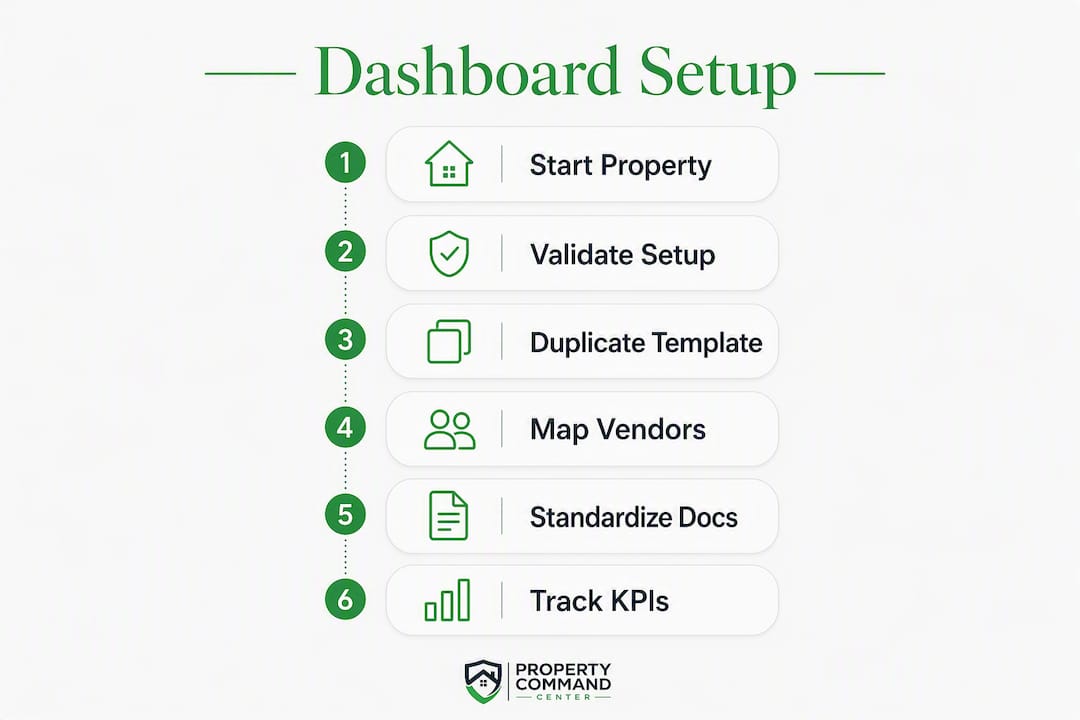
How to set up your property dashboard in 6 steps
Prepare these items before you start: a list of your properties with basic addresses and details, your key vendor contacts (name, phone, service type), and the most important documents for each property (insurance policy, warranties, any recent inspection reports).
- Create property containers. Add each property as a separate record with basic metadata: address, property type, purchase date, and any notes relevant to daily management.
- Import vendor contacts. Add each contractor to the vendor directory with service type, contact info, rates, and the date of their last job.
- Upload key documents. Drop warranties, manuals, and insurance policies into the document vault and link each file to its property.
- Build recurring maintenance schedules. Create tasks for HVAC filter changes, seasonal inspections, and any property-specific recurring work. Set repeat rules so reminders fire automatically.
- Configure the owner dashboard. Set up your three critical KPIs: NOI snapshot, occupancy or booking status, and maintenance backlog. These are the numbers you check every week.
- Test alerts and a work order. Trigger a test alert and walk a sample work order from intake through closeout to confirm the workflow runs cleanly.
Pro Tip: Start with one property, validate the setup, then duplicate the template to your remaining properties. Mapping errors across multiple homes at once are the most common reason owners abandon a new system in the first two weeks.
What to track and standardize across every property
Consistent records across properties are what make a dashboard genuinely useful rather than just organized-looking. Copy these template lists into your setup:
Maintenance categories: plumbing, HVAC, electrical, appliances, exterior/roofing, and seasonal (winterization, gutter cleaning, pest control).
Work order fields (per Estatewyze's pro playbook): service type, property location, assigned vendor, due date, estimated cost, photos, and a closeout note with final cost.
Vendor card fields: service category, primary contact, hourly or flat rate, warranty coverage they provide, and last service date.
Document categories: warranty, owner's manual, insurance declaration, inspection report, and permit or certificate of occupancy.
Reminder templates: HVAC filter replacement (every 90 days), water heater maintenance (annual flush), smoke detector battery check (biannual), seasonal HVAC service (spring and fall), and lock-code rotation for short-term rentals.
Structure each property as its own container linking to its vendors, documents, and active tasks. This keeps records isolated per property and prevents cross-property data bleed, which is the most common structural mistake in owner-built tracking systems.

Which KPIs should you check daily or weekly?
| KPI | Check frequency | Action when threshold is breached |
|---|---|---|
| Month-to-date NOI or net cash flow | Weekly | Investigate the largest expense line; adjust reserve if needed |
| Occupancy or booking status | Daily (STR) / Weekly (LTR) | Flag vacancy gap; review pricing or listing |
| Maintenance backlog (open work orders) | Weekly | Escalate any order open more than 7 days |
| Outstanding reimbursements | Weekly | Follow up with vendor or tenant; log dispute if unresolved |
| Repair reserve balance | Monthly | Replenish if below one month's average maintenance spend |
The Numetix layered dashboard model recommends four views: portfolio check, property drill-down, cash and trust balances, and accounts-receivable aging. For individual owners, the table above covers the same ground without the enterprise overhead.
Proactive maintenance planning adds one more layer: tracking vendor performance history alongside cost trends. When a contractor's average job cost rises or their time-to-close stretches, you see it before it becomes a budget problem.
How to evaluate dashboards, pricing, and red flags
Evaluation checklist:
- Daily usability: Does it load fast on mobile? Can you log a work order in under two minutes?
- Vendor and document depth: Can you attach files, link vendors to specific properties, and search by service type?
- Repeat scheduling: Does it support custom recurrence rules, not just weekly or monthly?
- Alerting: Are threshold-based alerts configurable, or just generic reminders?
- Data portability: Can you export your records? Are backups automatic?
- Onboarding and support: Is there guided setup, not just a help doc?
Mypropertycommandcenter uses a tiered subscription model based on the number of properties. The pricing page lists current plan details. Expect to spend 15–60 minutes per property during initial setup, with the full portfolio live within a week for most owners. Additional costs to budget for: any third-party integrations you add and any custom template work beyond the standard setup.
Red flags to watch during any free trial: no data export or backup option, no per-property isolation (everything lives in one flat list), no repeat scheduling for maintenance, and no basic reporting. A dashboard that cannot show you a maintenance cost trend over three months is not a dashboard; it is a to-do list.
Key Takeaways
A dedicated property dashboard saves owners about 12 hours per week by replacing scattered spreadsheets and emails with a single, organized source of truth for maintenance, vendors, documents, and KPIs.
| Point | Details |
|---|---|
| Time savings are real | Owners using purpose-built dashboards save about 12 hours per week versus spreadsheet management. |
| Start with one property | Validate your template on one property, then duplicate it to avoid setup errors across the portfolio. |
| Three KPIs to watch weekly | NOI snapshot, maintenance backlog, and occupancy status give you the full picture without enterprise complexity. |
| Standardize records first | Consistent maintenance categories and vendor fields make the dashboard useful from day one, not after months of cleanup. |
| Mypropertycommandcenter | Recommended for owners with 3–30 properties; 14-day free trial, no credit card, with guided onboarding. |
What actually changes when you stop managing by inbox
The conventional wisdom says the hard part of property management is finding good vendors or keeping up with repairs. It is not. The hard part is the cognitive load of holding everything in your head because your records are split across a Gmail thread, a Notes app, and a spreadsheet you last updated in March.
The moment that changes is not when you add a new tool. It is when you stop treating each property as a separate mental project and start seeing your portfolio as a system. A daily-use dashboard does not just save time. It changes what you notice. You catch the maintenance backlog creeping up before it becomes a cash problem. You see that one property is consuming three times the vendor spend of the others. Those are decisions, not discoveries.
The owners who get the most out of a dashboard like Mypropertycommandcenter are not the ones who set it up perfectly on day one. They are the ones who open it every morning and let the habit do the work.
Try Mypropertycommandcenter free for 14 days
Owning two or three properties should not feel like running a small business from a pile of sticky notes. Mypropertycommandcenter gives you a clean, owner-focused dashboard where every property's maintenance history, vendor contacts, documents, and reminders live in one place, organized the way you actually think about your portfolio.

The free trial runs 14 days with no credit card required. Start onboarding today and have your first property dashboard live in 30–90 minutes. The guided setup walks you through adding properties, uploading documents, and configuring your first recurring maintenance schedule. If you want to test the vendor directory or work-order flow first, the vendor features and pricing tiers are both worth reviewing before you commit.
Sources and further reading
- Property Management Dashboard: Real-Time Performance — Numetix: Explains the layered dashboard model (portfolio → property → cash → AR aging) that underpins the KPI section.
- How to Create a Proactive Property Maintenance Plan — MPulse Software: CMMS-style guidance on maintenance schedules, SLAs, and vendor performance tracking.
- 10 Ways CMMS Helps You Control the Cost of Maintenance — MPulse Software: Practical checklist for using maintenance dashboards to reduce costs in small portfolios.
- Mypropertycommandcenter — Onboarding: The starting point for new users; covers setup steps and first-use guidance.