
Centralize every renewal date in one dashboard, turn on multi-channel alerts (email, SMS, push or WhatsApp, plus calendar invites), and attach the declarations page or certificate of insurance to each record. That's the whole system. Everything else in this article is detail.
Three things to do right now:
- Find the renewal date. Check your declarations page, insurer portal, or the certificate itself.
- Set primary reminder windows. Start with an early reminder more than two months ahead, then send follow-ups as the renewal date approaches, tightening the schedule to the final days.
- Add a calendar event with alerts attached. Attach the document, not just a note.
If you own more than one property, a consolidated option like Property Command Center handles all of this from a single dashboard instead of six separate insurer logins.
Key Takeaways
A centralized dashboard with multi-channel alerts and stored policy documents prevents the missed renewals that cause coverage lapses and higher premiums.
| Point | Details |
|---|---|
| Use a tiered timeline | Alert at 90, 60, 30, 14, 7, and 1 days before expiration for full coverage. |
| Multi-channel beats email-only | Combining email, SMS, and push reduces missed notices from spam or clutter. |
| Attach the document, not just the date | Store the declarations page or certificate of insurance with every reminder. |
| Build in escalation | Widen the recipient list automatically if nobody confirms a reminder. |
| Property Command Center centralizes it | Its dashboard, alerts, and document vault handle renewal tracking across multiple properties in one place. |
Table of Contents
- Why Timely Insurance Renewal Reminders Matter
- How to Set Insurance Renewal Reminders That Work
- Tools and Features to Look for in a Reminder System
- Automations That Make Renewal Reminders Reliable
- The Best Workflow for Owners With Multiple Properties
- Renewal Checklist for the 30 Days Before Expiration
- When You Manage Multiple Properties, One Tool Can Handle It All
- A Note on Keeping the System Accurate Over Time
- Frequently Asked Questions
- Sources
Why Timely Insurance Renewal Reminders Matter
A missed renewal doesn't just mean a late fee. It means a coverage gap, and a coverage gap during the wrong week can cost you a claim entirely. Insurers rarely warn you twice, and most send exactly one renewal notice, often by mail or a single email that lands in a spam folder or gets buried under forty other messages.
There's also a money angle most people miss:
- Auto-renewal rates are frequently higher than what a new-customer quote would get you.
- Shopping in the month before renewal typically provides enough time to compare, according to consumer guidance from BoldRemind.
- A single missed notice, sent once, is the most common failure point in the whole system.
Statistic Callout: Insurers and reminder platforms increasingly rely on omnichannel notifications, combining email, SMS, and WhatsApp, because single-channel email alerts often get lost to spam filters and inbox clutter. A reminder that only exists in your inbox is a reminder that only sometimes works.
How to Set Insurance Renewal Reminders That Work
Timing and channel selection matter more than most people assume. A reminder sent through the wrong channel at the right time is just as useless as no reminder at all.
Production systems in insurance and vendor management often use a cadence with alerts well before expiration and on the expiration date itself, plus follow-up reminders if necessary, a pattern documented in IBM's guidance on policy expiration alerts. Here's how to adapt that cadence for your own policies.
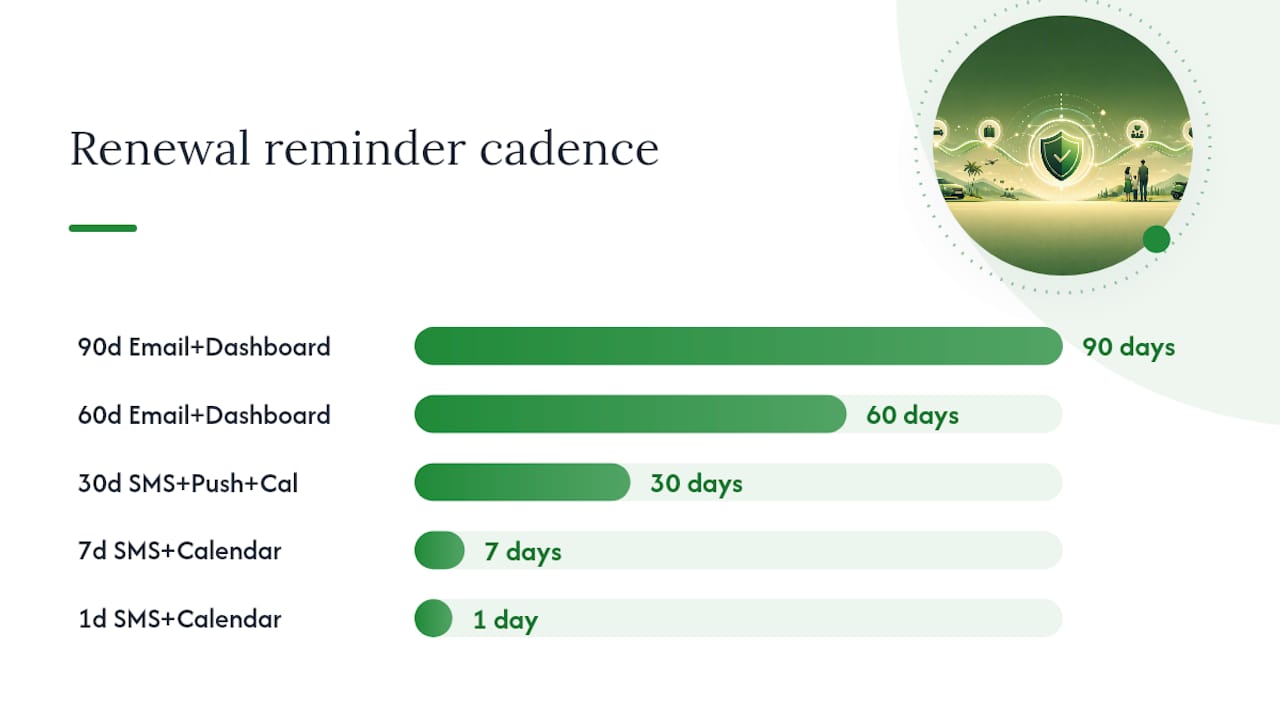
| Timing | Action | Best channel |
|---|---|---|
| 90 days | Review coverage, note any life changes | Email + dashboard note |
| 60 days | Start comparing quotes from other carriers | Email + dashboard |
| 30 days | Confirm auto-renewal status or request new quotes | SMS + push + calendar |
| 14 days | Update documents, confirm named insureds | SMS + push |
| 7 days | Final quote comparison, confirm payment method | SMS + calendar |
| 1 day | Confirm renewal went through | SMS + calendar alert |
For the message itself, keep it short and specific. Two templates that work well:
- Email: "Your [policy type] with [insurer] expires on [date]. Please confirm renewal or request updated quotes by [date]. Reply or log in to your dashboard to review."
- SMS: "Policy #[number] expires [date]. Confirm renewal or reply STOP for details."
Find your actual renewal date on the declarations page, through your insurer's online portal, or on the physical policy certificate, then store a copy of that document, not just the date, so every reminder you send later has proof attached.
Tools and Features to Look for in a Reminder System
Not every reminder app is built the same way, and the difference shows up exactly when you need it most, at 11 PM the night before a policy lapses. Look for these before you commit to anything:
- Multi-policy dashboard. One screen, every property, every policy, no tab-switching.
- Document vault. Attach the declarations page or certificate of insurance directly to the record.
- Multi-channel notifications. Email, SMS, push, and WhatsApp, not just one.
- Configurable schedules. You should set your own windows, not accept a fixed 30-day default.
- Escalation workflows. If nobody confirms a reminder, the system should widen who gets notified.
- Activity logs. A record of who saw what, and when, matters when you're managing several properties.
On pricing, most tools split into free tiers with property-count limits and paid tiers that unlock SMS delivery, multiple recipients, or unlimited policies. A free trial is worth testing specifically for delivery reliability, not just interface polish. Steer clear of any tool that is email-only, has no way to attach a document, keeps no history of past alerts, or expects you to log in daily to check status manually. That last one defeats the entire purpose of automation.
Automations That Make Renewal Reminders Reliable
The best reminder systems don't wait for you to remember anything. Calendar integrations with Google or Outlook can carry the attached declarations page directly into the event, so the document travels with the reminder instead of living in a separate folder. Payment-system integrations matter too, since some policies require action, not just acknowledgment, to actually renew.

Escalation is the piece most DIY systems skip. Vendor-management platforms like Vantaca generate automated expiration reminders with configurable lead times, then advance through escalation steps if nobody responds. Procore's system works similarly: once a policy record is flagged, daily notification emails go out automatically as expiration nears, and they keep going for up to 60 days past expiration until someone updates the date.
Picture this: a calendar event fires 14 days out, an SMS follows at 7 days, and the declarations page is already attached to both. Nobody has to dig through email to find it. That's the entire point of stacking automations instead of relying on memory.
The Best Workflow for Owners With Multiple Properties
Managing renewal dates across five properties in five separate insurer portals is how lapses happen. A repeatable workflow fixes that.
- Import every policy into one system, one record per property.
- Attach the declarations page or certificate of insurance to each record.
- Add property and vendor contact details tied to each policy.
- Configure your reminder schedule (90/60/30/14/7/1) and set escalation rules.
- Audit upcoming expirations monthly, not just when an alert fires.
- Confirm each renewal in writing after you take action.
A consolidated dashboard, the kind Property Command Center provides, replaces scattered emails and spreadsheets with one view of every property's status, documents, and vendor contacts.
Pro Tip: Designate one person, even if it's just you wearing a different hat once a month, to receive every escalation notice and do a quick reconciliation pass. Shared responsibility without a named owner is how things slip through.
Centralizing renewal dates and supporting documents, warranties, policy schedules, vendor contacts, in one secure location gives property owners a genuinely holistic view of portfolio status instead of a patchwork of half-remembered facts.
Property Command Center's structure maps directly onto this workflow: the dashboard holds property status, the alerts feature handles the multi-channel timing, and the document vault stores every schedule and certificate you'd otherwise be hunting for in email.
Renewal Checklist for the 30 Days Before Expiration
When a policy enters its final month, work through this list:
- Confirm the exact renewal date against the declarations page.
- Get quotes from at least one other carrier between 20 and 29 days out.
- Check that limits and deductibles still match your actual risk.
- Verify named insureds and beneficiaries are current.
- Confirm auto-pay is active, or schedule the payment manually.
- Update any document attachments if coverage terms changed.
For the manual follow-up, a short call works better than email: state the policy number, confirm the renewal date, ask for written confirmation, and note the representative's name. That one habit closes more gaps than any app feature.
When You Manage Multiple Properties, One Tool Can Handle It All
Sticky notes, six insurer logins, and a shared spreadsheet get harder to maintain every time you add a property. Property Command Center replaces all of it with one dashboard that tracks every policy's renewal date, stores the declarations page and certificate of insurance for each one, and sends alerts across email, SMS, push, and WhatsApp on the schedule you set.

The onboarding process walks you through importing existing properties and policies, attaching documents, and setting your first reminder schedule, usually in under an hour even for a portfolio of several homes. Pricing scales with the number of properties you manage, so you can check the tiers that fit before committing to anything. This setup fits individual owners, families with a vacation home or two, and short-term rental hosts, not enterprise property management firms with hundreds of units. If that's you, start a trial and get your first renewal date loaded today.
A Note on Keeping the System Accurate Over Time
A renewal system isn't something you build once and forget. Plan for maybe ten minutes a month to confirm dates, update contacts, and re-attach documents after a move, a sale, or a new vendor relationship. That small habit is what keeps the whole thing trustworthy.

Frequently Asked Questions
How far in advance should I set an insurance renewal reminder? Start at 90 days for a first review, then tighten to 30, 14, and 1 day as the date approaches. That staggered timeline mirrors the cadence used in production alert systems and gives you room to shop quotes before locking in.
Where do I find my policy's exact renewal or expiration date? Check the declarations page first, it lists the policy period explicitly. Your insurer's online portal or the physical certificate of insurance will show the same date if the dec page isn't handy.
Why do I need SMS or push alerts if I already get email reminders? Email-only reminders frequently get filtered as spam or lost in clutter. Adding SMS and push notifications significantly improves the odds that you actually see the alert in time to act.
What should I do if I manage several properties with different renewal dates? Centralize everything in one dashboard rather than tracking dates property by property. A consolidated system, like the one Property Command Center provides, lets you see every upcoming renewal and its attached documents in a single view instead of six separate insurer accounts.
Is a 30-day shopping window really enough time to compare insurance quotes? Yes, for most standard policies. Consumer guidance from BoldRemind points to that window as sufficient time to request and compare quotes before your current policy auto-renews at a higher rate.
Sources
- What is omnichannel customer experience and why it matters in insurance | Cincom
- Vendor Insurance and Expiration Reminders – Vantaca Library
- Who receives notification emails when a vendor's insurance expires? | Procore Support
- Insurance Policy Expiration Alert | IBM Support
Check your own tool's support pages too, exact reminder behavior varies by platform.