An Airbnb house manual is a written guide that tells guests everything they need to know to use your property comfortably, from the Wi-Fi password to checkout instructions. To get one working today: place Wi-Fi credentials and access instructions first, add check-in/out times and at least one emergency contact, then save the file as a reusable template before you publish.
Three things to do right now:
- Write your Wi-Fi name, password, and door access steps at the top of a blank document.
- Add check-in and checkout times, plus a local emergency number and your contact info.
- Save that draft as a master template so you can clone it for every property you manage.
Once those three are done, you have a working manual. Everything below makes it better.
Key Takeaways
A well-built Airbnb house manual reduces guest messages, speeds up check-ins, and protects your property by giving guests clear, accessible instructions from the moment they confirm their booking.
| Point | Details |
|---|---|
| Wi-Fi and access go first | Place the Wi-Fi password and door access steps at the top; guests open the manual for those two items above everything else. |
| Use Airbnb's built-in tool | The Listing Editor's house manual field is only visible to confirmed guests, which protects sensitive access details automatically. |
| Send access codes privately | Share door codes and alarm steps via Airbnb message 24–48 hours before check-in, never in a publicly accessible document. |
| Test on mobile before guests arrive | Open the manual on your phone as a guest would and confirm every section is readable and every link works. |
| Mypropertycommandcenter | Stores manuals in a document vault, sends seasonal update reminders, and lets multi-property hosts clone and localize a master template. |
Table of Contents
- What is an Airbnb house manual and why does it matter?
- Where should you publish your house manual?
- What should every house manual include?
- Copy-paste house manual template blocks
- How long should your manual be, and who can read it?
- What should you keep private and what is safe to share publicly?
- How to publish, test, and keep your manual current
- What actually works across multiple properties
- Mypropertycommandcenter keeps your manuals organized across every property
- Sources
What is an Airbnb house manual and why does it matter?
A house manual is the operational layer of your listing. A welcome book sets the mood with local tips and a warm greeting; a house manual tells guests how to turn on the hot water. Both matter, but the manual is what prevents the 11 PM text asking where the trash goes.
For hosts, the payoff is direct:
- Fewer repetitive messages about Wi-Fi, parking, and appliances
- Fewer bad reviews caused by guests who couldn't figure something out
- Faster, smoother check-ins because guests arrive already knowing the steps
- A paper trail showing you gave clear instructions, which helps in dispute situations
For guests, a clear manual means:
- They can arrive and settle in without hunting for basic information
- Appliances and house rules are explained before frustration sets in
- They feel cared for, which translates directly into five-star reviews
Hosts who skip the manual often discover the hard way that guests will not search for information. They will message you, leave a note in the review, or simply do the wrong thing with the dishwasher.
Where should you publish your house manual?
You have four realistic options, and the right answer usually involves more than one.
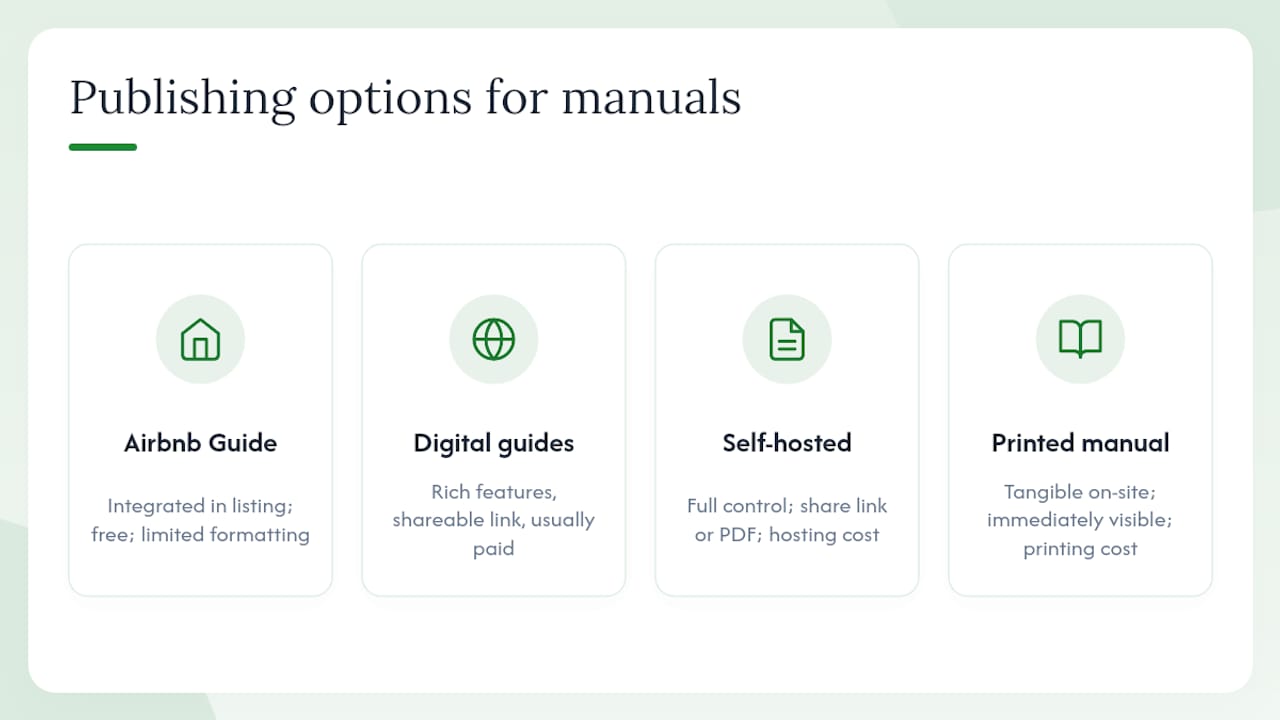
Airbnb's built-in house manual tool
Airbnb's house manual tool lives inside the Listing Editor. To add or edit it, go to your listing, select Listing Editor, scroll to the Guest resources section, and click House manual. The content is only visible to guests who have a confirmed reservation, which means sensitive details like door codes are protected from public view.
This is the right starting point for most hosts. It requires no extra tools, guests find it in the Airbnb app, and it is free.
Pro Tip: After publishing, book a test reservation on a second account or ask a trusted friend to confirm they can see the manual in the app before your first real guest arrives.
Third-party digital guide tools
Purpose-built digital guide tools centralize instructions and are designed to reduce guest messages and improve check-in reliability. Digital guide platforms let you build a branded, multimedia guide with photos, videos, and maps, then share it via a link or QR code. The tradeoff is a monthly subscription and a bit of setup time.
For hosts managing three or more listings, the time savings usually justify the cost. For a single listing, Airbnb's native tool is often enough.
Self-hosted page or PDF
A simple web page on WordPress or a PDF stored in Google Drive works well for hosts who want a branded experience without a subscription. You share the link via Airbnb messages before arrival. The downside: you manage the hosting and updates yourself.
Printed binder or laminated card
A physical binder at the property remains useful even when guests have a digital guide. Experienced hosts recommend printing a large-font laminated card (18pt or larger) with the Wi-Fi name and password in the kitchen. Guests who arrive tired or with low phone battery will reach for that card before they open any app.
Industry guidance recommends sending a digital manual 48–72 hours before check-in AND keeping a printed reference at the property for in-stay use. Both formats serve different moments in the guest journey.
Pro Tip: For families and older guests, a printed one-page quick-start card covering Wi-Fi, door code, and checkout time removes almost all arrival friction.
What should every house manual include?
Order your sections by urgency. Guests arriving at 10 PM need the door code before they need the recycling schedule. Airbnb recommends starting with Wi-Fi, keeping instructions short, and covering parking and appliances to cut repetitive messages.
Prioritized section order
- Access and arrival (must-have): door code or lockbox instructions, building entry, parking spot number or street parking rules
- Wi-Fi and tech (must-have): network name, password, smart TV login or cable instructions, thermostat basics
- House rules (must-have): quiet hours, pet policy, smoking policy, maximum occupancy, no-party clause
- Room-by-room how-tos (must-have): washer/dryer, dishwasher, coffee maker, oven/range, garbage disposal
- Checkout instructions (must-have): checkout time, what to do with towels and linens, trash and recycling, lock-up steps
- Safety and emergency (must-have): smoke detector locations, fire extinguisher, nearest hospital, your contact number, building manager if applicable
- Local recommendations (nice-to-have): favorite coffee shop, grocery store, pharmacy, nearest urgent care
- Property-specific extras (optional): pool rules, hot tub instructions, EV charger steps, bike lock combination
Inside each section: the specific items guests look for
Access and arrival:
- Exact door code or lockbox location and combination (share privately after booking, not publicly)
- Building entry steps if there is a gate or lobby
- Parking: assigned spot number, permit details, or nearest public lot address
Wi-Fi and tech:
- Network name (SSID) and password on a separate line, easy to copy
- Guest network vs. main network if you have both
- Smart TV: which input to use, how to log into Netflix or use their own account
Checkout:
- Exact checkout time
- Towels: leave in tub or pile on bathroom floor
- Dishes: run the dishwasher or leave in the sink
- Trash: which bin, where to leave it
- Doors and windows: lock all, leave key in lockbox
Safety:
- Smoke and CO detector locations
- Fire extinguisher location
- Emergency contacts: 911, your cell, nearest hospital name and address
Copy-paste house manual template blocks
These blocks are ready to drop into Airbnb's house manual field or a printable binder. Replace the bracketed placeholders with your property details. Free open-source templates exist for hosts who want a full starting file to fork and customize.
Welcome block (casual tone)
Welcome to [PROPERTY_NAME]! We're so glad you're here. This guide covers everything you need to get settled. Start with the Wi-Fi below, then skim the rest at your own pace. Reach us anytime at [HOST_PHONE].
Welcome block (professional tone)
Thank you for choosing [PROPERTY_NAME]. This manual contains all operational details for your stay. Please review the access and checkout sections before arrival. Contact [HOST_PHONE] for any questions.
Wi-Fi card
Wi-Fi Network: [WiFi_SSID] Password: [WiFi_PASSWORD] No login page required. Connect and go.
Arrival and access
Door code: [DOOR_CODE] — enter on the keypad to the right of the front door. Parking: [PARKING_INSTRUCTIONS — e.g., "Spot #12 in the rear lot. No permit needed."] Building entry: [BUILDING_ENTRY_STEPS if applicable]
Appliance how-tos (washer/dryer)
Checkout script
Emergency contacts
Emergency: 911 Host: [HOST_NAME] — [HOST_PHONE] Nearest hospital: [HOSPITAL_NAME], [ADDRESS] Building manager (if applicable): [MANAGER_NAME] — [MANAGER_PHONE]
Pro Tip: Bold the Wi-Fi password and the checkout time. Those are the two lines guests scan for first, and bolding them cuts the "where do I find X" messages almost immediately.
Tone variants matter more than hosts expect. A casual "We're so glad you're here!" works for beach rentals and family cabins. A neutral, professional tone fits corporate housing or urban apartments where guests want information, not warmth. Pick one and stay consistent throughout the manual.
For appliance instructions, short videos are worth adding alongside text. A 60-second clip showing how to operate a tricky range or a smart lock removes confusion that no amount of written description fully solves. A tool like Kudoflix lets you create short orientation videos for individual appliances or rooms, which you can link directly from your manual.
How long should your manual be, and who can read it?
Keep the manual short enough that a tired guest reads it on arrival. Most sections should stay under 150 words. The whole manual rarely needs to exceed 800–1,000 words for a standard property.
Tone guidance:
- Rules sections: neutral and factual, not bossy. "Quiet hours are 10 PM–8 AM" lands better than "You must be quiet after 10 PM."
- Welcome and local tips: warm and personal
- Appliance instructions: plain and numbered, never paragraph form
Accessibility best practices:
- Use clear headings for every section so guests can scan
- Write short sentences (one idea per sentence)
- Avoid jargon: "the HVAC unit" becomes "the heating and cooling system"
- For printed versions, use 18pt font or larger for the Wi-Fi card and door code
- Keep line spacing generous on printed pages
Multilingual tips:
Translate the access, Wi-Fi, and checkout sections first. Those are the three sections guests need most urgently, and a translation error there causes real problems. For the rest, a plain-English version with clear headings is usually readable enough for non-native speakers. Free tools like Google Translate handle a quick first draft; a bilingual friend or a professional translator can review the access section for accuracy.
If your property regularly hosts international guests, consider adding a one-page summary in Spanish, Mandarin, or the language most common among your bookings. Even a partial translation signals care and reduces friction.
Pro Tip: Run your manual through a free readability checker like Hemingway Editor. Aim for a Grade 6–8 reading level. If sentences are flagged as "very hard to read," split them.
What should you keep private and what is safe to share publicly?
Airbnb's house manual tool protects you here: the manual is only visible to guests with a confirmed reservation, not to the general public browsing listings. That means door codes and alarm instructions are safer inside the Airbnb tool than in a public PDF or a listing description.
Never publish these in a publicly accessible location: door codes, alarm disarm sequences, lockbox combinations, gate codes, or any security procedure that would let an unauthorized person enter the property. Share these privately via Airbnb message, sent 24–48 hours before check-in.
Privacy checklist for hosts:
- Door and alarm codes: send via Airbnb message only, 24–48 hours before arrival
- Local contact names and phone numbers: include only what guests genuinely need; avoid publishing a neighbor's personal cell
- Security camera locations: disclose in the listing description as required by Airbnb policy, but do not detail camera models or blind spots
- Lockbox location: fine to describe generally ("right of the front door"), but share the combination privately
A simple workflow: keep a "public manual" version (Wi-Fi, appliances, rules, local tips) inside Airbnb's tool, and send a short "private access message" with the door code and alarm steps 24 hours before check-in via Airbnb messaging.
How to publish, test, and keep your manual current
Publishing to Airbnb
- Log in to Airbnb and go to Manage Listings.
- Select the listing you want to edit.
- Open Listing Editor and scroll to Guest resources.
- Click House manual and paste or type your content.
- Click Save. The manual is now visible to confirmed guests in their Airbnb app.
For guests who prefer a physical reference or arrive without phone access, many hosts also post a QR code at the property that links to a digital version of the manual. Print the QR code, laminate it, and place it on the kitchen counter or inside the front door.
Testing before your first guest
- Open the Airbnb app on your phone and navigate to the listing as a guest would. Confirm the manual appears under Your reservation.
- Check that every link in the manual works.
- Read the checkout section aloud. If any step is ambiguous, rewrite it.
- Ask a friend or family member to read the manual cold and tell you what confused them.
Keeping it current
A manual that references a broken dishwasher or an old Wi-Fi password is worse than no manual at all. Build a simple update routine:
- After every repair or appliance replacement: update the relevant how-to section the same day
- Seasonally (spring and fall): review checkout instructions, thermostat settings, and local recommendations
- After a guest flags a problem: treat every "I couldn't figure out X" message as a manual gap and fill it
Pro Tip: Keep a "master template" document outside Airbnb (a Google Doc or a document vault) so you can push updates to multiple listings without rewriting from scratch each time. Change the property-specific variables, keep the structure identical.
For hosts managing more than one property, vacation rental software that centralizes documents and sends update reminders saves significant time compared to maintaining separate files per property.
What actually works across multiple properties
Most hosts overthink the manual at first, then under-maintain it after the first few bookings. The real problem is not writing the manual. It is keeping it accurate across three or four properties when appliances change, Wi-Fi passwords rotate, and seasonal rules shift.
The workflow that works: one master template with clearly labeled placeholders ([PROPERTY_NAME], [WiFi_SSID], [DOOR_CODE]), cloned per property and stored in a central document vault. When the router password changes at one property, you update that property's file and send the new access message. Nothing else breaks.
The single highest-impact change most hosts can make is not adding more sections. It is bolding the Wi-Fi password and the checkout time, because those are the two things guests scan for and miss when they are buried in paragraphs. Hosts who do that one thing consistently report fewer "where do I find X" messages within the first few bookings.
For hosts running short-term rental compliance across multiple jurisdictions, the manual is also where house rules need to reflect local regulations, not just personal preferences. That is worth a separate review when you set up each property's version.
Mypropertycommandcenter keeps your manuals organized across every property
Keeping one manual accurate is manageable. Keeping four or five current, each with different appliances, Wi-Fi passwords, and seasonal rules, is where hosts lose track fast.

Mypropertycommandcenter gives you a document vault where you store each property's manual, a task and reminder system to flag seasonal updates before they become problems, and a vendor directory that connects directly to the emergency contacts in your manual. Clone a master template per property, update one field, and every version stays clean. The smart alerts remind you when it is time to review thermostat settings or update checkout instructions after a repair. No scattered Google Docs, no outdated PDFs sitting in email threads.
Start a free trial at Mypropertycommandcenter with no credit card required and get your first property set up in under 15 minutes.
Sources
- Adding a house manual to your home listing
- Free Airbnb guest guide template (welcome book & house manual)
- Vacation Rental Welcome Book: Complete 2026 Template
- The house manual for Airbnb: everything you need to know | Touchstay