
Your emergency home contacts list needs multiple vetted vendors per trade in plumbing, electrical, HVAC, and locksmith services, plus a neighbor, an insurance claims contact, and a saved entry in your property dashboard. Build that list today, before anything breaks. Save it digitally and post a printed copy at the property, because a burst pipe at 11 PM is the worst time to start googling emergency plumbers.
TL;DR:
- Maintaining at least three vetted vendors per trade ensures availability during holidays, vacations, or emergencies when your first choice may be unavailable.
- Quarterly checks of vendor contact info and annual reviews of insurance policies prevent lapses that could delay emergency responses or create liabilities.
- Clear response time thresholds for emergencies (2 hours), urgent issues (24 hours), and routine repairs (3 days) enable effective escalation and faster problem resolution.
- A centralized property dashboard with organized profiles and document storage reduces response time by providing instant access to contact details, insurance, and location specifics.
- Proper after-hours procedures specify a single point of contact and strict escalation steps, minimizing confusion and delays during high-pressure emergency situations.
Table of Contents
- Which Trades Need Emergency Contacts On File?
- How Do You Vet and Onboard Emergency Vendors?
- What Belongs in a Property-Specific Emergency Profile?
- Setting Response Rules and Escalation Steps
- How Often Should You Test and Refresh the List?
- How Should You Handle After-Hours Emergencies?
- Why a Centralized Dashboard Cuts Emergency Response Time
- Store Every Emergency Contact Where You'll Actually Use It
- Sources
Which Trades Need Emergency Contacts On File?
A working emergency home contact list covers every trade that can turn into a middle-of-the-night crisis, not just the obvious ones. Skip a trade and you'll be searching for a vendor while water spreads across a hardwood floor.
Every property, whether it's your primary home or a short-term rental three states away, needs coverage for these trades:
- Plumbing — burst pipes, water heater failures, sewage backups
- Electrical — outages, sparking outlets, panel failures
- HVAC — no heat in January, no AC in July, both genuine emergencies
- Locksmith — lockouts, broken locks, guest access failures
- Appliance repair — a dead refrigerator during a heat wave ruins more than dinner
- General handyman — the catchall for problems that don't fit a specialty trade
- Cleaning/make-ready — critical for turnover between guests or after an incident
- Landscaping/snow removal — seasonal, but a blocked driveway during a storm is its own kind of emergency
- Pest control — wasp nests and rodent infestations rarely wait for business hours
- Roofing — storm damage needs a fast response before water intrusion spreads
Add pool technicians, septic services, or generator specialists if your property has them. The reasoning behind keeping three vendors per trade is simple: your first-choice plumber is on vacation the same week your water heater dies. A panel of three spreads the workload and protects you against exactly that kind of bad timing.
How Do You Vet and Onboard Emergency Vendors?

Vetting happens before the emergency, not during it; for detailed guidance see Rental Property Inspection: What Tenants and Landlords Need. An unvetted contractor showing up to a flooded basement is how small problems become liability nightmares.
Run every candidate through this checklist before adding them to your list:
- Verify an active trade license for their specialty and your state.
- Confirm general liability insurance and request a current certificate.
- Check for workers' compensation coverage if they employ a crew.
- Collect a signed W-9 for tax and payment records.
- Call at least two references, ideally other property owners.
- Confirm they service your property's zip code after hours, not just during business hours.
Once a vendor passes, put the relationship in writing: a short contract or scope-of-work document should spell out response time expectations, whether they provide photo documentation of completed work, and how invoicing works. Store the signed contract, the insurance certificate, and their W-9 together, either in a cloud folder or a property management dashboard where expiration dates trigger a reminder automatically.
Pro Tip: Set a recurring quarterly check to confirm phone numbers are still active and insurance hasn't lapsed, then do a deeper annual review of contracts and references. A five-minute check now beats discovering a lapsed policy after a claim.
What Belongs in a Property-Specific Emergency Profile?
A real emergency profile is more than a phone list. It's the operational file that lets anyone, including a house sitter or a co-owner, respond correctly without calling you first.
Build each property's profile with these fields:
- Vendor names and after-hours numbers for every trade above
- Insurance policy numbers and the claims department's direct line
- Water, gas, and electrical shutoff locations, with a photo if the layout is unusual
- Access instructions: gate codes, key lockbox location, alarm disarm sequence
Where you store it matters as much as what's in it. A printed binder at the property works when the power is out and Wi-Fi is down, but it can't send you a reminder when a policy expires. Cloud documents solve searchability but require someone to remember to check them. A centralized dashboard does both: it holds the documents and pushes alerts before anything lapses.
For guests or short-term renters, post a QR code linking to a shareable version of the list, or include it in your welcome booklet. Vacation rental platforms handle bookings and disputes, but none of them dispatch a plumber to your property at 2 AM. That job is yours, and a guest who can scan a code and reach your locksmith directly saves everyone a frustrating night.
Setting Response Rules and Escalation Steps
Vague expectations produce slow responses. Set explicit thresholds so vendors know what "emergency" actually means to you, and so you know when to escalate.
A workable framework looks like this:
- Emergency (active flooding, no heat in freezing weather, electrical hazard): 2-hour response window
- Urgent (appliance failure, minor leak, lockout): 24-hour response window
- Routine (cosmetic repairs, scheduled maintenance): 3 business days
If your primary vendor doesn't respond within that window, escalate to vendor two on the list, then vendor three, then a neighbor or on-site manager who can assess the situation in person. Notify your insurance carrier immediately for anything involving water, fire, or structural damage.
Keep records for every incident: timestamped photos, itemized invoices, work-order logs, and a running note of which vendor responded and how fast. That log becomes your evidence if a dispute ever arises, and it tells you which vendors actually deliver.
How Often Should You Test and Refresh the List?
An emergency contact list that hasn't been checked in a year is a guess, not a plan. Numbers change, vendors retire, insurance lapses quietly in the background.
Run this cadence to keep it reliable:
- Every quarter, call or text each vendor to confirm the number still works and they're still taking after-hours calls.
- Once a year, audit every insurance certificate, signed contract, and W-9 for expiration or missing paperwork.
- After any real incident, update the list immediately, noting which vendor responded, how long it took, and whether they're worth keeping.
- Set automated reminders 30 days before any certificate or contract expires so you're never caught renewing after the fact.
Owners managing more than one property tend to skip this because it feels repetitive, right up until the quarter they skip is the one where a vendor's insurance lapsed and nobody noticed.
How Should You Handle After-Hours Emergencies?
After-hours calls are where most emergency plans actually fail, not because the vendor list is wrong, but because nobody follows the escalation order under pressure. Write the protocol down so panic doesn't override the plan.
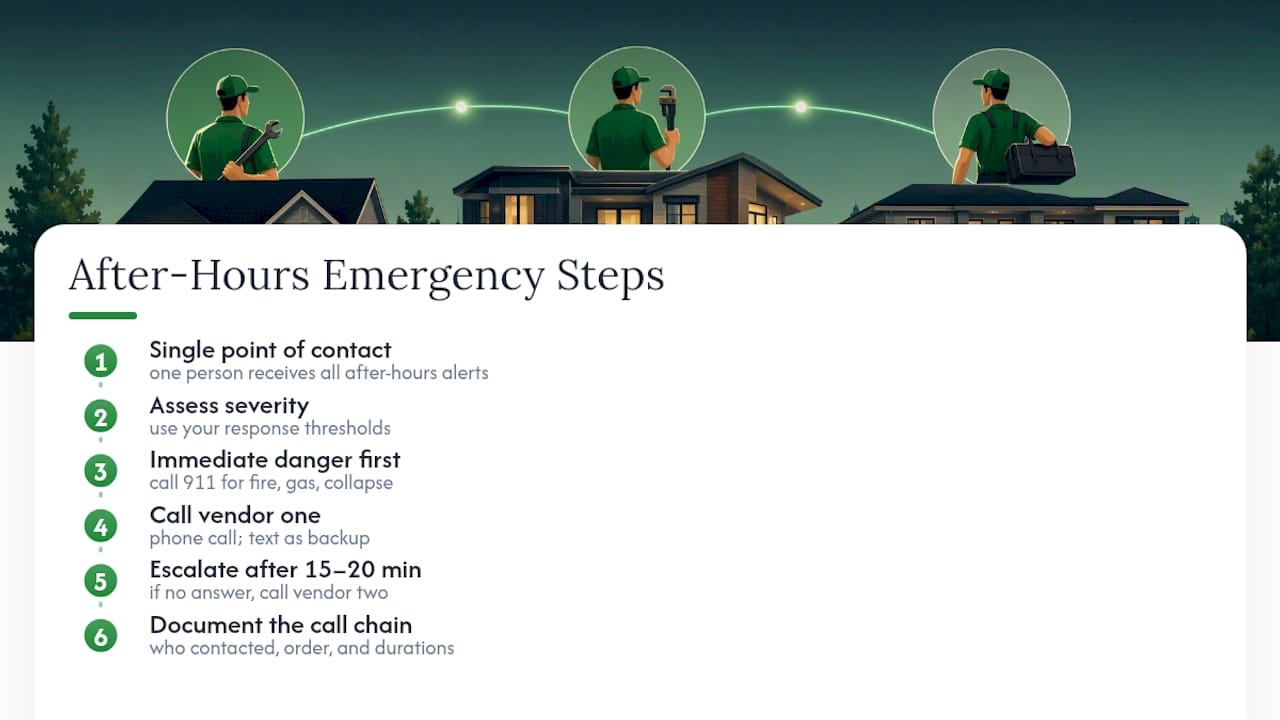
Start with a single point of contact rule: one person, whether it's you, a co-owner, or a property manager, is designated to receive after-hours alerts and make the first call. Everyone else, including guests and neighbors, reports to that person first. That prevents three people calling three different plumbers for the same leak.
From there, the flow should run: assess severity using your response thresholds, call vendor one, and if there's no answer within 15 to 20 minutes, move to vendor two without waiting for a callback. Text as a backup to a phone call. Many contractors screen unknown numbers at midnight but respond to a text with the address and problem stated plainly.
If the situation involves immediate danger, fire, gas smell, structural collapse, call 911 first and vendors second. For water and electrical emergencies, know your shutoff locations well enough to act before help arrives; a homeowner who can shut off the main water valve while waiting on a plumber saves thousands in damage.
Document the call chain afterward. Note who was contacted, in what order, and how long each step took. That record tells you whether your escalation plan actually works or just looks good on paper.
Why a Centralized Dashboard Cuts Emergency Response Time
Most owners keep vendor contacts scattered across text threads, a notes app, and a drawer full of business cards. That works until 1 AM, when you're scrolling through months of texts trying to find the electrician who fixed your panel last spring.
A centralized property dashboard solves the actual problem: everything lives in one place, tied to the specific property it applies to. Picture a burst pipe at a vacation rental you manage remotely. Instead of digging through email for the plumber's number and then hunting for the insurance policy to check your deductible, both are sitting in the same profile, accessible from your phone. That's the difference between a 10-minute response and a 45-minute scramble.
The document vault and automated reminders matter as much as the contact list itself. A vendor list without insurance tracking is a liability waiting to surface at the worst moment.
— Francisco
Store Every Emergency Contact Where You'll Actually Use It
Property Command Center gives multi-property owners one dashboard instead of five spreadsheets and a shoebox of business cards. You get a vendor directory built for exactly the trade-by-trade panel this article describes, a document vault that holds every contract and insurance certificate, and automated alerts that flag an expiring policy before it becomes a problem during an actual emergency.

Every property gets its own profile, so a vacation rental three time zones away has the same organized emergency setup as your primary residence. No more digging through old texts to find which electrician handled last year's panel upgrade. Check out the vendor directory to see how it holds your full trade-by-trade contact list, or start a free trial to build your first property profile today.
Sources
- Vendor Management for PMs: 3 Vendors Per Trade, Always | Leads for PMs
- How to Handle Emergencies at Remote Vacation Rentals - Hoste
- Vendor Management for Property Managers: Beyond the Contract | ReadFort Blog
- Vendor Management for Property Managers: Maximizing ROI & Compliance