
Home document storage, in practice, means a secure document vault built into your property management dashboard, not a folder on Google Drive and definitely not a filing cabinet. The distinction matters: a real vault attaches your lease, your insurance policy, and your HVAC warranty directly to the property record they belong to, so a search for "123 Maple Street" surfaces every document tied to that address instead of forcing you to guess which of forty folders holds the deed.
If you own or manage more than one property, the short answer is this: stop storing documents by themselves and start storing them attached to something. Pick a property-focused vault, run a one-time inventory of what you have, and migrate it in a single organized push rather than a slow trickle that never finishes. The rest of this guide walks through exactly how.
Key Takeaways
The fastest path to organized home document storage is a property-linked vault, a one-time inventory, and a migration checklist you follow start to finish for one property before moving to the next.
| Point | Details |
|---|---|
| Choose entity-first storage | Attach documents to properties, leases, and vendors instead of using standalone folders. |
| Inventory before migrating | List every scattered source (email, laptop, physical files) before you scan or upload anything. |
| Migrate one property at a time | Finish full setup, tags, permissions, and alerts, on one property before starting the next. |
| Insist on real security controls | Require AES-256 encryption, role-based access, and audit logs before trusting any vault. |
| Start with Property Command Center | Its 14-day free trial with no credit card lets you test property-attached documents and alerts firsthand. |
Table of Contents
- Why Home Document Storage Needs to Be Property-Linked, Not Folder-Based
- What Features Actually Matter in a Home Document Vault
- How to Organize Documents Across Multiple Properties
- Your Migration Checklist for Moving Scattered Files Into a Vault
- Security and Backup Standards Worth Insisting On
- Daily Workflows That Make a Vault Worth Using
- What Pricing Actually Depends On
- Why Property Command Center Fits This Exact Problem
- What Multi-Property Owners Consistently Get Wrong
- Try Property Command Center's Document Vault Free for 14 Days
- Frequently Asked Questions
- Sources
Why Home Document Storage Needs to Be Property-Linked, Not Folder-Based
A folder system organizes files by where you put them. A property-linked vault organizes files by what they're about. That sounds like a small difference until your second home is on fire (figuratively, hopefully) and you need the insurance policy number in ninety seconds.
Generic cloud storage, whether it's Dropbox or a shared network drive, treats every file as an isolated object. Attaching documents directly to properties, leases, tenants, and vendors instead means a file is discoverable the moment you open the record it relates to, which industry documentation on entity-attached storage points to as the difference between a "file dump" and something you can actually run a portfolio on.
The practical benefits stack up fast when you own more than one home:
- A 360-degree view per property. Open the record for your lake house and see the deed, the last three insurance renewals, the roofer's invoice, and the septic inspection report in one place.
- Faster retrieval under pressure. Closings, insurance claims, and surprise maintenance calls all reward whoever finds the paperwork first.
- Cleaner access control. Give your property manager, your cleaner, or your adult kid view access to one property's folder without exposing every other home you own.
- Fewer lost files. Consolidated backups mean one system to trust instead of five email accounts and a phone camera roll.
Faster search and retrieval keeps coming up as the top reported benefit as property professionals shift toward digital record-keeping, and that pattern holds whether you manage twenty units or two vacation homes.
What Features Actually Matter in a Home Document Vault
Not every "document management" feature is worth paying for, and not every vault marketed to property owners actually behaves like one. Here's what separates a real vault from a glorified upload button.
| Feature | Why it matters |
|---|---|
| Property-linked attachments | Files live on the property, lease, or vendor record, not in a standalone folder tree |
| OCR and full-text search | Search inside scanned PDFs, not just filenames |
| Tagging and expiry tracking | Flag insurance renewal dates and warranty expirations automatically |
| Granular permissions | Give a vendor access to one invoice, not your entire vault |
| Version control and audit logs | See who changed a lease and when, with a full history |
| Mobile access | Pull a warranty up standing in front of a broken appliance |
| Automatic backups and export | Get your data out cleanly if you ever switch platforms |
Auto-attachment paired with OCR search and expiry reminders is what turns a document store into something audit-ready property software is actually built around, and it's the difference between finding a document and finding it before your insurer's deadline passes.
How to Organize Documents Across Multiple Properties
Structure beats effort here. A clear taxonomy applied consistently across two properties or twenty will save you more time than any search feature.
Build your hierarchy entity-first: property → unit (if applicable) → lease, vendor, or transaction → document type. So a warranty for the water heater at your rental cottage lives under Cottage → Appliances → Warranties, not in a generic "Warranties" bucket shared across every property you own.

For filenames, a simple convention prevents chaos as your file count grows:
propertyabbr_documenttype_YYYYMMDD_shortdesc
Example: LAKEHSE_insurance_20260214_homeowners-renewal.pdf
That single naming pattern does more heavy lifting than most people expect. Tags for expiry-sensitive categories (insurance, warranties, certifications) let the system prompt you before a policy lapses instead of after. A sample folder path might look like: Lake House / Insurance / 2026 / LAKEHSE_insurance_20260214_homeowners-renewal.pdf, searchable by property name, document type, or date without ever opening a single folder manually.
Your Migration Checklist for Moving Scattered Files Into a Vault
Most owners put this off because it sounds like a weekend lost to scanning. It doesn't have to be, if you work through it in order.
| Step | What to do |
|---|---|
| 1. Inventory | List every source: email attachments, laptop folders, phone photos, and physical files |
| Scan and OCR | Digitize paper documents; batch-rename using your naming convention |
| 3. Bulk import | Upload in batches and auto-attach files to the correct property record |
| 4. Set permissions | Assign access levels per stakeholder before anyone else logs in |
| 5. Configure alerts | Turn on expiration reminders and confirm backups are running |
| 6. Verify | Pull a sample audit pack per property and test an export |
A useful checklist for what actually belongs in that audit pack includes deeds, insurance certificates, warranties, and inspection reports, the same categories lenders and auditors expect to see when a property changes hands or gets refinanced.
Pro Tip: Do the migration one property at a time, start to finish, rather than scanning everything first and sorting later. A fully migrated property with alerts and permissions set is worth more than five half-migrated ones.
Security and Backup Standards Worth Insisting On
Property documents aren't trivial paperwork. Deeds, insurance policies, and lease agreements carry your address, your signature, and often your financial details, which makes the security layer non-negotiable.
At minimum, look for AES-256 encryption both at rest and in transit, along with multi-factor authentication on every account with access. Real estate security guidance specifically recommends expiring share links and watermarking for sensitive files, plus incremental backups running every few hours with a full backup nightly.
- Role-based access controls limit exposure when you bring on a new vendor or property manager.
- Expiring links and dynamic watermarking stop a shared lease from circulating past its intended recipient.
- Audit logs and version history mean you can trace exactly who touched a document and when.
- Automated, geographically redundant backups protect against both accidental deletion and hardware failure.
General-purpose cloud drives often skip the controls that matter most here. Real-estate-specific vault providers point to dynamic watermarking and no-download view modes as protections that basic shared drives simply don't offer, which is exactly why sensitive leases and management agreements deserve a purpose-built home. Document-security guidance for organizations more broadly echoes the same baseline: role-based access and clear audit trails aren't optional extras, they're the floor.
Daily Workflows That Make a Vault Worth Using
A vault that only gets touched during tax season isn't earning its subscription. The real payoff shows up in the small, repeated tasks that otherwise eat your Saturday.
| Workflow | What it saves you |
|---|---|
| Auto-attach invoices to maintenance tickets | No more digging through email for a plumber's receipt |
| Automatic expiry alerts | Insurance and inspection deadlines never sneak up |
| Shared owner portal, view-only | Family members or seasonal caretakers see what they need, nothing more |
| Saved searches and templates | Generate a full audit pack per property in one click |
Set an alert once for your annual inspection date and it fires every year without you remembering to check a calendar. That's the entire point of pairing alerts with your document vault instead of treating them as separate tools.
What Pricing Actually Depends On
Most property document platforms price around a handful of variables: number of properties, total storage volume, number of user seats, and whether you need premium security features like watermarking or advanced audit logs. Media-heavy portfolios (think vacation rental listing photos) tend to cost more than document-only storage.
A few things worth checking before you commit to any plan:
- Does the trial let you test real migration, not just a demo account with sample data?
- Can you export everything cleanly if you switch platforms later? Vendor guidance on small business cloud storage treats export policy as a top selection criterion, and that logic applies just as much to a homeowner as it does to a company.
- What's the actual support response time during onboarding, not just after you're a paying customer?
- Does the tiered structure scale sensibly if you buy a third property next year?
Run the monthly cost against the annual option before deciding. Most platforms discount annual billing enough to matter if you're confident you'll stick around past the trial.
Why Property Command Center Fits This Exact Problem
Mypropertycommandcenter was built around the property-first model this whole guide describes: documents attach directly to property, vendor, and lease records instead of floating in a generic folder tree. That's not an incidental feature, it's the structural decision the entire dashboard is built on.
- Every document you upload gets tied to the property, lease, or vendor it belongs to, giving you the 360-degree view this guide keeps coming back to.
- Onboarding support walks you through your first property import instead of leaving you to figure out the interface alone.
- A 14-day free trial with no credit card required means you can migrate a real property, not just poke at a demo.
- Alerts, version tracking, and owner-portal views cover the feature checklist point for point, from expiry reminders to shared access.
If you already manage vendor relationships across properties, the vendor directory feature pairs naturally with document attachments, since invoices and contracts land next to the vendor they came from.
What Multi-Property Owners Consistently Get Wrong
I've watched enough owners set up document systems to notice a pattern: people over-invest in the scanning step and under-invest in the tagging step. They'll spend an entire weekend digitizing every warranty they own, then dump it all into one undifferentiated folder because tagging felt like busywork at the time.
That's backwards. A scanned PDF with no property attachment and no expiry tag is barely better than the paper version sitting in a drawer. It's searchable, technically, but you still have to know what you're looking for before you can find it. The entire value of a property-linked vault comes from the metadata, not the digitization itself.
The owners who get real value out of this approach are the ones who treat the vault as infrastructure, not storage. They set up alerts once and let the system chase deadlines for them. They give a cleaning service exactly the access that service needs and nothing more. They stop thinking of documents as things to file and start thinking of them as things attached to a property that has its own life cycle: renewals, repairs, sales, refinances.
If you manage two homes or ten, the return on doing this right shows up the first time you're standing in an insurance adjuster's office and pull up the full claim history in under a minute, instead of promising to "email it over later."
Try Property Command Center's Document Vault Free for 14 Days
Mypropertycommandcenter gives you a property-linked document vault without asking for a credit card up front, which matters if you just want to test whether attaching files to property records actually changes how fast you find things. The onboarding flow walks you through importing your first property, so you're not staring at a blank dashboard wondering where to start.

Start small during the trial: import one property, upload its current lease or insurance policy, and set a single expiration alert. That one action shows you the whole loop, attach, tag, get notified, working end to end. If you have questions while you're testing setup, the property query tool answers configuration questions without waiting on a support ticket, and the pricing page lays out how plans scale once you're ready to add more properties.
Frequently Asked Questions
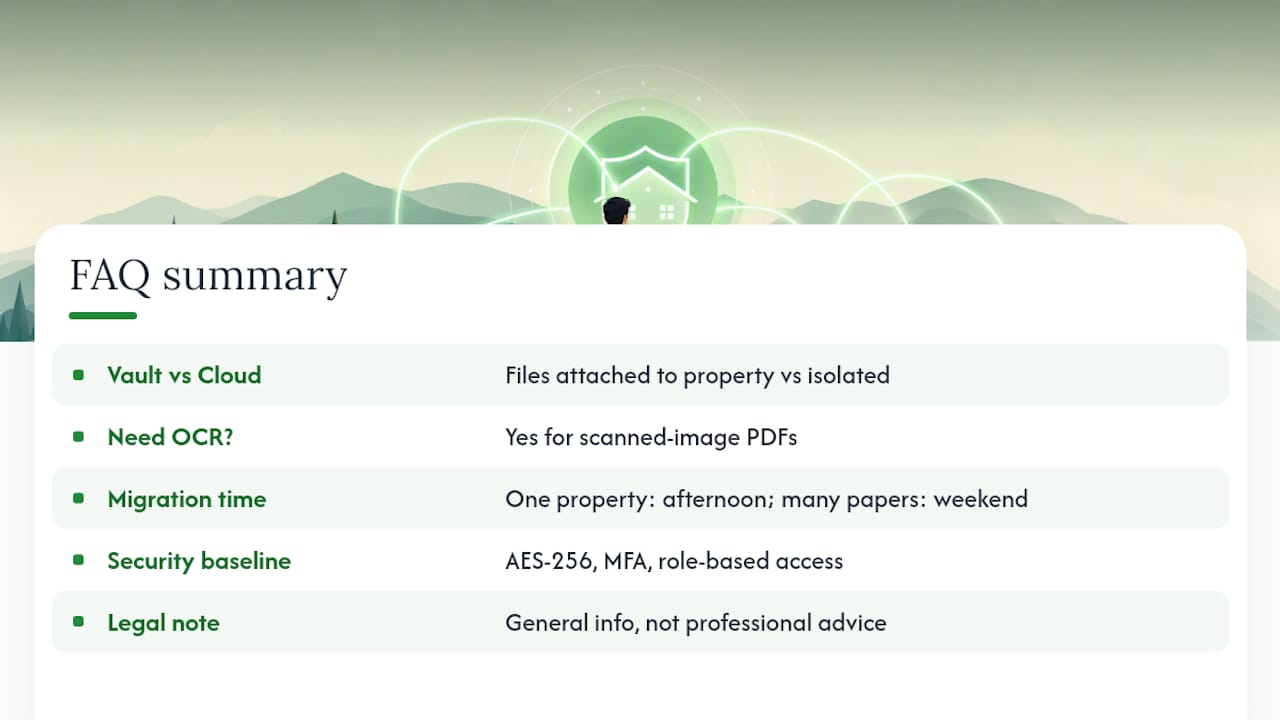
What's the difference between home document storage and just using Google Drive or Dropbox? A property-linked vault attaches each file to the property, lease, or vendor it belongs to, so you retrieve documents by searching the property, not by remembering a folder path. Generic cloud drives store files in isolation with no connection to the property record itself.
Do I need OCR if I already keep PDFs? Yes, if those PDFs are scanned images rather than text-based files. OCR makes scanned insurance policies and warranties searchable by content, so you can find a document by a policy number or a phrase inside it, not just its filename.
How long does migrating documents for two or three properties usually take? Most owners finish a focused migration for a single property in an afternoon once files are inventoried, since scanning, tagging, and uploading move quickly with a naming convention already in place. Plan a weekend if you're digitizing several years of paper records.
Is a property document vault safe enough for deeds and financial records? Look for AES-256 encryption, multi-factor authentication, and role-based access controls at minimum. Those three protections, combined with automated backups, cover the baseline that real-estate-specific security guidance recommends for sensitive property files.
This article provides general information about digital document storage practices and is not a substitute for professional advice on data security, insurance requirements, or legal recordkeeping obligations specific to your properties.
Sources
For readers who want to go deeper on the security side before migrating sensitive files, a few resources are worth bookmarking alongside this guide.
- Cloud Storage Security Tips for Real Estate Media - HomeJab Real Estate Photography
- Secure Cloud Storage for Small Business: 2026 Guide | Total Cyber Solutions
- Document Security: The 2026 Guide for Organizations