
Estate home management, in practical terms, means running your primary residence, vacation house, or short-term rental portfolio through one centralized system instead of scattered spreadsheets and email threads. The immediate fix is simple: put every property's maintenance log, vendor list, and documents into a single dashboard app. If you manage multiple homes, stop juggling folders and start with one property profile per home. From there:
- Log every repair request consistently
- Keep vendor contacts and warranties in one searchable place
- Set recurring reminders for seasonal and preventative work
- Review your whole portfolio regularly
Start small: create one property profile today and see how much mental clutter disappears by next week.
Key Takeaways
Estate home management works best when every property runs through one standardized system for intake, maintenance proof, vendors, and documents rather than scattered tools.
| Point | Details |
|---|---|
| Standardize intake first | Use one channel for every maintenance request, with timestamps, photos, and cost fields required. |
| Separate turnover from preventative maintenance | Keep guest/tenant turnover checklists distinct from long-term system inspection calendars. |
| Require proof of completion | Attach photos, timestamped notes, and invoices to every closed ticket for insurance and resale value. |
| Run monthly portfolio reviews | Spend 60 minutes auditing open tickets and vendor performance across all properties. |
| Centralize with Property Command Center | The dashboard consolidates status, maintenance, vendors, and documents in one login, with a 14-day free trial to start. |
Table of Contents
- What Should an Estate Home Management Dashboard Actually Include?
- How Do You Move From Spreadsheets to One System?
- What Separates Good Estate Maintenance Solutions From Sloppy Ones?
- How Property Command Center Handles the Details
- The Setup Work Is the Whole Game
- Start Your Free Trial and See Your Properties in One View
- Sources
What Should an Estate Home Management Dashboard Actually Include?
Most owners who try to manage multiple homes hit the same wall: the tools they already have (email, texts, a shared spreadsheet, a shoebox of receipts) work fine for one house and fall apart at two or three. A real dashboard fixes that by giving you a portfolio view and a property-level view at the same time. You see every home's status at a glance, then click into any single property for the details.
The maintenance ticket is where most of the value lives. Every request should capture a timestamp, photos, the cost, and a resolution note. Standardizing that intake, using one channel instead of five, keeps small issues from turning into expensive ones, according to guidance from the National Association of Residential Property Managers. Skip a field and you lose the ability to prove what happened later, whether for a warranty claim or an insurance dispute.
A working setup generally includes:
- Portfolio dashboard: status of every property in one view, plus a dedicated page per home
- Maintenance tickets: timestamp, photos, cost, vendor assigned, resolution notes
- Vendor directory: contact info, service history, and an assignment workflow so tickets route automatically
- Document vault: warranties, appliance manuals, insurance policies, and lease copies, named consistently (e.g., "HVAC_WarrantyExp2028")
- Recurring task calendar: seasonal inspections, filter changes, gutter cleaning, smoke detector checks
- Expense tagging: costs tied to the specific property for tax season and insurance audits
Pro Tip: Name your documents by property and category before you upload a single file. "123Main_Insurance_2026" beats "scan0047.pdf" every time you're searching for something during a claim.
Once you manage more than two properties across different platforms, a unified system becomes less of a convenience and more of a necessity, since fragmented communication and missed tasks scale right alongside your portfolio, as HostReply's guide to managing multiple vacation rentals points out.
How Do You Move From Spreadsheets to One System?
You don't need a weekend seminar to make the switch. Six steps, done in order, get you from scattered notes to a working system faster than most owners expect.
- Inventory your properties and responsibilities. List every home, who owns which decisions (repairs, vendor approval, budget), and where the current records live.
- Create property profiles and upload your must-have documents. Start with insurance policies, warranties, and anything tied to a deadline. Export your spreadsheets first, then import property by property so nothing gets lost in the shuffle.
- Standardize your maintenance intake form. Decide on the fields you'll capture for every ticket, timestamp, cost, photos, resolution, before you log a single repair.
- Build your preventative maintenance calendar. Prioritize high-risk systems first: water heaters, HVAC units, roofs. These are the failures that get expensive fast if you miss them.
- Add and vet your vendors, then build an emergency contact list. Include response times and past job notes so you're not searching for a plumber's number during a burst pipe at 11 p.m.
- Set your alerts and run a first monthly portfolio review. Thirty to 60 minutes auditing open tickets, upcoming seasonal items, and recent vendor performance tends to catch small problems before they become emergency calls, a pattern documented in guidance on managing multiple rental properties efficiently.
Most owners can knock out steps one through three in an afternoon. The vendor vetting and calendar building usually take a bit longer, but it's a one-time setup cost against months of saved hours.
What Separates Good Estate Maintenance Solutions From Sloppy Ones?
The single biggest mistake owners make is treating turnover checklists and preventative maintenance as the same list. They're not. A turnover checklist covers cleaning, restocking, and photo-documented inspections between guests or tenants. A preventative maintenance calendar covers the slow-moving stuff, HVAC servicing, roof inspections, water heater flushes, that has nothing to do with who's staying in the house this week.
Confusing turnover routines with long-term system checks is how safety inspections get skipped and how a home's condition declines faster than an owner realizes, according to maintenance guidance from the National Association of Home Builders.
Every completed repair needs proof: a photo, a timestamped note, an invoice attached to the ticket. That record protects you if a warranty claim comes up or an insurance adjuster asks when the roof was last serviced. Keep finance and maintenance histories organized by property, not lumped together, so tax season and insurance audits don't turn into archaeology projects.
Watch for these red flags in your own process:
- Repair requests coming in through texts, emails, and a shared spreadsheet, with no single source of truth
- Tickets missing timestamps or before-and-after photos
- No agreed response time with your vendors, so "urgent" means something different to everyone
How Property Command Center Handles the Details
Property Command Center was built around the exact job described above: owners juggling multiple properties who need clarity without learning enterprise software. The platform consolidates property status, maintenance schedules, vendor contacts, and documents into a single accessible dashboard, eliminating the scattered emails, spreadsheets, and sticky notes that most self-managing owners eventually drown in.
A few specifics worth knowing:
- The vendor directory lets you assign jobs, track service history, and compare vendor response performance over time instead of guessing who did good work last time.
- Blog resources walk through maintenance log templates and project trackers you can adapt immediately, no custom setup required.
- The dashboard is designed for people who own their homes, not property management firms running dozens of units for clients.
The Setup Work Is the Whole Game
Most advice on estate home management focuses on the wrong end of the problem. Articles obsess over which app has the prettiest interface while skipping the part that actually determines whether you'll stick with a system: the migration. If you dump three years of scattered spreadsheets into a new dashboard without standardizing your intake fields first, you've just built a nicer-looking mess.
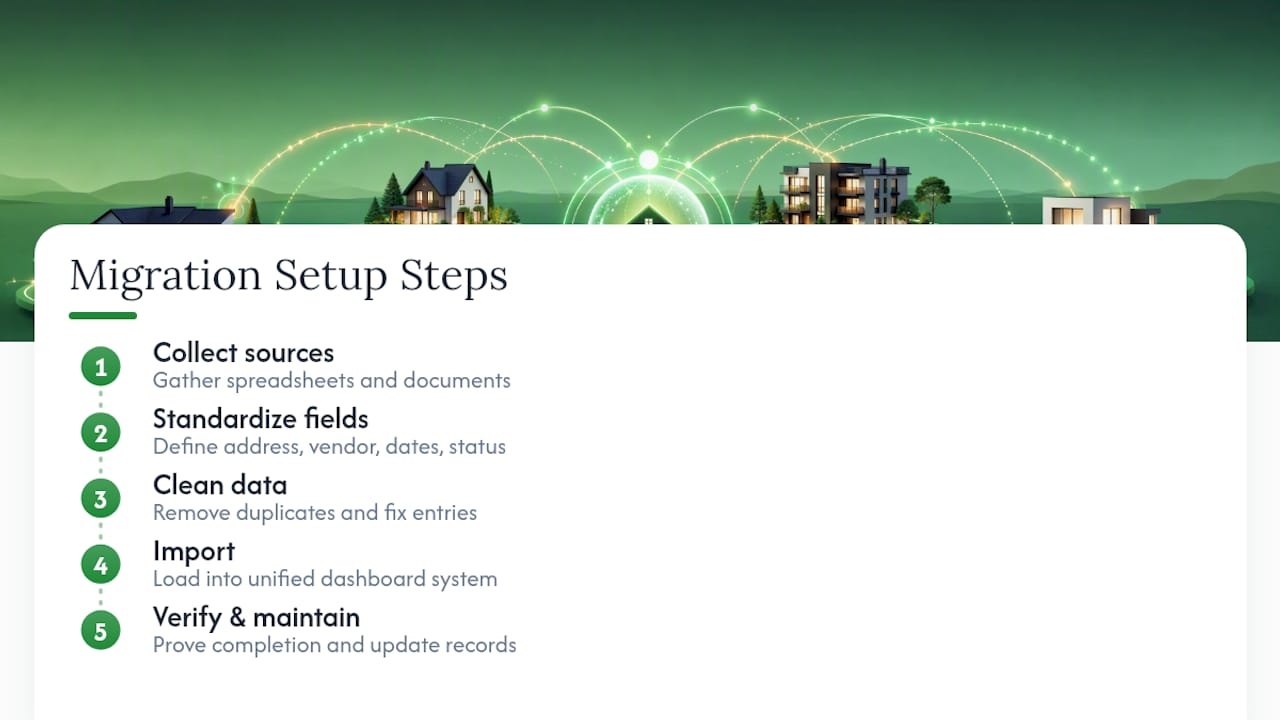
The setup-first approach works because it forces decisions you'd otherwise avoid, like what counts as a "completed" repair, or which vendor gets the call for a plumbing emergency versus a general contractor. Owners who skip that step end up right back where they started within a few months, just with a fancier interface layered on top of the same chaos.
What actually matters, based on everything the maintenance and property management guidance converges on, is proof of completion and consistent intake. Not automation for its own sake, not a slick mobile app. If your system can't tell you when the water heater was last serviced and what it cost, it's not managing anything, it's just storing files. Prioritize that discipline before you worry about anything else.
— Francisco
Start Your Free Trial and See Your Properties in One View
Property Command Center gives self-managing owners something a shared spreadsheet never will: one login where every property's status, maintenance history, and vendor contacts already live together, instead of rebuilt from scratch every time something breaks.

The platform offers a 14-day free trial with no credit card required, and pricing scales by how many properties you manage, so a family with two homes isn't paying for enterprise-scale tools they'll never use. Fewer emergency calls, less time hunting for a warranty PDF, and one place to check before you sign off on a repair. If you're currently tracking vendors in a phone contacts app, the vendor directory alone is worth the look. Create your first property profile today and see what your portfolio looks like from one screen.
Sources
- Maintenance: Beyond the Basics — NARPM
- 6 Maintenance Tips to Optimize Home Performance — NAHB
- How to Manage Multiple Vacation Rentals | HostReply
- How to Manage Multiple Rental Properties Efficiently — Home24seven