The fastest way to organize maintenance, repairs, vendors, and documents across multiple homes is a property-focused home project tracker. Mypropertycommandcenter is the recommended starting point: a subscription dashboard built specifically for individual owners, families, and small-scale hosts who need one place for everything. Start the 14-day free trial with no credit card, run the 30-minute quickstart, and you'll have a functioning multi-property dashboard before lunch.
Key Takeaways
A property-focused home project tracker consolidates maintenance schedules, vendor contacts, and documents across multiple homes into one dashboard — and Mypropertycommandcenter delivers that in a 30-minute setup with a 14-day free trial.
| Point | Details |
|---|---|
| Start with the quickstart | Add properties, three recurring tasks, two vendors, and one document in 30 minutes. |
| Migrate from spreadsheets | Export to CSV, map columns to tracker fields, run a two-week test, then archive originals. |
| Verify security before uploading | Check encryption, MFA, export options, and US data jurisdiction before adding sensitive documents. |
| Watch trial pricing carefully | Test recurring tasks and the document vault first; check for SMS and overage add-on fees. |
| Mypropertycommandcenter | A subscription dashboard for individual owners and families with a 14-day free trial and no credit card required. |
Table of Contents
- What does a home project tracker actually cover?
- What features should every home project tracker have?
- How to set up your tracker in 30 minutes
- How to move your data out of spreadsheets and email
- What should you expect from pricing and free trials?
- Security and privacy checks before you trust a tracker with your data
- Why Mypropertycommandcenter fits owners who want a simple dashboard
- An honest note on why we built this
- Your 14-day trial starts here
- Sources
What does a home project tracker actually cover?
The phrase "home project tracker" gets used two ways online. This guide covers the property-management sense: a dashboard for tracking maintenance schedules, repair tasks, vendor contacts, warranty documents, and alerts across multiple homes. It does not cover contractor-level renovation timelines or single-project remodel planners.
Property types this kind of tracker supports:
- Primary residences
- Vacation homes and second properties
- Short-term rental units (Airbnb, VRBO, and similar)
- Small portfolios of two to five homes
Core jobs it handles:
- Scheduling recurring maintenance (HVAC filters, gutter cleaning, annual inspections)
- Logging repairs and tracking their status
- Storing vendor contacts, warranties, manuals, and insurance documents
- Sending reminders before tasks go overdue
- Giving collaborators (a spouse, a co-owner, a property manager) role-based access
What features should every home project tracker have?
Digital dashboards consolidate maintenance workflows, secure document storage, and alerts so owners stop juggling multiple apps. Here is what to look for and why each feature earns its place:
| Feature | Why it matters |
|---|---|
| Multi-property dashboard | See all homes and their open tasks in one view without switching accounts |
| Recurring maintenance schedules | Set monthly, quarterly, and annual tasks once; the system prompts you automatically |
| Vendor directory | Store contractor names, phone numbers, and specialties so you're never searching old texts |
| Document vault with versioning | Keep warranties, manuals, and insurance policies organized by property and retrievable in seconds |
| Mobile access | Log a repair or pull a vendor number from the driveway, not just your desk |
| Alerts and notifications | Get reminded before a task goes overdue, not after |
| Roles and permissions | Give a co-owner full access; give a contractor read-only access to relevant tasks |
| Calendar integrations | Sync maintenance due dates to Google Calendar or Apple Calendar |
| Backup and export | Download your data at any time so you're never locked in |
Pro Tip: A four-phase dashboard build — define workflows, build the data model, design the interface, then add a portal for collaborators — produces a setup owners actually use daily. AI-assisted maintenance categorization speeds up triage when requests pile up across properties.
How to set up your tracker in 30 minutes
You can have a working multi-property dashboard in half an hour. Running a consistent operating system — tasks, calendar sync, maintenance logs, and a weekly review routine — is what lets a single owner manage multiple properties without surprises. Here are the exact steps:
- Add your properties. Enter each home's address, type (primary, vacation, rental), and key systems (HVAC, plumbing, roof age).
- Invite one collaborator. A spouse, co-owner, or trusted property manager. Assign their role before you go further.
- Add three recurring tasks. Start with HVAC filter replacement (monthly), gutter cleaning (twice yearly), and a smoke-detector check (annual). Visit the tasks page to set default cadences.
- Add two vendors and one document. Enter your HVAC contractor and a plumber. Upload one warranty or insurance certificate to the document vault.
- Enable alerts and calendar sync. Turn on email or push notifications for upcoming tasks. Connect to your calendar app from the alerts settings.
Pro Tip: Set default recurring cadences at the property level, not the task level. Monthly, quarterly, and annual templates copy across all homes in one action, saving you from re-entering the same schedule for each property.
How to move your data out of spreadsheets and email
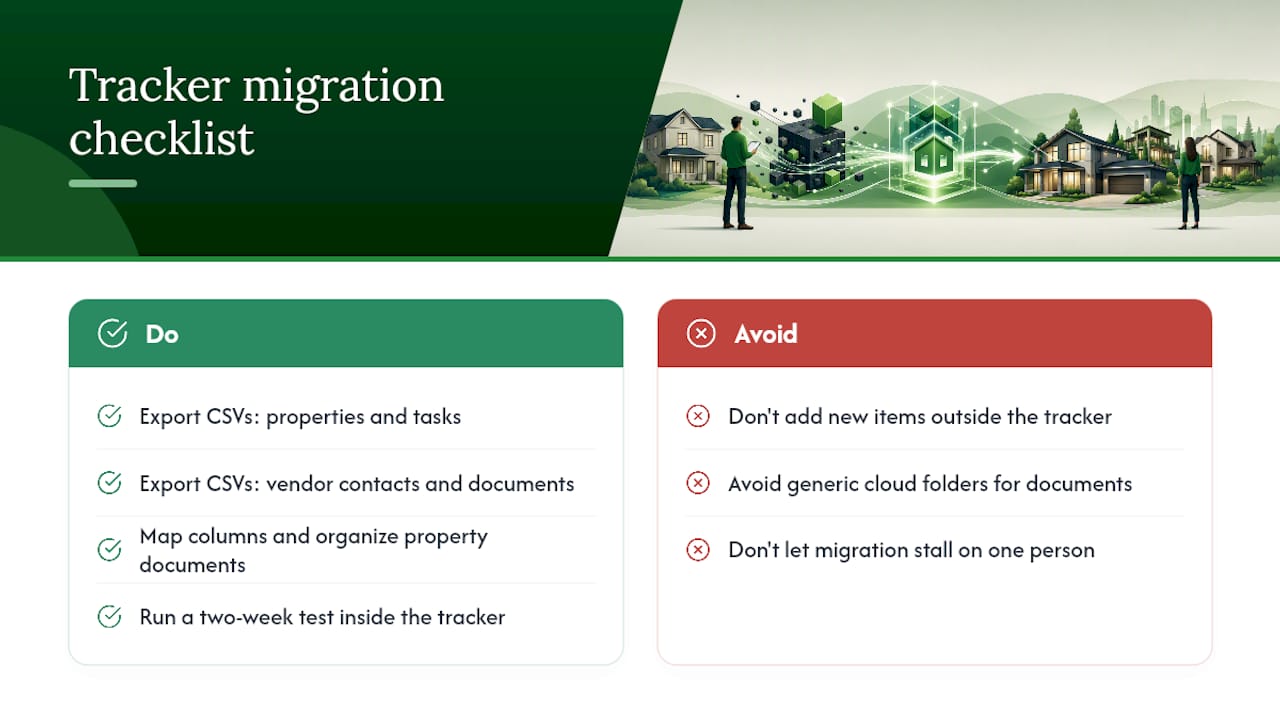
Most owners start with a spreadsheet, a notes app, and a folder of PDFs. Moving that data into a tracker takes one focused afternoon.
Start by exporting everything into simple CSVs: one for properties, one for tasks, one for vendor contacts, one for documents. Map your spreadsheet columns to the tracker's fields. "Unit name" maps to property. "Contractor phone" maps to vendor phone. "Warranty expiry" maps to document expiry date. A consistent property-level document hierarchy — organized by acquisition, improvements, operating, maintenance, insurance, and tax documents — scales far better than a generic cloud folder once you manage more than two properties.
After importing, run a two-week test: add new tasks and vendors only inside the tracker, not the spreadsheet. At the end of two weeks, confirm nothing fell through the cracks, then archive the originals. Delegate cleanup tasks (tagging old vendor records, uploading remaining documents) to a collaborator so the migration doesn't stall on one person. The vendor directory makes it easy to bulk-add contacts once your CSV is clean.
What should you expect from pricing and free trials?
Property-focused trackers typically price by number of properties or by feature tier. A single-home plan often runs at the low end of a monthly subscription; a small portfolio of a few homes sits in a mid-tier range. Feature-gated tiers (basic, pro, premium) add capabilities like advanced reporting, additional document storage, or priority support as you move up.
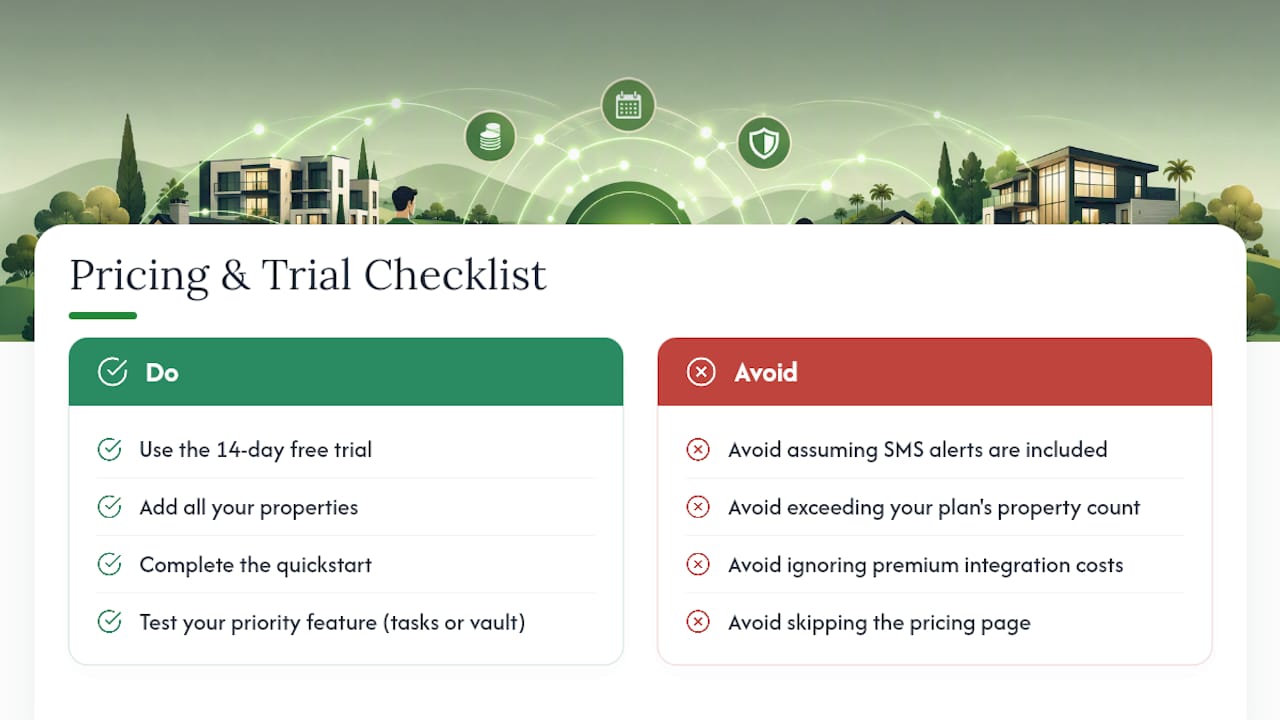
The standard free trial in this category is 14 days with no credit card required. Use that window deliberately. Add all your properties, complete the quickstart, and test the one feature you care most about — usually recurring tasks or the document vault. If the tracker saves you one frantic search for a warranty document, it has already paid for itself.
Watch for three common add-on costs: SMS alerts (sometimes billed separately from email notifications), extra-property overages if you exceed your plan's property count, and premium integrations with smart-home devices or calendar platforms. Check the pricing page before committing to a tier.
Security and privacy checks before you trust a tracker with your data
Your tracker will hold contractor contact details, insurance documents, and home system records. Before you upload anything sensitive, run through this checklist:
- Encryption: Confirm data is encrypted both at rest and in transit (TLS in transit, AES-256 at rest are standard benchmarks).
- Access controls: Use the least-privilege principle. Contractors get read-only access to their relevant tasks; co-owners get full access.
- Multi-factor authentication (MFA): Verify MFA is available and turn it on for every account with document access.
- Backups: Ask how often data is backed up and whether you can trigger a manual backup.
- Export and portability: Confirm you can export all your data as a CSV or PDF at any time. If you can't get your data out, you're locked in.
- Data jurisdiction: For US owners, ask where servers are located. US-based data centers are preferable for privacy expectations and breach-notification compliance.
- Breach notification: Ask what the vendor's process is if a breach occurs — how quickly they notify users and what remediation looks like.
Why Mypropertycommandcenter fits owners who want a simple dashboard
Mypropertycommandcenter was built for exactly this audience: individual owners, families, and small-scale hosts who need clarity across multiple homes without enterprise-level complexity. A maintenance tracking system that accepts submissions, notifies contractors, and keeps a digital log helps catch recurring issues and reduces emergency calls. Mypropertycommandcenter delivers that in a dashboard that takes 30 minutes to set up.
What owners report after switching from spreadsheets:
- Less time searching for records (warranties, past invoices, contractor numbers)
- Fewer emergency calls because recurring maintenance runs on schedule
- A predictable maintenance cadence that reduces year-end surprises
- One place a spouse or co-owner can check without asking you first
The onboarding quickstart walks you through adding properties, tasks, vendors, and documents in a single session. The 14-day free trial requires no credit card, so the only cost is 30 minutes of your time.
An honest note on why we built this
Your 14-day trial starts here
Mypropertycommandcenter gives you the multi-property dashboard, recurring task schedules, vendor directory, document vault, and alert system described in this guide — all in one subscription, with no credit card required to start.

The 14-day free trial is the lowest-friction way to see whether the tracker fits your workflow. Use the onboarding quickstart to complete the 30-minute setup, then check the pricing page to pick the tier that matches your property count. If you have questions before signing up, the property query form connects you directly with the team.
Sources
- Build a Property Management Dashboard With AI Tools 2026 - Step by step guide to building a property management dashboard
- How to manage multiple rental properties: systems that scale
- Why UAE Landlords Need Digital Property Dashboards in 2026
- The Best Ways to Handle Multiple Properties in Need of...