
Organize contractor contacts by property first, trade second: create a profile for every vendor tied to the specific home or rental it serves, keep a small number of vetted vendors per trade to ensure reliable backups without diluting relationships, and store contracts, COIs, and invoices with expiration alerts in a single system. That one change removes most of the friction multi-property owners feel when a pipe bursts at the lake house and the plumber's number is buried in a text thread from two summers ago.
TL;DR:
- Organize vendors by property first and trade second, creating detailed profiles with insurance, rate sheets, invoices, and last verification dates.
- Store and tag all contractor documents with property and trade labels, setting alerts for expiration dates to prevent coverage lapses.
- Use a dedicated dashboard to connect vendor profiles, scheduling, work orders, and communication history in one central system, especially when managing multiple properties.
- Regularly verify contact details quarterly and update vendor profiles immediately after interactions to prevent delays during emergencies.
- Limit vendor list size to two or three per trade and conduct quarterly and annual audits to review responsiveness, rates, and overall vendor performance.
Table of Contents
- Quick Checklist: What to Capture First When You Organize Contractor Contacts
- How to Set Up a Per-Property Contractor Directory
- What Documents Do You Need Before Onboarding a New Contractor?
- How Should You Store and Track Contractor Documents and Insurance?
- What's the Workflow for Routine Work Orders and Emergencies?
- How Often Should You Audit and Prune Your Vendor List?
- Spreadsheets, Apps, or a Dashboard: When Should You Switch?
- Methods to Regularly Update and Verify Contact Information
- Categorizing Contacts Beyond Trade and Property
- Data Privacy and Security When Storing Contractor Information
- Integrating Contractor Contacts With Scheduling and Communication
- Tracking Communication History With Every Contractor
- Author Perspective: Three Small Habits That Prevent Big Headaches
- Start Organizing Your Contractor Contacts With Property Command Center
- Sources
Quick Checklist: What to Capture First When You Organize Contractor Contacts
Before you build anything elaborate, get the basics down for every vendor you already use. A contractor contact list only works if the fields are consistent across every entry, so pick a format and stick with it.
Capture these fields for each vendor:
- Business name, primary contact person, phone, and email
- Service area (which properties or zip codes they actually cover)
- Emergency contact number if different from the main line
- Typical response time for routine versus urgent calls
- License number, insurance status, and W-9 on file (yes or no)
Attach these documents to the profile:
- Certificate of Insurance, ideally with an additional-insured endorsement noted
- Signed contract or service agreement
- Current rate sheet
- Before/after photos from past jobs
- Recent invoices
Then tag each vendor by priority (primary, backup, or emergency-only) and by property. A handyman who covers three of your four homes should show up under each one, not just once in a general list.
Pro Tip: Add a "last verified" date field to every profile and update it every time you use that vendor. A stale phone number is the single most common reason emergency calls go unanswered.
How to Set Up a Per-Property Contractor Directory
Structure matters more than software. Whether you use a spreadsheet or a dashboard, the underlying logic should follow the same hierarchy.
- Start with the property, not the trade. Create a top-level folder or profile group for each home, cabin, or rental unit you own.
- Nest trades under each property. Inside the property folder, break vendors into categories: plumbing, electrical, HVAC, landscaping, cleaning, pest control.
- Build a full profile per vendor. Each profile needs contact details, insurance status, rate history, and a running log of past jobs.
- Link invoices directly to both the property and the vendor. When a $400 water heater repair shows up, you should be able to pull it from either direction, by property or by vendor name.
- Add searchable tags. Tag by trade, by property, and by status ("active," "backup," "do not rehire") so a remote search takes seconds, not minutes.
This structure pays off the moment you're managing a repair from another state. Buildium's guidance on vendor profiles that link work orders, invoices, and communications points to the same principle: keep the vendor record and the property record connected, not siloed. A vendor directory built around each property rather than a flat trade list makes this lookup instant instead of a scavenger hunt through old emails.
What Documents Do You Need Before Onboarding a New Contractor?
Never add a vendor to your core list without three documents in hand: a current license, a Certificate of Insurance with expiration date and additional-insured status confirmed, and a signed W-9. Skipping this step is how owners end up liable for an uninsured worker's injury on their own property.
Beyond paperwork, a real onboarding process sets expectations up front:
- Confirm expected response time for both routine and emergency calls
- Agree on invoicing format (itemized, with photos, within a set number of days)
- Require before/after photo documentation on every job
- Define the escalation path if a job runs over budget or behind schedule
- Call at least one reference and ask specifically about follow-up communication, not just work quality
A short trial task, something low-stakes like a gutter clean or a minor repair, tells you more about reliability than any phone interview. Written vetting covering insurance, license, and W-9 status is the baseline every serious vendor-management system uses, and a solid vendor onboarding checklist also collects availability windows and emergency protocols before the first job ever gets assigned.
Pro Tip: Ask every new vendor how they prefer to receive emergency calls, text or phone. A vendor who never picks up unscheduled calls isn't an emergency contact, no matter what they promise during onboarding.
How Should You Store and Track Contractor Documents and Insurance?
Every file needs two tags at minimum: property and trade. A COI, contract, invoice, or scope-of-work document that isn't tagged both ways becomes nearly impossible to find six months later when you're trying to remember which roofer worked on the beach house versus the mountain cabin.
Insurance expiration is where most owners get burned. Set alerts well in advance of COI or contract expiration, with multiple reminders to request renewal and follow up, holding new work orders if unresolved to avoid coverage lapses.
Automated COI alerts at these intervals prevent last-minute coverage gaps that create real liability exposure, especially if a vendor is mid-job when their policy lapses. Keep version history on every document too. If a dispute ever comes up over a repair or a bill, being able to export a dated document trail settles the argument in minutes instead of weeks. Centralized document storage with automated alerts and audit-ready exports is standard practice for anyone managing more than one property.
What's the Workflow for Routine Work Orders and Emergencies?
Routine and emergency work follow different scripts, and mixing them up costs you time exactly when you can least afford it.
For standard work orders:
- Identify the issue and match it to the right vendor profile for that property.
- Assign the job and confirm an estimated time of arrival before work starts.
- Require photo documentation and an itemized invoice on completion.
For emergencies, every property needs a one-page emergency card listing the primary and backup contact for the relevant trade, clear access instructions (lockbox code, key location, gate code), the location of water shutoffs and the breaker panel, and a nearby neighbor or property manager who can grant physical access if you're not local. Keep that card under one page and posted somewhere a house sitter or cleaner can find it fast.
Set spending permissions too. Decide in advance who can authorize work above a certain dollar threshold without calling you first, whether that's a property manager, a trusted neighbor, or nobody, but you.
How Often Should You Audit and Prune Your Vendor List?
Run a quick check quarterly and a full audit once a year. The quarterly pass just confirms nothing's obviously broken: are your primary vendors still responsive, are invoices still coming in on time, has anyone's insurance quietly lapsed.
The annual audit goes deeper:
- Review response time, quality of work, and invoicing accuracy against your notes from the year
- Compare current rates against what similar vendors charge in your area
- Decide who gets promoted from backup to primary, and who gets dropped
Quarterly checks catch problems early, and the annual audit often becomes leverage for renegotiating rates once you know a vendor's actual track record. Keeping the list capped at two to three vendors per trade also matters here: a bloated list of six plumbers you rarely use is harder to manage than three you actually trust, and it makes every audit take three times as long for no real benefit.
Spreadsheets, Apps, or a Dashboard: When Should You Switch?
A spreadsheet works fine for one property and a handful of vendors. The moment you add a second home, bring in a property manager or a family member to help, or start juggling short-term rental turnovers, a spreadsheet starts leaking information. Someone forgets to update it, a phone number changes, and nobody notices until there's a leak at 11 p.m. and the "current" plumber's number goes straight to voicemail because he retired.
A dashboard earns its place when you need these solved in one spot rather than five:
- Vendor profiles that carry full history, not just a name and number
- Automatic reminders before insurance or contracts expire
- A property-by-property view instead of one long undifferentiated list
- Work orders that connect directly to the vendor and the invoice, so nothing gets reconciled twice
Property Command Center was built around exactly this gap: it centralizes vendor contacts, maintenance schedules, documents, and alerts in one dashboard instead of scattering them across email, texts, and a spreadsheet nobody remembers to open.
Pro Tip: If you're delegating property tasks to a spouse, adult child, or property manager, that's usually the exact moment a spreadsheet stops being "enough." Shared access without shared confusion is what a dashboard solves that a spreadsheet can't.
Methods to Regularly Update and Verify Contact Information
Stale contact information causes more emergency delays than any other single organizational failure. A phone number that worked last year and a plumber who retired six months ago look identical in a spreadsheet until you actually need him.
Build verification into your routine rather than treating it as a separate chore. Every time you use a vendor, confirm their number and email haven't changed before you even dial. That single habit catches most drift automatically, because you're checking during a real interaction instead of relying on memory.
Set a recurring calendar reminder, quarterly works well, to run through your full vendor list and send a quick text: "Confirming this is still your best number for service calls." Most vendors respond within a day, and a nonresponse over a week is itself useful data about reliability.
Cross-check against invoices too. If a vendor's letterhead or payment details change but their profile still shows the old business name, that's a sign they've restructured, been acquired, or changed how they operate. Update the profile immediately rather than letting two versions of the same vendor float around your system.
For remote owners, verification matters even more. Ask a local property manager, cleaner, or neighbor to confirm a vendor's number still works before you rely on it during an actual crisis. A number that rings but goes unanswered for days is functionally the same as a wrong number, just harder to catch until it's too late.
Categorizing Contacts Beyond Trade and Property
Trade and property get you organized, but they don't tell you which vendor to call first when three plumbers are all technically available. Add a layer of categorization built around performance and specialty, and the list starts working for you instead of just sitting there.
Specialization matters more than the broad trade label suggests. "Plumber" covers someone who's great at clearing a clogged drain but has no experience with tankless water heaters. Note specific skills in each profile: appliance brands they service, whether they handle historic-home quirks, or if they're comfortable with smart-home integrations like leak sensors and smart thermostats.
Service rating deserves its own field, and it should be more specific than a star count. Track three things separately: quality of the work itself, communication (did they call back, send photos, explain the problem), and pricing fairness relative to quoted estimates. A vendor who does excellent work but never answers texts is a different risk than one who's responsive but overcharges.
Add a seasonal tag where it applies. A landscaper who's excellent at spring cleanup might be mediocre at snow removal, and knowing that before winter hits saves a scramble. Similarly, flag vendors who specifically understand short-term rental turnaround, since a cleaner used to weekly turnovers between guests operates on a different schedule than one used to a single family home.
These categories turn a flat directory into something closer to a decision tool. When a job comes up, you're not scrolling through every plumber, you're filtering for the one who's rated highest on communication and already knows your tankless system.

Data Privacy and Security When Storing Contractor Information
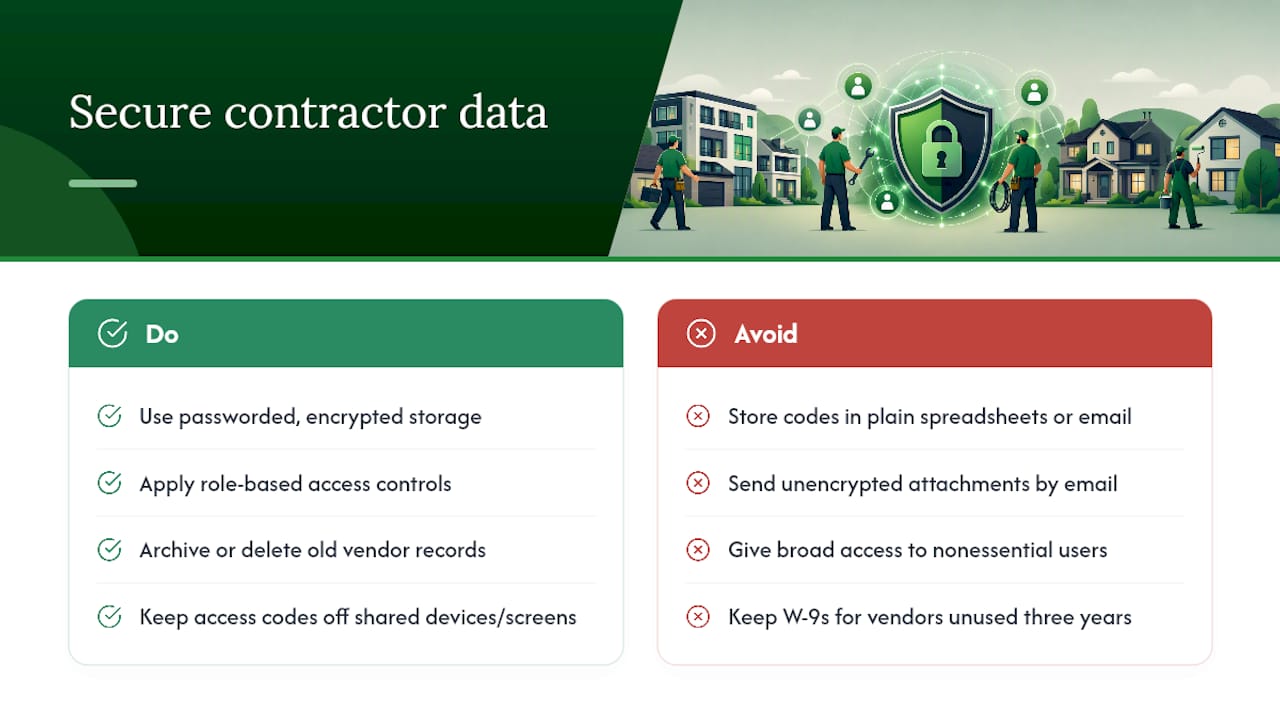
Contractor records hold more sensitive information than most owners realize: home access codes, alarm details, W-9s with tax identification numbers, and sometimes banking details for direct payment. Treat this data with the same caution as your own financial records, because in the wrong hands it's a roadmap to every property you own.
Avoid storing access codes and vendor contact details in plain, unencrypted spreadsheets shared over email. Email attachments get forwarded, downloaded onto random devices, and left in inboxes indefinitely. A system with password protection and encrypted storage closes most of that gap immediately.
Limit who sees what. A cleaner doesn't need the electrician's rate history, and a part-time property manager doesn't need your full financial records tied to every invoice. Role-based access, giving each person only the information relevant to their job, cuts down the damage if one login gets compromised.
Be deliberate about how long you keep sensitive documents. A W-9 or insurance certificate from a vendor you haven't used in three years is a liability sitting in your files with no upside. Archive or delete records for vendors you've formally removed from your list rather than letting old tax documents accumulate indefinitely.
If you use a shared household device or a family assistant to manage properties, make sure access instructions and lockbox codes aren't visible on an unlocked screen or printed on paper left on a counter. The convenience of a quick lookup isn't worth the risk if that same lookup is visible to anyone who walks past.
Integrating Contractor Contacts With Scheduling and Communication
A contact list that lives separately from your calendar creates a constant translation problem: you find the vendor's number in one place, then switch apps to actually schedule the job, then switch again to text them the address. Every extra step is a chance to lose the thread, especially during an actual emergency.
The fix is connecting the vendor record directly to whatever you use for scheduling and messaging. When a work order gets created, it should pull the vendor's contact details automatically rather than requiring you to look them up and retype a phone number you've typed forty times before.
Text messaging remains the most reliable channel for most contractors, more so than email, since most vendors are on job sites without easy laptop access. Whatever system you use should support quick text-based updates and keep those messages attached to the specific job and property, not floating in your personal phone's message history where they vanish the next time you switch devices.
Calendar integration matters just as much. If a vendor confirms an appointment, that confirmation should land on a shared calendar visible to anyone else managing the property, a spouse, a property manager, a house sitter, so nobody double-books a cleaner and a repair crew for the same afternoon. A connected system linking maintenance tasks to vendor records removes that redundancy by keeping the schedule, the contact, and the job history in one thread instead of three disconnected apps.
Tracking Communication History With Every Contractor
The single most useful thing you can do with any vendor relationship is keep a running log of every interaction, not just the invoices. When a dispute comes up over a missed appointment or a quote that changed midway through a job, "I remember him saying" loses to a dated text message every time.
Log the basics every time you contact a vendor: date, what was discussed, and any commitment made (price, timeline, scope). This doesn't need to be elaborate. A single line under the vendor's profile, "March 3, quoted $340 for water heater flush, scheduled for March 10," takes ten seconds to write and saves you an argument later.
Photos belong in this history too. Requiring before-and-after photos with a one-line scope note on every invoice means you're not relying on memory to settle whether a repair was done correctly, and it gives you leverage if a job needs to be redone under warranty.
Pay attention to response patterns over time, not just individual jobs. A vendor who answered every call within an hour last year but now takes three days to respond is telling you something about their current capacity, whether that's growth, overload, or declining interest in smaller residential jobs. That pattern belongs in your notes just as much as pricing does.
If you manage a short-term rental, tie communication history directly to guest turnover dates. A cleaner who's consistently late for Saturday turnovers but reliable on weekdays is a scheduling problem worth flagging before it becomes a guest complaint.
Author Perspective: Three Small Habits That Prevent Big Headaches
The owners who never seem to have a vendor crisis aren't the ones with the fanciest system. They're the ones who created one profile per vendor the first time they hired someone, instead of letting contacts pile up across texts and email. That single habit, formed early, does more work than any app.
Busy weeks call for quick checks, not full audits: confirm a number, glance at an insurance date, move on. Save the deeper review for a scheduled quarterly pass. And keep the emergency card current and visible. A card nobody's updated in a year is worse than no card at all, because it creates false confidence right when you need accuracy most.
— Francisco
Start Organizing Your Contractor Contacts With Property Command Center
Property Command Center gives you one dashboard instead of five disconnected tools, a vendor directory, document storage, COI expiration alerts, and maintenance schedules all tied directly to each property you own. For owners juggling two homes or a vacation rental alongside a primary residence, that consolidation is what actually cuts down emergency response time, not another spreadsheet template.

Instead of hunting through old texts when a pipe bursts at the property you're not currently standing in, you open one dashboard and see the plumber's profile, their insurance status, and the last three invoices in one screen. The vendor directory organizes every contractor by property automatically, and the onboarding flow walks you through setting up your first profiles without a learning curve.
Check pricing and plans to see which tier fits your number of properties, and start the free trial today, no credit card required, to see your own vendor list organized the way this article describes within the first sitting.
Sources
- The Ultimate Property Management Vendor Guide | Buildium
- Vendor Management for Property Managers: The Complete Guide · DiscoveryMark
- Building a Reliable Vendor Network: A Guide for Property Managers - NS Propertese
- Vendor Management for Property Managers: Beyond the Contract | ReadFort Blog