
The fastest, safest way to organize mortgage documents is a hybrid system: keep originals of permanent paperwork (deed, promissory note, closing disclosure) in a fireproof safe, back up scanned copies to encrypted cloud storage, and maintain one active folder for current statements. Start now with three moves: gather every document from email, portals, and paper files; sort each into keep, shred, or scan-only; then upload your scans to an encrypted backup before you file the originals away.
TL;DR:
- Most mortgage documents are scattered across multiple sources and need to be gathered from email, portals, and paper files before organizing.
- Keep critical ownership, legal, and tax-related documents permanently, and regularly update your digital folder structure with clear naming conventions.
- Store originals in a fireproof safe, back up scans in encrypted cloud storage, and regularly test your backups for accessibility and security.
- Use a master index or a property command center dashboard to quickly locate files and manage tasks for multiple properties efficiently.
- Maintain your system with quarterly reviews, prompt updates after life events, and consistent naming, backups, and shredding of unnecessary copies.
Table of Contents
- How to Gather and Sort Your Mortgage Documents
- Which Mortgage Documents Should You Keep, and for How Long?
- Build Your Folder Tree and File-Naming System
- How Should You Store and Back Up These Documents Securely?
- Keep the System Working: Maintenance and Life-Event Triggers
- Ready-to-Use Templates and Tools
- How Property Command Center Fits This System
- One Habit That Saves Multi-Property Owners Hours
- Try Property Command Center: Start Organizing Today
- Sources
How to Gather and Sort Your Mortgage Documents
Most homeowners have mortgage paperwork scattered across four or five places without realizing it. Before you can organize anything, you need to pull it all into one pile.
Check these sources first:
- Your email inbox (search "closing," "mortgage," or your lender's name)
- Your lender or servicer's online portal
- The closing binder from your title company or attorney
- Your homeowners insurance provider's client portal
- Prior-year tax files where mortgage interest statements usually land
Once everything is in front of you, sort it into six working categories: closing and ownership, loan and servicer records, insurance, taxes, home improvements and warranties, and current statements. Each category has a different retention rule, which is why lumping everything into one folder creates problems later. A mortgage payoff letter needs to live forever; a monthly statement from three years ago does not.
Apply a simple triage as you sort:
- Keep anything tied to ownership, taxes, or legal proof (deeds, closing disclosures, tax returns)
- Scan then shred routine paperwork you might need to reference but don't need in paper form (old monthly statements, insurance renewal notices)
- Shred immediately anything expired or duplicated with no tax or legal relevance
The Consumer Financial Protection Bureau recommends downloading your full closing package directly rather than relying on a lender portal alone, since servicers change systems and portal access can lapse without warning. A one-page tracker (property name, document type, location, date filed) keeps you honest about what's done and what's still loose in a drawer somewhere.
Which Mortgage Documents Should You Keep, and for How Long?
A handful of documents need to be kept permanently, for as long as you own the home. Everything else follows a shorter, more predictable timeline tied to tax rules or loan status.
Keep these forever, even after you sell:
- The deed and any title insurance policy
- The promissory note and mortgage or deed of trust
- The closing disclosure and final settlement statement
- Proof of any lien releases
The IRS treats closing records and deed documentation as essential to ownership history, which matters if you ever need to prove basis or resolve a title dispute years down the road. Once you pay off the loan, add the payoff letter and lien release to this permanent pile. Don't assume your county recorder will have a clean digital copy on file if you ever need one in a hurry.
| Document type | How long to keep it |
|---|---|
| Deed, title insurance, closing disclosure | Permanently (life of ownership) |
| Promissory note, mortgage/deed of trust | Permanently, plus proof of payoff after loan ends |
| Mortgage interest statement | 3–7 years, matching your tax return retention |
| Tax returns claiming mortgage interest | At least 3 years; longer if you claim losses |
| Home improvement receipts | Life of ownership plus 3 years after sale |
| Homeowners insurance policies | Current policy plus prior year |
Improvement receipts deserve special attention. The IRS uses these records to calculate your cost basis when you sell, which directly affects capital gains tax. A $30,000 kitchen remodel you can't document is $30,000 you can't add to your basis. General homeowner recordkeeping guidance from the IRS backs the same pattern across tax-related paperwork: when in doubt, keep it three years past the relevant tax filing, and keep anything tied to basis for as long as you own the property.
Build Your Folder Tree and File-Naming System
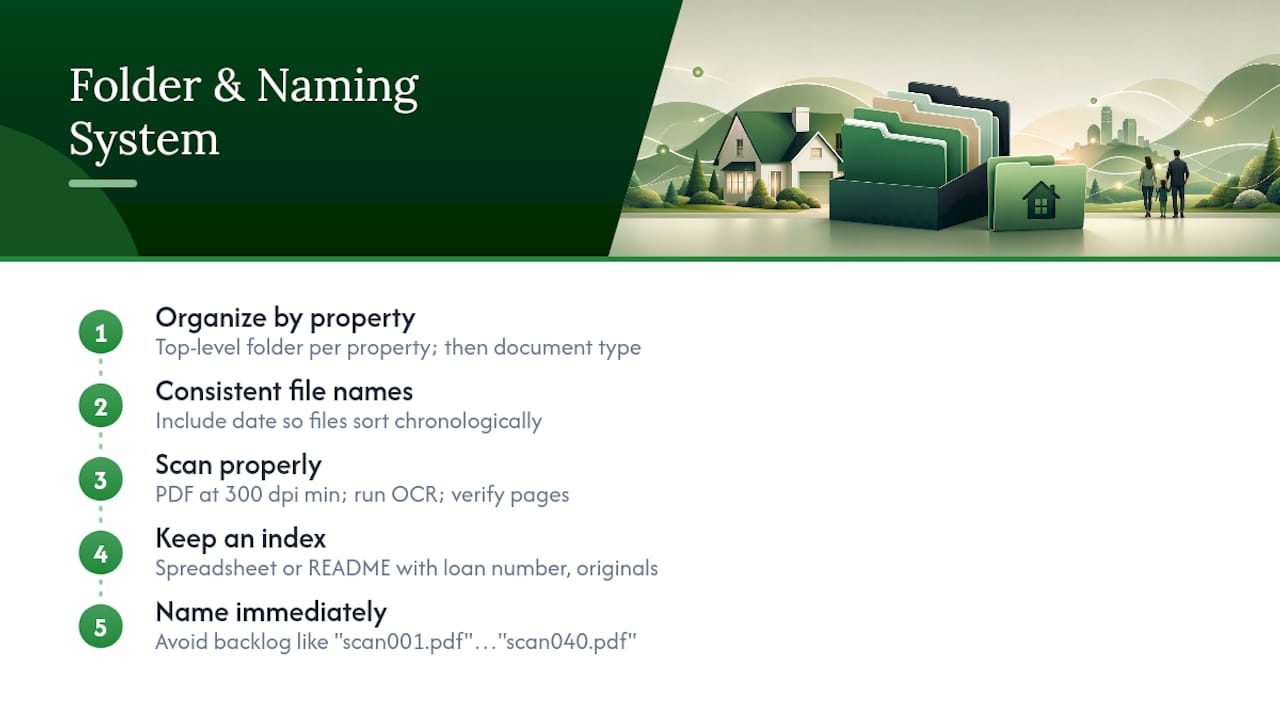
A folder structure only works if you can find something in ten seconds without thinking. The trick is organizing by property first, then by document type, so the system scales the moment you buy a second home or a rental.
Here's a folder tree that holds up:
/Properties
  /123-Maple-Street
    /Closing-Ownership
    /Loan-Servicer
    /Insurance
    /Taxes
    /Improvements-Warranties
    /Current-Statements
  /45-Lakeview-Drive
    /Closing-Ownership
    /Loan-Servicer
    /Insurance
    ...
For file names, use a consistent pattern: PropertyName_YYYY_DocType_Version. A real example: MapleSt_2026_ClosingDisclosure_Final.pdf or LakeviewDr_2023_RoofReplacement_Receipt.pdf. This naming convention means you never have to open a file to know what's inside it, and it sorts chronologically inside each folder automatically.
When you digitize paper documents, scan to PDF at 300 dpi minimum, and run OCR (optical character recognition) so the text becomes searchable rather than just a flat image. Verify every page made it into the scan, including blank pages. Navy Federal's mortgage checklist notes that lenders commonly reject incomplete document sets, and a missing page (even a blank one meant to preserve pagination) can stall an underwriting review or a refinance application.
Keep a simple index, either a spreadsheet or a plain text README in your top-level folder, listing each property, its loan number, and where the originals physically live. This one habit saves real time when you're filing an insurance claim at 11 p.m. or prepping documents for a refinance.
Pro Tip: Name your scans the moment you create them, not later. A backlog of 40 files named "scan001.pdf" through "scan040.pdf" is worse than no digital system at all, because now you have to open every single one to know what it is.
How Should You Store and Back Up These Documents Securely?
The safest setup layers three types of storage so no single point of failure wipes out your records: encrypted cloud storage for everyday access, a local encrypted external drive as a second digital copy, and a fireproof, waterproof safe for physical originals you can't easily replace.
Security basics matter as much as the storage medium itself:
- Use a unique, strong password for your cloud storage account, not one reused elsewhere
- Turn on multi-factor authentication (MFA) wherever it's offered
- Enable full-disk encryption on the device you use to access these files
- Avoid emailing sensitive documents like your Social Security number or loan details unencrypted
The Federal Trade Commission specifically warns against sending sensitive financial documents over unsecured email, since a compromised inbox can expose everything in one breach. A safe deposit box at a bank offers strong physical protection but limits access to banking hours and adds a step during emergencies; a home fireproof safe trades some security for round-the-clock access, which matters if you need your deed fast after a disaster.
FEMA's guidance on documenting home ownership makes a point worth repeating: pairing physical originals with encrypted digital backups protects you against both a house fire and a hacked account, which is exactly why relying on just one method leaves a gap. Test your backup at least twice a year by actually restoring a file, not just confirming the upload finished.
Keep the System Working: Maintenance and Life-Event Triggers
A filing system decays the moment you stop touching it. Set a recurring calendar reminder, quarterly at minimum, to keep it current.
- Reconcile new statements against your active folder and archive anything older than one year
- Verify your cloud backup actually ran and test one file restore
- Rotate passwords on your document storage accounts annually
- Shred physical copies of anything you've confirmed is safely archived and no longer needed in paper form, using a cross-cut shredder for anything with account numbers or Social Security numbers
- Update your index whenever you add, refinance, or sell a property
Certain events demand immediate action outside your regular schedule. Refinancing means a new closing disclosure, updated promissory note, and a payoff letter for the old loan that needs to move into your permanent folder. Selling means securing the lien release and updating your master index before the file goes cold. If you manage the household's paperwork alongside a spouse or partner, name one person as the system owner so nothing falls through when responsibilities shift.
Ready-to-Use Templates and Tools
You don't need to build this from scratch. Copy the folder tree and naming convention from the previous section directly into your cloud storage today, and use a simple spreadsheet as your document tracker, with columns for property, document type, date, location, and retention deadline.
For scanning, a phone scanner app that outputs to PDF with automatic edge detection saves time over a flatbed scanner for most homeowners, as long as you check that OCR is enabled and blank pages are included when a document calls for them.
Four tool categories round out the setup:
- Cloud backup service with encryption at rest and in transit
- External encrypted drive for a local, offline copy
- Password manager to generate and store unique credentials for every account tied to your documents
- Scanner app with OCR and multi-page PDF support
How Property Command Center Fits This System
If building and maintaining folders manually isn't appealing, a dashboard built for property owners handles most of this automatically. Property Command Center centralizes document storage by property, so each home gets its own vault instead of a shared, cluttered drive.
- Document vault organized by property, matching the folder-tree logic above
- Reminders for recurring tasks like insurance renewals or warranty expirations
- Vendor contact directory linked to the documents tied to each job
- One dashboard view across every property you own
| System component | Manual setup | Property Command Center |
|---|---|---|
| Folder organization | You build and maintain it | Pre-structured by property |
| Reminders | Calendar app, self-managed | Built-in alerts |
| Vendor records | Separate spreadsheet | Linked directory |
For owners juggling more than one property, tagging files by property and document role in a dedicated dashboard removes the manual index-keeping altogether.
One Habit That Saves Multi-Property Owners Hours
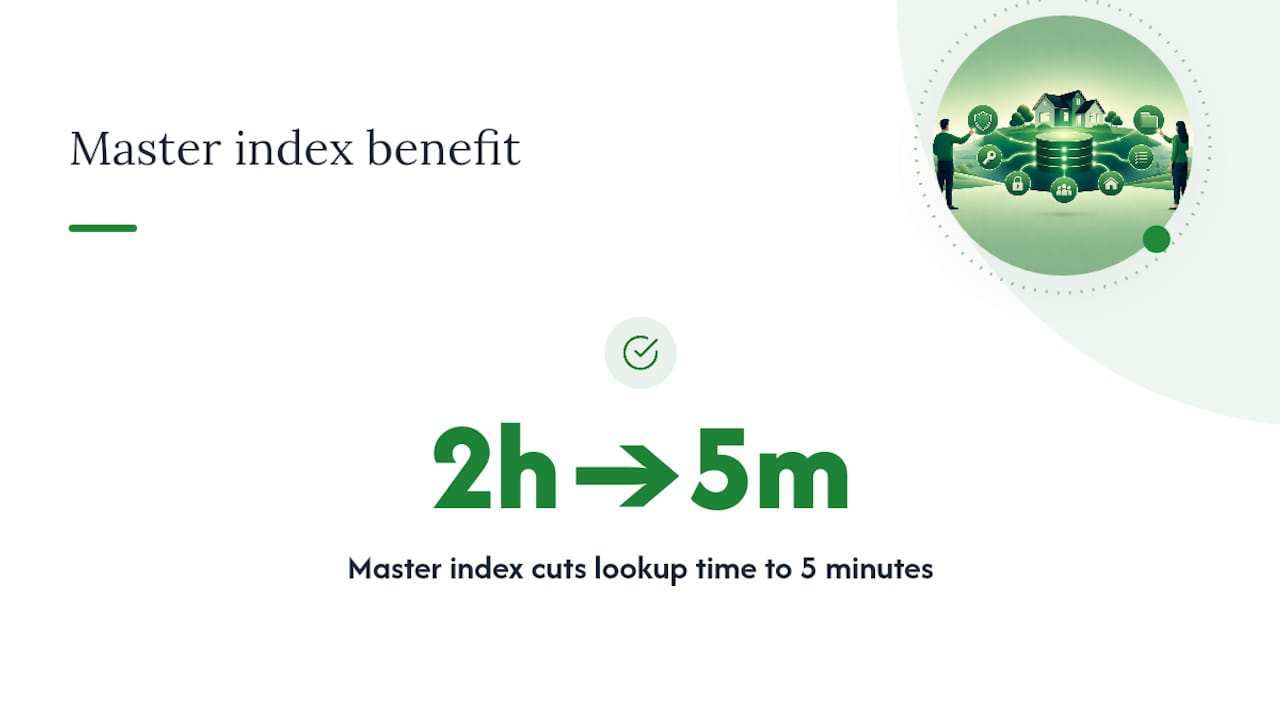
The homeowners who handle document chaos best aren't the ones with the fanciest scanner. They're the ones who maintain a single master index, a spreadsheet or README that maps every property to its folder locations, loan numbers, and where originals physically sit.
That one habit turns a two-hour scramble during a refinance or insurance claim into a five-minute lookup. If you own more than one property, treat the master index as non-negotiable, not optional. Everything else in this system (folders, naming, backups) supports that index. Without it, you've just built a more organized version of the same haystack.
— Francisco
Try Property Command Center: Start Organizing Today
Building the hybrid system above by hand works, but it takes a weekend and ongoing discipline to maintain across multiple properties. Property Command Center gives you that same structure (secure document vault, property-level dashboards, automatic reminders) without the manual setup, so you spend your time owning your properties instead of managing folders.

The vault holds your deeds, closing disclosures, and warranties by property, vendor contacts stay linked to the documents tied to each job through the vendor directory, and reminders keep insurance renewals and tax deadlines from slipping through the cracks. Start with the 14-day free trial, no credit card required, and see whether the dashboard replaces your spreadsheet within the first week. Check pricing and plans once you're ready to keep it running long term.
Sources
- IRS Publication 523
- Consumer Financial Protection Bureau
- FEMA fact sheet: How to document home ownership and occupancy
- Navy Federal mortgage checklist