
A property information sheet is a digital dashboard that pulls a home's status, maintenance schedule, vendor contacts, and stored documents into one place instead of scattered emails and spreadsheets. If you own more than one property, start with the big-ticket systems first: HVAC, roof, water heater, and major appliances. A subscription dashboard gives you structure to manage this without building a spreadsheet from scratch.
TL;DR:
- Prioritize recording your highest-cost systems first, such as HVAC, roof, and water heater, including installation details and warranties while paperwork is accessible.
- Use a consistent folder structure by category and a clear naming convention to ensure quick retrieval of warranty and service documents years later.
- Log routine maintenance tasks immediately with date, vendor, notes, photos, and cost to create a trustworthy, ongoing maintenance history.
- Keep your property records updated through quick, photo-based entries to ensure the information remains current and useful for resale or insurance claims.
- Manage multiple properties with a centralized dashboard that consolidates vendor contacts, documents, and reminders, saving time and reducing organizational clutter.
Table of Contents
- What Goes Into a Digital Property Information Sheet?
- How Do You Set Up a Property Information Sheet Fast?
- Organizing and Naming Records So They Still Make Sense in Five Years
- How Often Should You Log Maintenance, and Why Log It at All?
- Why a Living Record Beats a One-Time Document
- Run Your Property Information Sheet Inside a Property Management Dashboard
- Sources
- FAQ
What Goes Into a Digital Property Information Sheet?
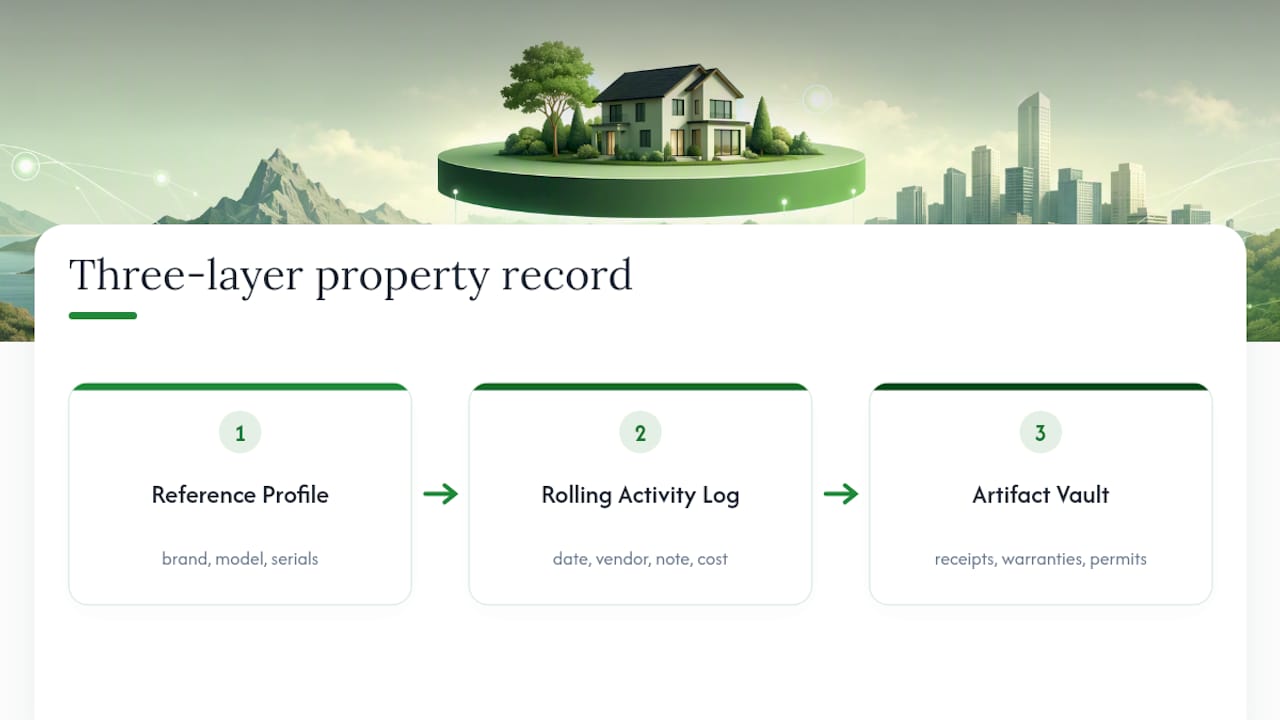
A useful property information sheet works in three layers, and skipping straight to layer three is the mistake most owners make.
Layer 1 is your reference profile — the static facts about each major system. This includes the property basics plus, for each big system, the brand, model and serial number, install year, installer name and phone number, and warranty expiration date. This layer barely changes once entered, which is exactly why it belongs first.
Layer 2 is the rolling activity log. Every time work happens, you log the date, the vendor, a short note on what was done, a photo if relevant, the cost, and a link to the receipt. Over a few years this log becomes the property's actual maintenance history, not a guess.
Layer 3 is the artifact vault — the receipts, warranties, permits, inspection reports, and photos themselves, stored as PDFs or images in cloud storage. This three-layer structure is what makes a record durable enough to hand off to a buyer, a contractor, or an insurance adjuster years later, rather than something only you can decode.
Skipping to the vault without the first two layers is why so many "digital home files" end up as a folder of 200 unlabeled PDFs nobody wants to open.
How Do You Set Up a Property Information Sheet Fast?
Don't try to document everything on day one. Owners who commit to a short daily habit for the first couple of weeks are far more likely to actually finish setup than those who block off a single weekend and burn out halfway through.
Here's a realistic sequence:
- Week 1: Log your highest-cost systems first: HVAC, roof, water heater, electrical panel. Capture installer contact info and warranty dates while you still have the paperwork handy.
- Weeks 2 to 4: Add appliances and secondary systems (water softener, garage door opener, sump pump) one at a time. Fifteen to thirty minutes a day is plenty.
- Month 2: Build your vendor directory. Every contractor who has ever touched the house gets a contact card.
- Month 3: Set recurring reminders for the maintenance cadence you settle on (more on that below), then stop adding and start logging.
Choosing a tool with low setup friction matters more than picking the "most complete" one. Tools that let you snap a photo of a receipt or forward a warranty email instead of retyping everything tend to survive well past the first month, while ambitious manual spreadsheets often get abandoned by spring.
Pro Tip: *Forward every service invoice from your email straight into your dashboard's inbox address, if it has one.
Organizing and Naming Records So They Still Make Sense in Five Years
The system that survives is the one where you can find a specific warranty in under a minute, three years from now, without remembering which property it belongs to.
A folder structure by category, not by room, works best for this: Appliances, Contractors, Warranties, Permits, Inspections, Photos. Searching for "the dryer" is faster than remembering whether it lives under "Laundry Room" or "Basement."
For filenames, a consistent pattern beats a clever one. Try YYYY-MM-DD_System_Vendor_Brief, so a water heater invoice becomes 2026-03-14_WaterHeater_AcmePlumbing_Replacement.pdf. This naming convention sorts chronologically inside any folder and tells you what happened without opening the file.
For owners juggling several addresses, add a property tag at the front: LakeHouse_2026-03-14_WaterHeater_AcmePlumbing.pdf. A few habits that hold up over time:
- One top-level folder per property, subfolders by category underneath.
- Photos of serial plates and receipts get renamed the same day, not "someday."
- One shared naming rule across every home you own, so muscle memory transfers between properties.
How Often Should You Log Maintenance, and Why Log It at All?
Most homes settle into a predictable rhythm: monthly filter checks, quarterly HVAC and gutter work, semiannual water heater flushes and smoke detector tests, and annual roof and chimney inspections. The exact cadence depends on your climate and equipment age, but the pattern rarely changes.
Each time a task gets done, log five things:
- The date it happened
- Which vendor or you did the work
- A one-line note on findings
- A photo where relevant (before and after helps)
- The cost, linked to the receipt in your artifact vault
Documented routine maintenance matters more than people assume. Small, boring tasks logged consistently build the maintenance history that insurance adjusters and buyers actually trust, often more than a single big renovation with no paper trail.
A maintained log changes the conversation at claim time and at closing. A complete digital home record — receipts, service history, warranties, contractor contacts, and photos in one place — reduces resale friction and speeds insurance claims because you're handing over proof instead of promises.
Why a Living Record Beats a One-Time Document
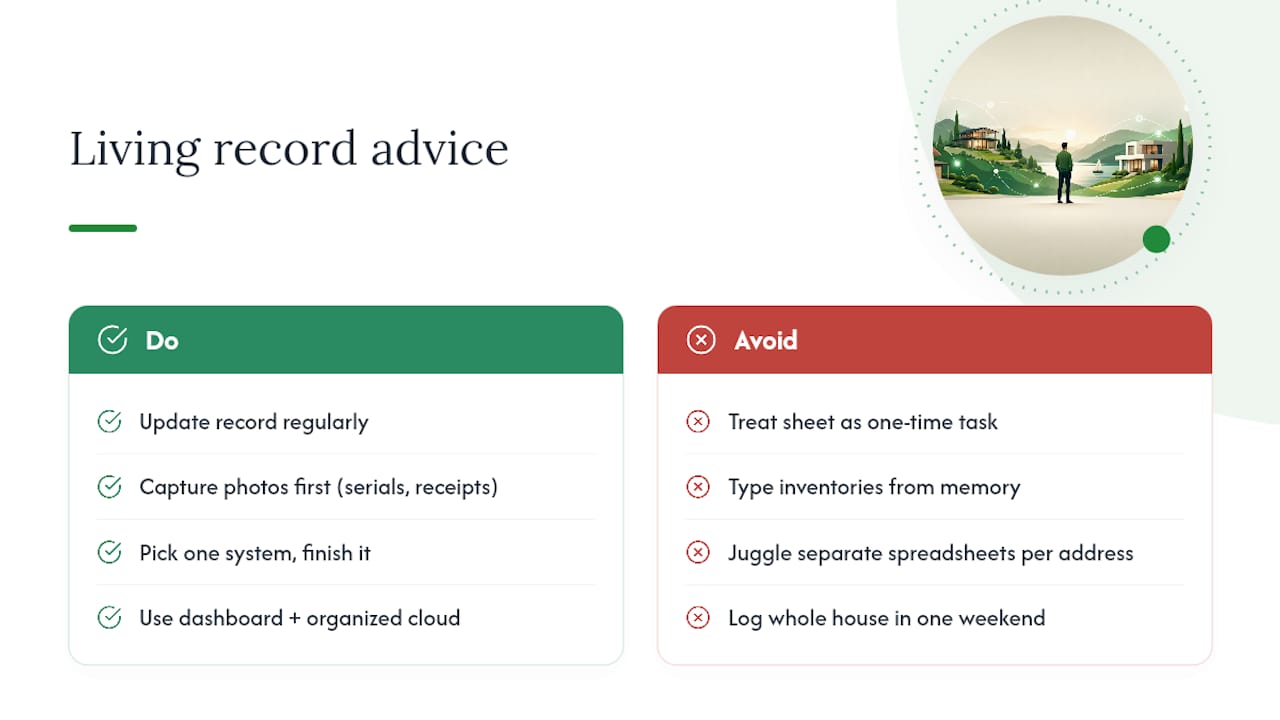
Most owners treat a property information sheet like a form to fill out once and forget. That's backwards. The value comes from the habit of updating it, not the initial setup.
The owners who keep their records current almost always use photo-first capture: snap the serial plate, snap the receipt, add a two-word note, move on. Typing full inventory entries from memory is where most systems die. This matters more for people managing several homes, since a multi-property platform with vendor coordination built in saves real time compared to juggling separate spreadsheets per address.
On the insurance and resale side, the payoff is concrete: a documented maintenance history gives an adjuster or a buyer's inspector something to verify instead of something to question. That alone can shorten a claim or a closing by days.
If you're starting from zero, don't try to log the whole house this weekend. Pick one system and finish it. Do the next one next weekend. The hybrid approach of a lightweight dashboard paired with organized cloud folders tends to outlast the all-in-one apps people abandon after month two.
— Francisco
Run Your Property Information Sheet Inside a Property Management Dashboard
You've seen what a property information sheet needs: a status view, a maintenance schedule, a vendor directory, and a document vault that doesn't require you to remember a folder structure you invented two years ago. Some platforms are built around exactly those four jobs, in one dashboard, instead of a spreadsheet and three cloud folders you have to keep in sync yourself.

For owners managing more than one home, that consolidation is the actual time savings: one vendor directory across every property instead of a contact list per address, and one document vault instead of five scattered ones. The platform's reminder system handles the recurring cadence work covered above, so you're not manually rebuilding a calendar every season.
Start with the 90-day plan from this guide, but run it inside the dashboard instead of a notebook. Check the pricing page for plan tiers based on how many properties you manage, and get set up through the onboarding walkthrough with a free trial that requires no credit card.
Sources
- HomeScore — Forecast Repairs, Costs & Lifespan for Every Home System
- Home Maintenance Software: Your Complete Guide to Keeping Your Property in Peak Condition
- The Complete Guide to Creating Your Digital Home Record
FAQ
What Is a Property Information Sheet?
It's a digital property profile, usually inside a dashboard app, that consolidates a home's status, maintenance schedule, vendor contacts, and stored documents in one place instead of scattered files and emails.
What Should I Add First to My Property Information Sheet?
Start with your highest-cost systems: HVAC, roof, water heater, and electrical panel, capturing installer contact info and warranty dates while the paperwork is still on hand.
How Often Should I Update My Maintenance Log?
Log an entry every time work happens, and review the whole sheet on a seasonal cadence, since most systems need monthly, quarterly, semiannual, or annual attention depending on the task.
Can I Export My Property Data if I Switch Tools?
Yes, and you should confirm export options before committing to any platform, since data portability in PDF or CSV format keeps your records usable if you switch tools or sell the property.
Does a Documented Maintenance History Really Help at Resale?
A documented maintenance history gives buyers and their inspectors verifiable proof of upkeep rather than a verbal assurance, which tends to reduce friction during resale and support insurance claims.