
A single dashboard app is the most reliable answer to family property management: it centralizes maintenance tickets, vendor contacts, documents, and recurring tasks for every home you own in one place. Instead of digging through email threads or three different spreadsheets, you check one screen. Families who make the switch report fewer missed repairs, faster vendor callbacks, and far less mental clutter around who's responsible for what.
TL;DR:
- Switching from spreadsheets to family property management software can save over 150 hours annually by streamlining document storage, vendor contacts, and maintenance tracking.
- Families managing three or more properties or spending over five hours weekly on admin should upgrade to dedicated software to reduce errors and missed repairs.
- Key features to prioritize include a multi-property dashboard, photo-enabled maintenance tickets, a vendor directory, and role-based access control for family members.
- Tiered pricing plans costing between $20 and $50 per month provide predictable costs that scale more favorably than per-property fees as the portfolio grows.
- Centralizing property information with a shared system minimizes family disputes, simplifies legal compliance, and supports future ownership or management transitions.
Table of Contents
- What Does Family Property Management Software Actually Do?
- When Should You Stop Using Spreadsheets and Email?
- What Features Should You Prioritize When Choosing a Tool?
- How Do You Set Up a Family Property Dashboard in a Weekend?
- How Should Families Handle Security and Shared Access?
- What Does Family Property Management Software Cost?
- What Legal Considerations Apply to Family Property Management?
- How Should Families Handle Budgeting, Expenses, and Rent Collection?
- How Do Families Avoid Conflict Over Shared Property Decisions?
- What Insurance and Risk Management Do Family Properties Need?
- How Should Families Plan for the Future of Shared Properties?
- An Editorial Take on Why Centralization Wins for Families
- See How Property Command Center Fits This Checklist
- Sources
What Does Family Property Management Software Actually Do?
Family property management software exists to answer one question fast: what needs attention across all your properties right now? Everything else builds on that.
A real dashboard rolls up status across every home you own, so instead of opening five folders you scan one screen and see which property has an open repair, an expiring warranty, or a vendor waiting on a callback. Maintenance tickets should carry photos and timestamps so each repair issue is clearly identified and tracked, and so a family member arriving at the property has actual visual context before they call a plumber.
Recurring tasks and reminders need to filter by property, not just by date, because a HVAC service due at the lake house means nothing to the person managing the rental unit in town. A vendor directory with quick dispatch options saves you from scrolling old texts trying to remember your electrician's number. A document vault holds warranties, appliance manuals, and insurance policies, tagged by property so a claim doesn't turn into an archaeology project.
- Property dashboard with status across every home
- Maintenance tickets with photo and timestamp history
- Recurring task reminders filtered by property
- Vendor directory with one-tap contact and dispatch
- Document vault for warranties, manuals, and insurance
- Shared access with simple role controls for family members
- Mobile app for updates from wherever you are
Pro Tip: Snap a photo of every appliance's serial number sticker the day you move in and file it in the document vault immediately. You'll thank yourself the first time a warranty claim requires proof of purchase date.
When Should You Stop Using Spreadsheets and Email?
Most families keep patching together spreadsheets and email folders long after the system has quietly broken. The tipping point isn't dramatic. It's cumulative.
A few reliable signals it's time to switch include managing several properties, spending substantial time weekly on scheduling and admin, or having repeated contractor calls due to lost estimates. Manual rent collection and maintenance tracking often become genuine bottlenecks as property counts rise beyond a few homes, and reconciliation errors start eating time that should go toward actually enjoying the properties.
Here's a quick tradeoff to make this concrete. If a spreadsheet system costs you five hours a week hunting for documents and re-texting vendors, that's roughly 260 hours a year. Even a modest reduction to two hours a week, which is typical once tasks and vendor contacts live in one searchable place, hands back more than 150 hours annually.
- Three or more properties in the family portfolio
- More than five hours a week spent on admin and coordination
- Lost documents, missed maintenance windows, or duplicate vendor calls
- Different family members using different tracking methods for the same property
What Features Should You Prioritize When Choosing a Tool?
Not every feature on a pricing page matters equally. Some are non-negotiable, some are pleasant extras, and some are warning signs disguised as selling points.
Must-haves:
- A multi-property dashboard that shows status at a glance, not buried in submenus
- Maintenance workflow that accepts photos and tracks ticket history over time
- A vendor directory with contact details and job history per property
- Document storage for warranties, manuals, insurance, and leases
- Shared roles so family members see relevant properties without stepping on each other
- Mobile notifications for anything urgent, especially at vacation or rental properties
Nice-to-haves: bulk scheduling across properties, exportable reports for taxes or insurance renewals, and per-property summaries you can hand off to a family member managing one specific home.
Red flags: pricing that balloons per unit as your portfolio grows, an interface built for enterprise property managers juggling hundreds of units, and no free export option, which is a sign the company expects you to get stuck rather than stay because the product works.
Pro Tip: Test the free trial with your messiest property first, not your simplest one. If the tool handles the vacation rental with the finicky vendor and the expired warranty, it'll handle everything else.
How Do You Set Up a Family Property Dashboard in a Weekend?
You don't need weeks to migrate off spreadsheets. A focused weekend gets most families fully operational.
Before you open any software, gather your leases, vendor phone numbers, current maintenance logs, and the essential documents, insurance policies, appliance manuals, warranty paperwork, for each property. Having this in one pile before you start prevents the stop-and-search delays that make migrations drag on for weeks.
- Create a profile for each property with its address, purchase or lease details, and basic specs.
- Invite family members with appropriate roles. Give edit access to whoever actually handles repairs, and view-only access to everyone else.
- Add your vendor contacts under each relevant property so the plumber who works on the lake house isn't confused with the one for the townhouse.
- Build recurring maintenance tasks for things like HVAC servicing, gutter cleaning, and smoke detector checks, scheduled around each property's specific needs.
- Run a seven-day test ticket. Log one real maintenance issue, assign it, and track it through to resolution before you retire your old spreadsheet.
To verify the workflow is actually working, check that every task has one clear owner and every property has at least one document uploaded. If two family members both think someone else is handling the pool maintenance schedule, that's a role-assignment problem to fix immediately, not later.
How Should Families Handle Security and Shared Access?
Sharing access across a family means balancing convenience against control, and most families get this wrong in one direction or the other: either everyone has full edit rights and things get accidentally deleted, or one person hoards access and becomes a bottleneck.
Role-based access solves most of this. Give edit rights to whoever handles day-to-day decisions for a property and reserve view-only access for family members who just need visibility, like an adult child who wants to know the vacation home's roof isn't leaking without needing to approve every repair.
Organize documents by property from day one, and tag anything critical, insurance policies, deeds, warranty documents, so it surfaces in a search instead of requiring you to remember which folder you filed it under three years ago. Two-factor authentication should be standard on any account holding this much household financial and legal information, and regular data exports protect you from vendor lock-in if you ever switch tools.
- Set edit access only for family members actively managing a property
- Tag critical documents (insurance, deeds, warranties) for fast retrieval
- Turn on two-factor authentication and schedule periodic data exports
- Maintain a shared emergency contact list with each property's key vendors
Pro Tip: Export your document vault to a backup drive twice a year. It takes ten minutes and it's the cheapest insurance policy you'll never file a claim on.
What Does Family Property Management Software Cost?
Pricing shapes vary more than most families expect, and the difference between a fair price and an inflated one usually comes down to how the plan scales with your portfolio.
Per-property pricing charges you for each home individually, which works fine for two properties and gets expensive fast at five. Per-owner pricing charges based on how many family members need accounts, which can backfire for large families with several adult children wanting visibility. Tiered bundles, where a flat monthly rate covers a set number of properties, tend to be the most predictable for families since your costs don't creep up every time you add a rental unit or inherit grandma's cabin.
Budget-wise, multi-property capable tools with real feature depth generally run in the $20 to $50 monthly range, depending on how many homes and features you need. To judge whether that's worth it, weigh it against time saved on coordination, fewer emergency repairs from missed maintenance windows, and the reduced friction of one consolidated vendor list instead of five scattered ones.
- Prefer tiered plans over per-property pricing that scales aggressively
- Confirm there's a free trial before committing to a paid tier
- Check that export and cancellation terms are clearly stated upfront
- Calculate value against hours saved, not just the sticker price
What Legal Considerations Apply to Family Property Management?
Family-owned properties carry legal obligations that spreadsheets tend to obscure until something goes wrong. The most common blind spot is documentation: local landlord-tenant laws, HOA bylaws, and short-term rental ordinances all require you to retain specific records, lease agreements, inspection reports, notice histories, sometimes for years after a tenancy ends.
If any family property is rented out, even informally to a relative, you're subject to your state and local landlord-tenant statutes covering security deposits, notice periods, and habitability standards. These rules vary significantly by state and even by city, so a family managing homes in two different states is effectively operating under two different rule sets simultaneously. A centralized document system helps here specifically because it lets you attach jurisdiction-specific notes to each property rather than relying on memory.
Short-term rentals add another layer: many municipalities now require registration, occupancy limits, and specific insurance riders before you can legally list a property on a booking platform. If your family portfolio includes a vacation rental, confirm current local rules before each season, since ordinances change more often than most owners expect.
For estate-owned or multi-generational properties, keep title documents, trust paperwork, and any co-ownership agreements in the same document vault as your maintenance records. When a dispute or a sale eventually comes up, having that paperwork instantly retrievable, rather than scattered across three family members' filing cabinets, saves real legal costs. None of this replaces an attorney's advice for your specific properties and state, but a well-organized document system makes any legal conversation faster and cheaper.
How Should Families Handle Budgeting, Expenses, and Rent Collection?
Financial tracking is where family property management either stays organized or quietly falls apart, usually because expenses get split across personal accounts, group texts, and whoever paid the contractor that month.
Start with per-property budgets covering predictable costs, property taxes, insurance premiums, routine maintenance, and a repair reserve for the unexpected. Building this per property rather than as one household lump sum makes it obvious which home is actually costing more than it should, which matters when the family cabin needs a new roof and everyone wants to know how it affects the shared budget.
Expense tracking works best when receipts get logged at the moment they happen, tagged to the specific property and category. Waiting until tax season to reconstruct a year of repairs from memory is how deductions get missed and disputes start between family members about who paid for what.

If any property generates rental income, whether from a long-term tenant or a short-term booking platform, automated rent collection dramatically outperforms manual collection: units on autopay hit a 99% on-time payment rate versus 87% for manual payment collection. That gap alone justifies setting up automatic payments even for a single rental unit managed by family. Automated late fees and payment reminders also remove the awkward job of being the family member who has to chase a tenant, or worse, a relative, for rent.
How Do Families Avoid Conflict Over Shared Property Decisions?
Shared property ownership among family members creates predictable friction points: who pays for what, who gets final say on repairs, and who actually shows up when something breaks at 11 p.m. Most of this conflict isn't about money. It's about ambiguity.
The fix is surprisingly unglamorous: assign explicit roles before a disagreement happens, not during one. Decide in advance who has final approval on repairs above a certain dollar amount, who handles vendor communication for each property, and how expenses get split when a cost doesn't fit neatly into anyone's individual budget. Writing this down, even informally, prevents the retroactive arguments that happen when everyone remembers a verbal agreement differently.
Regular, low-stakes check-ins work better than emergency phone calls. A short monthly review of what's pending across all properties, using a shared dashboard rather than a group text nobody reads carefully, keeps small disagreements from becoming resentments. When family members can see the same maintenance history and the same vendor invoices, arguments about "who authorized that repair" mostly disappear, because the paper trail already answers the question.
Money disagreements specifically benefit from a documented reserve fund policy. Deciding upfront how much each property keeps in reserve, and how repairs above that threshold get approved, removes the awkward moment where one sibling feels blindsided by a bill they didn't expect to split.
What Insurance and Risk Management Do Family Properties Need?
Insurance gaps are the most expensive mistake in family property management, usually discovered at the worst possible moment: right after something breaks.
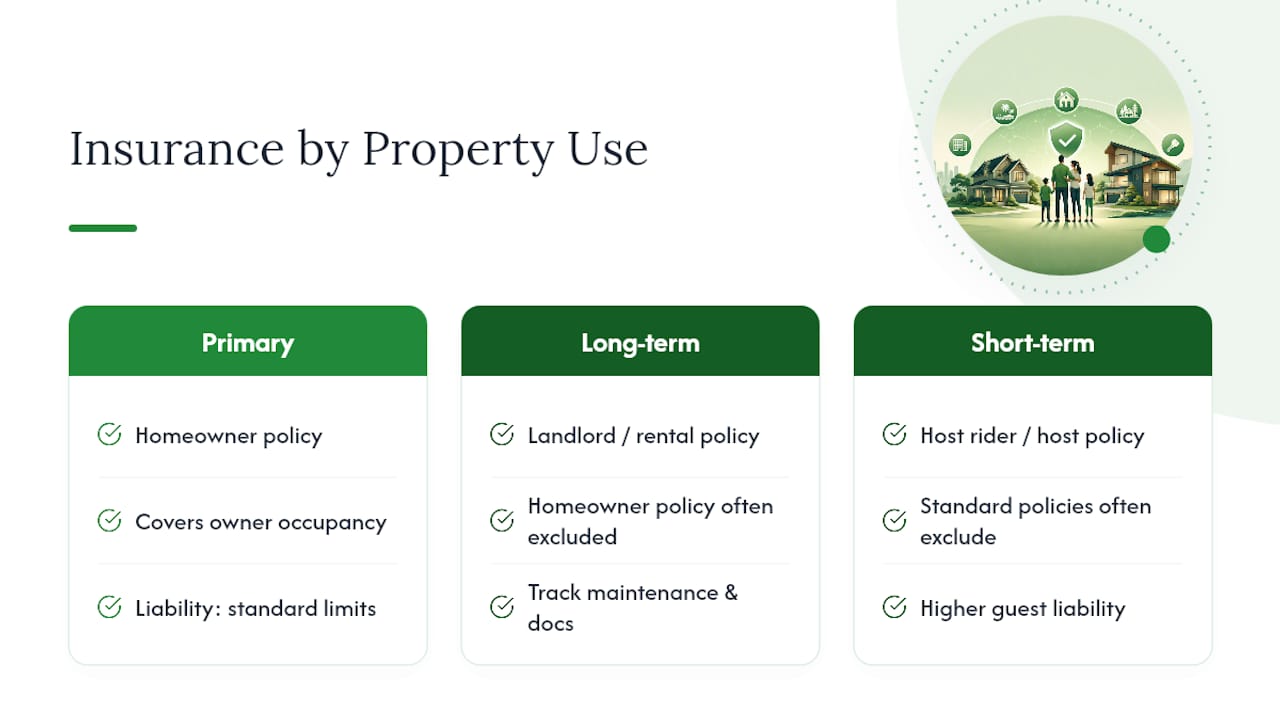
Every property needs coverage matched to its actual use. A primary residence, a long-term rental, and a short-term vacation rental each require different policy types, and using the wrong one is a common and costly error. A homeowner's policy generally does not cover a property once it's rented to tenants; that requires landlord or rental-dwelling coverage instead. Short-term rentals often need a specific rider or a dedicated host policy, since standard homeowner's and even standard landlord policies frequently exclude short-term guest stays entirely.
Liability coverage deserves particular attention for family-owned properties, especially vacation homes where extended family, friends, and sometimes paying guests use the property. Adequate liability limits protect against the realistic risk of an injury claim, and an umbrella policy is worth pricing out once your family owns more than one or two properties, since it extends protection across the whole portfolio rather than each home individually.
Risk management beyond insurance means keeping smoke detectors, fire extinguishers, and carbon monoxide detectors current across every property, and documenting that maintenance in your task system. Tying HVAC servicing and water heater flushes to installation or warranty dates in a document vault rather than a rough annual guess catches small problems before they become large insurance claims. Keep insurance policy documents, agent contact information, and claim history in the same centralized system as your maintenance records, so a claim after a storm or a break-in doesn't start with a scramble to find the policy number.
How Should Families Plan for the Future of Shared Properties?
Long-term planning is the piece most families put off until it's urgent, usually triggered by aging parents, a health scare, or a property that's suddenly harder to maintain than it used to be.
Succession planning starts with clarity on ownership structure. Whether a property sits in a trust, is jointly titled among siblings, or is held by an LLC changes how it transfers, who has decision authority, and what happens if one owner wants to sell while others want to keep it. These structures have real tax and liability implications specific to your state, and they're worth reviewing with an estate attorney rather than guessing based on what worked for a neighbor's family.
Beyond legal structure, think about the practical knowledge transfer that spreadsheets never capture: who knows the well pump needs servicing every spring, which contractor has a key to the lake house, where the original blueprints are stored. When that knowledge lives in one person's head, the family property management system collapses the moment that person is unavailable. A shared document vault and task history solve this by making institutional knowledge visible to whoever needs it next, whether that's a sibling taking over management or an adult child inheriting the property decades from now.
Revisit the plan periodically. A system built for two properties and three family members needs adjusting once it becomes four properties and eight grandchildren with opinions.
An Editorial Take on Why Centralization Wins for Families
Families that centralize their property management almost always describe the same shift: less time spent hunting, fewer arguments about who forgot what, and a noticeable drop in the background anxiety of "did anyone check on that?" The value isn't really the software. It's the fact that everyone finally works from the same information.
What surprises people is how much conflict disappears once maintenance history and vendor contacts live in one shared place instead of three inboxes. Property Command Center's dashboard approach, consolidating status, documents, and reminders in one view, exists because scattered notes are the actual root cause of most family property headaches, not lack of effort.
If you're skeptical, don't overhaul everything at once. Pilot the approach on your most complicated property first. You'll know within a week whether it's solving a real problem.
— Francisco
See How Property Command Center Fits This Checklist
Property Command Center was built around the exact checklist covered above: a multi-property dashboard, maintenance tracking with photo history, a vendor directory for quick dispatch, a document vault for warranties and insurance, and reminders that filter by property so nothing slips through during a busy season. If you've been nodding along at each must-have feature, that's not an accident.

Getting started doesn't require a credit card or a long commitment. The pricing page lays out plans by portfolio size, and the free trial gives you enough time to migrate one property, run a real maintenance ticket, and see whether the workflow fits your family before you commit to anything. Visit Property Command Center to start the trial and move your first property off spreadsheets this weekend.
Sources
The time and cost comparisons in this article draw on BiggerPockets' landlord scaling guide, Home24Seven's multi-property efficiency guide, and DoorLoop's systems and scaling breakdown. Pricing benchmarks referenced in the budgeting section come from Twobuoyslobster's home maintenance software guide.
For deeper setup help, see the internal guides on best rental property software, dashboard-style landlord tools, and warranty claim tracking for organizing manuals and insurance documents alongside your maintenance records.