
For property owners managing warranties across multiple homes, Mypropertycommandcenter is the recommended starting point — it ties warranty documents, vendor contacts, and repair tasks into one dashboard built for owners, not enterprise IT teams. If you need a dedicated warranty-specialist platform or handle high claim volumes, a few alternatives are worth knowing:
- Mypropertycommandcenter — best for small-to-mid portfolios needing warranty docs, vendor management, and task tracking in one place
- Claimlane — best for product-based businesses that need structured RMA workflows and supplier-side claim routing
- Tavant Warranty — best for enterprise manufacturers with complex multi-tier dealer networks
- After, Inc. — best for warranty marketing, post-sale customer engagement, and analytics
- Mize Warranty — best for service networks managing high-volume claims and parts logistics
- Clyde — best for e-commerce sellers adding embedded warranty programs to their checkout flow
Manufacturer portals like Eaton's dealer warranty portal and Google's Pixel support show how even large OEMs rely on self-service lookup tools — but those portals only cover their own products. Property owners juggling appliances, HVAC systems, roofing, and fixtures across multiple addresses need something that pulls everything together.
Key Takeaways
For property owners, the right warranty claim tracking tool is the one that connects warranty documents, vendor contacts, and repair tasks in a single place — not the one with the deepest RMA engine.
| Point | Details |
|---|---|
| Recommended pick for property owners | Mypropertycommandcenter integrates warranty docs, vendor contacts, and task tracking in one property-focused dashboard. |
| Specialist platforms for high-volume ops | Claimlane, Tavant, Mize, and After, Inc. suit enterprise or product-business use cases, not individual property portfolios. |
| Must-have workflow rules | Limit statuses to 5–7, assign one owner per claim, and log timestamps on every status change to maintain a clean audit trail. |
| Watch for hidden fees | Advanced-RMA convenience fees, integration charges, and per-claim fees are common — always request a full fee schedule before signing. |
| Start with a free trial | Mypropertycommandcenter offers a 14-day free trial with no credit card required, making it easy to test the workflow before committing. |
Table of Contents
- How do the top warranty claim tracking platforms compare?
- Which platform fits your specific situation?
- How does warranty claim tracking software actually work?
- How do you choose the right warranty tracking software?
- Getting warranty claim tracking up and running
- Which integrations does a warranty tracker actually need?
- How this comparison was put together
- Why property owners often do better with property-focused tools
- Mypropertycommandcenter keeps warranty tracking where your property data already lives
- Sources
How do the top warranty claim tracking platforms compare?
The table below maps each platform to the criteria that matter most for property owners and small businesses evaluating a warranty claim tracking system.
| Platform | Best for | Core features | Integrations | Pricing model | Scalability | Ease of setup |
|---|---|---|---|---|---|---|
| Mypropertycommandcenter | Property owners, families, vacation-home hosts | Document vault, task/repair tracking, vendor directory, alerts, maintenance schedules | Email alerts, vendor contacts, document storage | Subscription tiers by property count; free trial, no credit card | Single owner to small portfolio | Very easy; no IT required |
| Claimlane | Product brands, retailers, B2B warranty ops | RMA workflows, supplier routing, claim intake forms, status tracking | E-commerce platforms, supplier portals | Subscription; pricing not publicly listed | SMB to mid-market | Moderate |
| Tavant Warranty | Enterprise OEMs, dealer networks | AI-assisted claims, dealer portal, parts/labor validation, analytics | ERP, CRM, CMMS, dealer systems | Enterprise contract; custom pricing | Enterprise | Requires implementation support |
| After, Inc. | Warranty marketing and post-sale analytics | Warranty registration, customer engagement, analytics, upsell workflows | CRM, e-commerce, marketing platforms | Custom; not publicly listed | Mid-market to enterprise | Moderate to complex |
| Mize Warranty | Service networks, high-volume claims | Claims processing, service orders, parts logistics, dealer management | ERP, parts catalogs, field service | Enterprise contract; custom pricing | Enterprise | Requires implementation support |
| Clyde | E-commerce sellers, embedded warranties | Checkout-embedded warranty offers, claims portal, customer self-service | Shopify, WooCommerce, BigCommerce | Revenue-share or subscription; varies | SMB e-commerce | Easy for supported platforms |
Pricing for Tavant, After, Inc., and Mize is not publicly listed — request a demo or quote directly from each vendor to get accurate figures.
Which platform fits your specific situation?
Mypropertycommandcenter
Best for: Individual property owners, families managing multiple homes, vacation rental hosts, and short-term rental operators who need warranty documents and repair tasks organized by property.
Mypropertycommandcenter centers on the reality that most property owners don't run a warranty department — they just need to find the right document fast and know which contractor to call. The dashboard consolidates warranty certificates, appliance manuals, purchase receipts, and vendor contacts under each property address. Task and repair tracking lets you log a claim, assign it to a vendor, and set a follow-up reminder without switching apps.
- Pros: Simple onboarding with no IT support needed; document vault purpose-built for property records; vendor directory ties repairs to contacts; smart alerts for maintenance and warranty deadlines; free trial with no credit card required
- Cons: Not designed for high-volume B2B claim processing or multi-tier dealer networks; lacks native RMA shipping label generation; no parts-catalog integration
Pricing: Subscription tiers based on number of properties; publicly listed at Mypropertycommandcenter; free 14-day trial available.
Claimlane
Best for: Product brands and retailers that need structured RMA workflows and want to route claims to specific suppliers or repair partners.
Claimlane focuses on the supplier side of warranty operations. When a customer submits a claim, the platform can route it to the correct supplier or service partner automatically, reducing back-and-forth email chains. Intake forms are configurable, and the status workflow is designed for teams handling claims at volume.
- Pros: Strong supplier routing logic; configurable intake forms; clean claim status visibility for both customers and internal teams
- Cons: Pricing not publicly listed; overkill for individual property owners; no property-specific document organization
Pricing: Subscription model; contact Claimlane directly for current pricing.
Tavant Warranty
Best for: Enterprise manufacturers and OEM dealer networks with complex multi-tier warranty operations, parts validation, and labor reimbursement workflows.
Tavant brings AI-assisted claim adjudication and deep ERP/CRM integrations to large-scale warranty programs. Dealers submit claims through a branded portal; the system validates parts and labor against policy rules before approval. The analytics layer surfaces failure trends and cost drivers across product lines.
- Pros: Purpose-built for enterprise dealer networks; AI-assisted validation reduces manual review; strong analytics and reporting
- Cons: Custom pricing and long implementation timelines; far more complexity than a property owner needs; requires dedicated IT or implementation partner
Pricing: Enterprise contract; pricing available on request.
After, Inc.
Best for: Brands focused on post-sale customer engagement, warranty registration campaigns, and using warranty data to drive upsell and renewal revenue.
After, Inc. treats the warranty as a marketing channel, not just a cost center. Its platform handles registration, customer communication, and analytics around warranty utilization — useful for manufacturers who want to know which customers are actually engaging with their warranty programs.
- Pros: Strong post-sale engagement tools; warranty analytics for product and marketing teams; integrates with CRM and e-commerce platforms
- Cons: Not a claims-processing platform in the traditional sense; pricing not public; no property management context
Pricing: Custom; contact After, Inc. for details.
Mize Warranty
Best for: Service networks and manufacturers managing high claim volumes, parts logistics, and field service dispatch alongside warranty processing.
Mize handles the full service lifecycle: claim intake, service order creation, parts ordering, technician dispatch, and closure. For a company running hundreds of claims per week across a dealer or repair network, that end-to-end coverage matters. For a property owner with five homes, it's significant overkill.
- Pros: End-to-end service lifecycle management; strong parts and logistics integration; scales to enterprise volumes
- Cons: Enterprise pricing and complexity; no consumer-facing property management features; implementation requires professional services
Pricing: Enterprise contract; pricing on request.
Clyde
Best for: E-commerce sellers who want to embed warranty offers at checkout and give customers a self-service claims portal.
Clyde integrates directly with Shopify, WooCommerce, and BigCommerce to present warranty upsells at the point of sale. Customers who purchase a warranty can file claims through a self-service portal. It's a clean solution for online retailers — not relevant for property owners managing existing appliance or structural warranties.
- Pros: Easy checkout integration for supported e-commerce platforms; customer-facing claims portal; revenue-share model available
- Cons: Limited to products sold through integrated e-commerce channels; not designed for property or real estate contexts; pricing varies by model
Pricing: Revenue-share or subscription; contact Clyde for current terms.
A note on hidden fees: Watch for advanced-RMA convenience fees, which some vendors charge when they ship a replacement before receiving the defective unit. TP-Link's RMA program, for example, charges convenience fees in the $14.99–$49.99 range depending on shipping speed. Integration fees, onboarding charges, and per-claim fees are also common in enterprise platforms — always ask for a full fee schedule before signing.
How does warranty claim tracking software actually work?
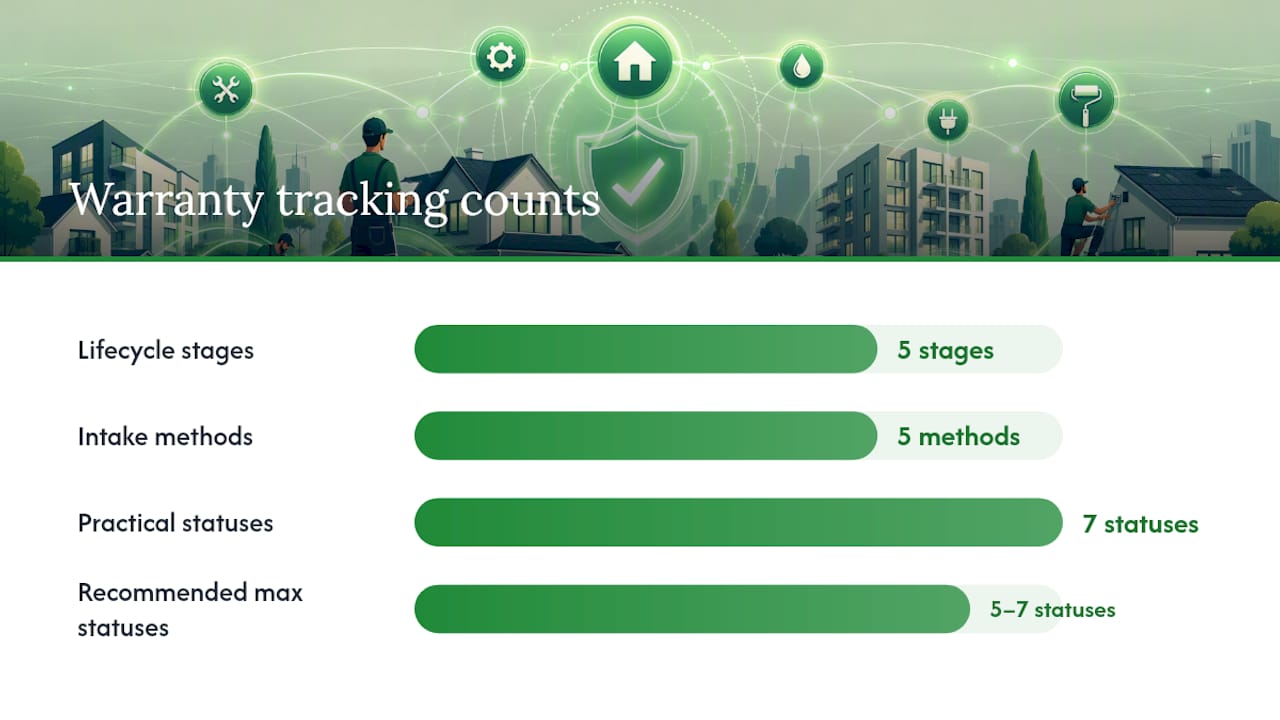
The typical lifecycle runs: intake → evidence collection → decision/RMA → fulfillment → closure. Software manages each stage with structured fields, status labels, and timestamps, so nothing falls through the cracks.
Intake methods vary by platform and context:
- Web form or customer portal, (most common for consumer-facing claims)
- Portal lookup by contract number or name plus last 6 of VIN/serial — Alpha Warranty's portal is a clean example of this pattern.
- Ticket ID plus mobile number lookup, as seen in lightweight consumer trackers like boAt's warranty ticket system
- Phone or email intake logged manually by a support agent
- Automated registration triggered by e-commerce purchase or POS transaction
Status lifecycle: AppMaster's warranty tracker guidance recommends keeping statuses to 5–7 maximum. A practical set: Received, Under Review, Need More Info, Approved, Awaiting Part/Repair, Shipped/In Progress, Closed. Each status change should log a timestamp, the actor who made the change, and a short note. That audit trail is what prevents disputes later and speeds escalations when a claim stalls.
One thing most guides skip: the difference between date reported and expected resolution date is your early-warning system. If a claim sits at "Under Review" past its expected decision date with no status change, that's a stalled claim — not a claim in progress. Logging both dates makes that visible immediately.
Google's Pixel support illustrates how even consumer-grade warranty processes confirm coverage by serial or IMEI before routing to walk-in or mail-in repair, with mail-in timelines typically taking about a week after shipping. That timeline expectation, set at intake, is exactly what a good tracking system surfaces automatically.
Pro Tip: Log the 'date reported' and 'expected resolution date' as separate fields at intake. Set an automated alert if no status change occurs within the expected window — that single rule catches most stalled claims before they become disputes.
How do you choose the right warranty tracking software?
Start with a feature checklist before you talk to any vendor. The criteria that matter most:
- Intake and evidence handling: Can claimants attach photos, receipts, and serial number images at submission? Columbia's warranty process requires proof of purchase and a problem description per item — your software should enforce the same at intake, not chase it later.
- Serial/VIN lookup: Does the system validate serial numbers or VINs against a product database at intake?
- Flexible status workflow: Can you customize status names and transition rules to match your process?
- Timeline logging: Does every status change log a timestamp and actor automatically?
- Single owner per claim: Is one person clearly responsible for each open claim at all times?
- Audit trail: Is the full event history immutable and exportable?
- SLA controls: Can you set time targets for first response, decision, and close — and get alerts when those targets are missed?
- Export and reporting: Can you pull claim data into a spreadsheet or BI tool without calling support?
Questions to ask in vendor demos:
- How do claimants attach proof of purchase and photos, and who on your team can see them?
- Can we import existing warranty records and purchase history from a spreadsheet or another system?
- What are your standard SLAs for support tickets, and how are SLA breaches escalated internally?
- What does a status change notification look like to the claimant — email, SMS, portal update?
- How does your pricing change if we add properties, users, or claim volume?
- What integration does your platform have with carrier tracking for return shipments?
- Is there an API or webhook so we can connect to our accounting or property management system?
Red flags to watch for:
- Pricing that requires a sales call to get even a ballpark figure
- More than 7 status options with no clear definitions for each
- No single-owner assignment per claim (shared inboxes cause claims to go unanswered)
- Evidence files stored outside the claim record, in a separate folder or email thread
- No carrier tracking integration for return shipments
- No webhook or API access, which locks you into manual data entry for any external system
Getting warranty claim tracking up and running
A small portfolio owner can realistically be operational in 2–4 weeks. Enterprise integrations with ERP or CMMS systems typically add 4–12 weeks depending on data complexity and IT availability.
Onboarding checklist:
- Gather warranty documents and purchase records — pull together all existing warranty certificates, receipts, appliance manuals, and serial number records before you touch the software. Gaps here slow everything else down.
- Import SKUs, serial numbers, and VINs — enter or upload product identifiers so the system can validate claims against registered assets. Eaton's dealer portal, for example, requires a VGT number or OEM dealer code plus repair order number — your own system needs comparable identifiers stored and searchable.
- Configure your status workflow and SLAs — set up your 5–7 status labels, define who owns each stage, and set time targets for first response, decision, and close.
- Connect integrations — at minimum: email notifications, carrier tracking for return shipments, and any accounting system handling refunds or credits. For property owners, connecting your vendor directory to claim records is the integration that saves the most time.
- Define roles and permissions — decide who can approve claims, who can view-only, and whether vendors or repair partners get portal access.
- Train staff and vendors — even a 30-minute walkthrough prevents the most common intake errors.
- Run 5–10 past claims as a dry run — use closed claims to test the workflow end-to-end before going live with new submissions.
For property owners using Mypropertycommandcenter, the onboarding process is designed to get you to a working setup without IT support — typically a few hours of document uploading and configuration rather than an extended implementation period.
Pro Tip: Require a clear photo of the receipt and the serial number label at the moment of intake — not as a follow-up request. The best-performing trackers make evidence the mandatory 'next step' before a claim can advance. Chasing evidence after the fact is the single biggest cause of stalled approvals.
Which integrations does a warranty tracker actually need?
The integrations that deliver real value for property owners and small businesses:
- Carrier tracking APIs (UPS, FedEx, USPS) — so return shipment status updates automatically inside the claim record rather than requiring manual lookups
- Serial/VIN lookup services — validates product identity at intake and prevents fraudulent or duplicate claims
- CMMS/ERP/CRM connectors — syncs claim data with maintenance management, accounting, or customer records for enterprise users
- E-commerce and POS order history — pulls purchase date, price, and product details automatically when a claim is submitted
- Accounting systems — handles AP flows for refunds, credits, and replacement cost tracking
- Parts catalogs and supplier portals — for platforms managing replacement part sourcing alongside claim approval
- Repair partner portals — gives authorized repair shops or contractors visibility into approved claims and work orders; appliance repair service software can connect field technicians directly to claim records
On the technical side, look for two-way webhook support so status changes in the warranty system push updates to connected tools automatically — and vice versa. A persistent document vault that stores evidence files inside the claim record (not in a linked folder that can be moved or deleted) is non-negotiable for auditability. Authentication via OAuth or API keys, clear data mapping for serial numbers and order IDs, and documented rate limits are the details that separate integrations that work reliably from ones that break quietly.
For property owners, the most practical integration is simpler: a vendor directory that links the repair contractor directly to the warranty claim, so you're not cross-referencing two separate systems when a water heater claim needs a plumber dispatched. Tracking water heater maintenance alongside warranty status is exactly the kind of workflow that property-focused tools handle naturally.

How this comparison was put together
This shortlist was built using a structured feature checklist applied to each platform's public documentation, vendor demo materials, and published support pages. Criteria were weighted toward the needs of property owners and small-portfolio operators: document vault capability, vendor directory integration, alert and SLA features, ease of setup without IT support, and publicly available pricing.
What to look for on vendor pages when you do your own research:
- Pricing transparency — at minimum, a published starting price or tier structure
- Case studies or use cases that match your industry or portfolio size
- SLA language in support documentation (not just marketing copy)
- Demo screenshots or video walkthroughs showing actual claim workflows
- Published integration lists with named platforms and connection methods
A few caveats: pricing for enterprise platforms (Tavant, After, Inc., Mize) changes frequently and is negotiated by contract — figures in this article reflect publicly available information and should be verified directly with each vendor. Some features described as available may be add-ons or enterprise-tier only. Always confirm current pricing and feature availability before making a purchasing decision.
Why property owners often do better with property-focused tools
The warranty-specialist platforms in this comparison — Claimlane, Tavant, Mize — are genuinely impressive at what they do. If you're processing hundreds of RMAs per month across a dealer network, that depth matters. But for a property owner managing warranties on a furnace, a roof, three appliances, and a home security system across two addresses, those platforms solve a problem you don't have.
The real friction in property warranty management isn't RMA routing logic. It's finding the warranty certificate three years after installation, remembering which contractor installed the unit, and knowing whether the coverage window is still open. A platform that centralizes those three things — documents, vendor contacts, and timeline alerts — eliminates the actual problem faster than any enterprise claims engine.
Consider a practical scenario: a vacation home's HVAC system fails in July. The owner needs the warranty certificate, the installer's contact, and the service history — ideally in under two minutes, from a phone. A property-focused dashboard built around that workflow beats a claims portal designed for a manufacturer's dealer network every time, for that owner, in that moment.
The trade-off is real: property-focused tools won't generate RMA shipping labels or route claims to a parts supplier automatically. If you need those features, a specialist platform is the right call.
Mypropertycommandcenter keeps warranty tracking where your property data already lives
Warranty documents buried in email, vendor contacts in a notes app, repair history in a spreadsheet — that's the setup most property owners are working around. Mypropertycommandcenter replaces all of it with a single dashboard organized by property address.

The document vault stores warranty certificates, purchase receipts, and appliance manuals by property. The vendor directory links your contractors directly to the properties and assets they service. Task and repair tracking logs every claim, follow-up, and resolution with timestamps. Smart alerts notify you before warranty windows close or maintenance deadlines pass. Setup takes hours, not weeks, and the free 14-day trial requires no credit card.
- Document vault for warranties, manuals, and purchase records — organized by property
- Vendor directory tied to properties and repair tasks
- Task and repair tracking with timeline logging
- Alerts for warranty deadlines and maintenance schedules
- Subscription pricing by property count, publicly listed
Check current plans and start your free trial — no credit card required.
Sources
When you need to check a specific claim's status or start an RMA, these pages are the fastest starting points:
- Warranty claim status | commercial vehicle
- Track your claim - Alpha Warranty
- boAt Warranty Ticket Tracking
- Complete a Warranty Claim Form
- Warranty claim tracker for product-based businesses | AppMaster
A note on portal idiosyncrasies: manufacturer portals often require identifiers that aren't obvious — OEM dealer codes, VGT numbers, repair order references, or the last 6 digits of a VIN rather than the full number. Collect and store these identifiers at the time of purchase or installation, not after a problem occurs. Missing the right identifier is the most common reason a portal lookup fails.