
A rental key information sheet is a one-to-two-page reference for a single property. It holds the facts you reach for when something breaks, a vendor calls, or a tenant or guest asks a question: utilities, shutoff locations, appliance models, warranties, keys and codes, contacts and open repairs. The sheet itself is easy to make. The hard part is keeping one accurate for every property you own, so the best version is a living record that sits next to your documents and maintenance history instead of a PDF that goes stale in a folder. Property Command Center is built to hold that record for each property.
TL;DR
- A key information sheet is a per-property reference of facts, contacts, documents and open items, so you never hunt through email or spreadsheets mid-emergency.
- Cover seven groups: property basics, access, utilities and shutoffs, systems and appliances, warranties and insurance, vendors and contacts, and maintenance status.
- Build one sheet per property, from files you already have, then assign a review date.
- Static PDFs and spreadsheets drift out of date. A living record tied to documents, vendors and reminders does not.
- Short-term rental hosts and second-home owners need extra fields: remote access, service schedules and who holds keys.
Table of Contents
- What a rental key information sheet is (and is not)
- What to put on the sheet
- Add the fields your property type needs
- How to build one for each property
- Why spreadsheets and PDFs stop working at three properties
- Using the sheet to coordinate maintenance and dates
- A worked example: one emergency, two ways
- Keeping every sheet current across a portfolio
- How Property Command Center handles this
- Our perspective
- FAQ
- Sources
What a rental key information sheet is (and is not)
The term gets used for two different documents, and search results mix them.
The first is a tenant information sheet: a form the tenant fills out with their name, contact details, emergency contacts and vehicle information. It lives with the lease. That is a tenant record, not what this article covers.
The second is a property information sheet, sometimes called a unit information sheet. This is the owner's reference for the property itself. BiggerPockets describes a landlord's unit information sheet as a per-property reference holding what a landlord needs while a unit is occupied, so you are not waiting on a tenant or scrambling when a vendor asks for details.
This article is about the second kind, because that is the one that saves you time across a portfolio. If you own two to twenty properties, you probably already have the information. It is just scattered across a spreadsheet, a Drive folder, old emails and a notes app.

What to put on the sheet
Published property information sheets from US property management firms are a useful benchmark for scope. Reading several of them, the same groups come up again and again. Here is the consolidated list, with examples of the specific fields.
| Group | What to record | Why it matters |
|---|---|---|
| Property basics | Address, property type, year built, square footage, bedrooms and baths, parcel ID | Needed for insurance, permits and vendor quotes |
| Access | Key counts (house, mailbox, garage remotes, gate remotes, pool keys), lockbox or smart-lock details, alarm company and code | Lets a vendor or backup person get in without you |
| Utilities and shutoffs | Provider for electric, water, sewer, gas, trash and internet; account numbers; main water shutoff location; who pays each | Speeds up emergencies and transfers |
| Systems and appliances | Make, model, age, filter sizes, water heater type, heating fuel | Lets you order parts and quote repairs fast |
| Warranties and insurance | Home warranty company and contract number, builder's warranty, appliance warranties, insurer and policy number | Claims are faster when the paperwork is one click away |
| Vendors and contacts | Plumber, HVAC, electrician, cleaner, landscaper, HOA and management company | Continuity when you are traveling or something fails at night |
| Maintenance status | Open items, last service dates, next due dates, owner approval limits | Shows what needs attention now |
The fields in that table are not invented. An Arizona rental firm's property information sheet records home-warranty company and contract number, builder's warranty, HOA contact, utility companies for electric, water, sewer, gas, cable and trash, key counts including gate remotes and pool keys, and the alarm company and code. A second US sheet adds homeowner's insurance company and policy number, water and sewer source (city or well and septic), HVAC brand and age, and who is responsible for lawn, tree, HVAC and smoke and CO detector work: owner, tenant or contractor.
Local rules can add fields. A Maryland firm's sheet records the main water shutoff and its instructions, HVAC filter location and size, trash and recycling days, parking, pet restrictions and, for Maryland properties built before 1978, a note on the state's lead-inspection requirement. Check what your state and city require and add a line for it.
Tenant-related records to link, not copy
For a long-term rental, the sheet should point to the current lease and addenda, rent amount and schedule, deposit records and move-in condition photos. A property manager onboarding guide lists these along with inspection reports, open repair items and the owner's repair-approval limits. Keep the full documents in your vault and put a link or a one-line summary on the sheet. Duplicating a lease onto the sheet just creates a second version to maintain.
Add the fields your property type needs
Long-term rentals. Add the lease end date, move-in condition photos, smoke and CO detector locations and the last inspection date. Note which maintenance the tenant handles and which you handle. If you want a deeper checklist for turnover paperwork, our rental document checklist covers it.
Short-term rentals and Airbnb properties. Add the cleaner's name and schedule, linen and supply locations, smart-lock or lockbox instructions, Wi-Fi details, trash pickup days, and the local contact who can reach the property within the hour. Add the recurring services that must happen between guests, such as pest control or pool service, with their dates.
Vacation and second homes. You are not there to notice problems, so record who holds a key, who checks the house and how often, where the water shuts off, winterization steps, and who is allowed to approve a repair up to what dollar amount. Seasonal routines belong here too. See our guide to seasonal home maintenance for when to book pros.

How to build one for each property
You do not need to start from a blank form. Use what you already have.
Step 1: Gather what exists
Pull your closing documents, insurance declarations, warranty paperwork, appliance manuals, vendor invoices and the emails where contractors sent quotes. The model numbers on invoices and the policy numbers on declarations are most of the sheet. Where it goes wrong: owners start typing from memory and get model numbers and policy numbers wrong. Copy from the document.
Step 2: Fill the seven groups
Work through the table above, one property at a time. Leave blanks visible instead of skipping fields, so you can see what is missing. A blank water-shutoff location on a property you own is the single most useful gap to find on a calm day.
Step 3: Attach documents, not just text
A policy number is useful. The policy PDF one click away is better. Attach the warranty, manual, inspection report and the latest invoices to the property record. Photos of the water shutoff, breaker panel and appliance rating labels save a phone call later.
Step 4: Assign vendors
List each trade you use, their phone number and what you last paid them for. A good directory also notes who is preferred and who is the backup. We cover how to build one in our guide to a rental vendor directory.
Step 5: Record maintenance status
Separate open items from completed work. For each open item, note what was reported, what has been done, whether a vendor is scheduled, whether an estimate is pending and whether you have approved the next step. That is the same breakdown the onboarding guide above recommends. Completed work becomes your maintenance history, which is valuable for recurring plumbing, HVAC, appliance or roof problems.
Step 6: Set a review date
Put a date on the sheet and a reminder to review it. Many property information forms include an updated-date field for exactly this reason. Pick a rhythm: after every vendor visit, after every tenant or guest turnover, and once a year for everything else.
Why spreadsheets and PDFs stop working at three properties
One property with one sheet is manageable. At three or more, the same few things go wrong.
- Versions multiply. There is a spreadsheet, a PDF from last year and a note on your phone. Nobody knows which is right.
- Documents live elsewhere. The sheet says a home warranty exists. The contract is in an email from 2023.
- Nothing prompts you. A sheet cannot tell you that a filter change is due or a warranty ends next month.
- Contacts go stale. A plumber retires, a cleaner changes numbers, and the sheet keeps the old one.
Keeping proper records is a discipline in any ownership structure. Even general guidance on business record keeping basics stresses organized, retrievable records, and a rental is a small business whether or not you have formed an entity.
Using the sheet to coordinate maintenance and dates
A key information sheet is most valuable when it ties to action. A landlord forms library suggests tracking each maintenance request by date received, tenant, property, issue and location, photos, urgency, safety concerns, vendor assigned, access instructions, owner approval, estimate, completion date, invoice and follow-up. Pair that with a preventive-maintenance calendar and a vendor contact sheet and you have the core of a working system.
For your own set-up:
- Log every repair the same way. What was reported, what was done, who did it, what it cost.
- Attach the invoice. It proves the work and holds the model number you will need later.
- Schedule the next one. If the HVAC was serviced in April, the next service is a dated task, not a good intention.
- Review across properties. Once a month, scan for open items, expiring warranties and upcoming insurance renewals.
If you are starting a schedule from scratch, two checks to start your maintenance calendar is a good first step, and our 90 day plan for a small portfolio shows how to sequence it. For a printable list of recurring tasks, use the home maintenance checklist, and for record keeping habits specific to small landlords, see rental property maintenance schedules and recordkeeping.
A worked example: one emergency, two ways
Imagine a water heater fails at a rental on a Saturday night.
Without a sheet: you search your email for the install invoice, can't find the model, call a plumber who asks for the tank size, text the tenant to ask where the shutoff is, then try to remember whether a home warranty covers it. An hour later you still do not know.
With a sheet: the record shows the water heater type and age, a photo of the shutoff, the preferred plumber and a backup, the warranty contract number and the repair-approval limit you set. You call, share the model, shut the water off and file the claim in minutes.
The information was the same in both cases. The difference was where it lived.
Keeping every sheet current across a portfolio
The real cost of a sheet is not creating it. It is the quarterly upkeep, multiplied by every property. Three habits keep it manageable:
- Update at the moment of change. When a vendor finishes, add the invoice and any new model numbers right then, not later.
- Use one source of truth. Every property has one record. Everything else points to it.
- Make gaps visible. A missing policy number or empty shutoff location should be easy to spot, not buried in a cell.
This is the part software should carry. Typing a hundred fields per property across several properties is the exact manual work that makes owners abandon the system.
How Property Command Center handles this
Property Command Center turns the sheet into a living record. Each property holds its maintenance history, documents, vendors, tasks, reminders and other important information in one place. Its AI-powered Smart Setup can help extract and organize information from your existing files, emails and spreadsheets, and portfolio import tools let you bring in multiple properties without entering them one at a time. You can then see what needs attention across the portfolio, instead of opening a folder per property.
Plans are priced by number of properties: Starter is $19 per month and Pro is $49 per month, both listed on the pricing page. Every plan starts with a 14-day free trial, no credit card required.
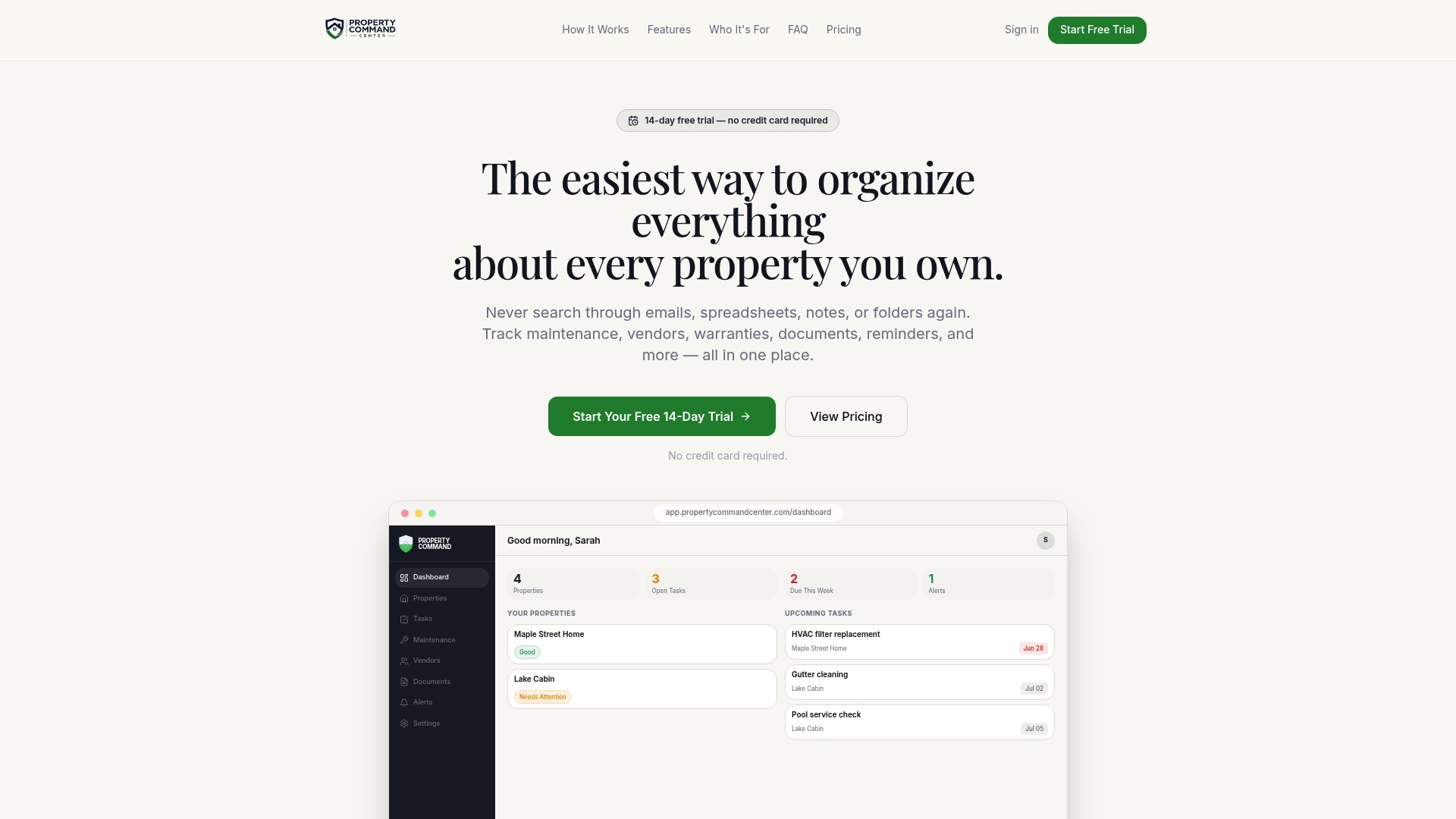
If you want to see your own properties in this format, start with the properties view and bring in the spreadsheet you already use.
Our perspective
Most owners we talk about don't have a documentation problem. They have a retrieval problem. The warranty exists, the invoice exists, the plumber's number exists. They just live in five places.
That is why we built Property Command Center around property knowledge instead of rent and leasing workflows. A key information sheet should not be a form you fill out once and forget. It should be the front page of a record that grows each time a repair happens, a vendor is added or a document arrives.
Our Smart Setup is designed to do the first pass for you, reading the files, emails and spreadsheets you already have and organizing them by property. After that, each new invoice and task adds to the record, so the sheet stays true without a yearly cleanup weekend.
If you own more than one property, start with the one that causes you the most scrambling. Get its record right, and the rest follow the same pattern.
Francisco
FAQ
What is the difference between a tenant information sheet and a key information sheet?
A tenant information sheet captures the tenant's details: names, contact information, emergency contacts and vehicles. A key information sheet records facts about the property itself: utilities, systems, warranties, vendors, access and maintenance status. Most owners need both, but the property sheet is the one you use to run maintenance.
How often should I update a rental property information sheet?
Update it whenever something changes: after a vendor visit, a replaced appliance, a new insurance policy or a turnover. Add a scheduled review at least once a year so nothing quietly goes stale. Putting an updated date on the sheet makes the last review obvious.
Should passwords and alarm codes go on the sheet?
Many published property sheets include alarm company details and codes, and key counts for gates and garages. Store sensitive codes only in a record that you control and share it only with people who need access, such as a backup caretaker or a trusted local contact.
Can I use the same sheet for a vacation rental and a long-term rental?
The core groups are the same: basics, access, utilities, systems, warranties, vendors and maintenance. Short-term rentals add cleaner schedules, check-in access and between-guest service tasks, while long-term rentals add lease dates and move-in condition records. Start from the shared core and add fields by property type.
Sources
- BiggerPockets: Landlord's Unit Information Sheet
- Property Information Sheet (Arizona)
- Property Information sheet (US)
- Rental Property Information Sheet (Maryland)
- Rental Property Management Onboarding Guide for Owners
- Landlord Forms and Checklists for Rental Property Owners
- Business record keeping basics