
A vacation home dashboard is one screen that shows you the state of each property you own: what is due, who to call, where the documents are and what happened the last time something broke. The best ones are built around property knowledge (maintenance history, vendors, warranties, insurance, access details), not just bookings and revenue. Below is what to include, how to set it up from the files you already have, and how to keep it current with very little effort.
TL;DR
- A useful vacation home dashboard holds six things per property: systems and maintenance, vendors, documents and warranties, utilities, access and shut-offs, and upcoming dates.
- Start with the files you already have in spreadsheets, email and Drive. Import them instead of retyping them.
- Schedule seasonal work about six weeks before the season starts, so your vendors still have openings.
- If you rent the home out, add a thin layer of performance numbers (occupancy, nightly rate, RevPAR) on top of the maintenance record, not instead of it.
- Property Command Center is built for this job, with a 14-day free trial and no credit card required.
Table of Contents
- What a vacation home dashboard actually is
- What to include for each property
- If you rent the home out: add a performance layer
- A quick comparison of dashboard types
- How to set one up in a weekend
- Focus on the 20% that prevents the expensive problems
- Dashboard or spreadsheet?
- Our perspective
- Try it on one property
- FAQ
- Sources
What a vacation home dashboard actually is
Search for the term and most results are about rental operations: reservation calendars, payment reports, guest analytics. That is one kind of dashboard, and it is useful if your main question is "how did the rental perform this month?"
Owners of second homes and small portfolios usually have a different problem. The house is hours away. The HVAC technician's number is in a text thread from two years ago. The water heater warranty is a PDF somewhere in Gmail. Nobody remembers when the gutters were last cleaned. What you need is a dashboard for the property itself.
One guide for multi-property owners calls the property document "your external brain" because it answers "what happened last time we dealt with this?" without relying on memory (Hubstone). That is a good test for any dashboard: if you can answer that question in under a minute, it works.
What to include for each property
Build one record per property. Several owner guides converge on the same core list (Hubstone), and it is a sensible template for any second home.
Systems and maintenance history
List each major system with its age, model and last service date: HVAC, water heater, electrical panel (and where it is), furnace filter size, septic, roof. Then log every repair or service with the date, who did it, what they did and what it cost.
This history is what saves you money later. When the same compressor fails again, you can see it failed before, who fixed it and whether it is still under warranty.
Vendors
A bare phone number is not enough. For each vendor, record five things:
- What they are responsible for (HVAC, plumbing, pool, exterior).
- Their service schedule (quarterly, annually, after storms).
- Their authority level, meaning how much they can spend before calling you.
- How you reach them (phone, email, scheduling system).
- How they price (flat rate, hourly, service call fee).
That framework comes from the same Hubstone guide, and it is especially valuable when a neighbor or caretaker has to hire someone while you are traveling. Add the last visit date and what was done, and the list becomes a working vendor directory instead of an address book.
Documents, warranties and insurance
Keep scans or links for appliance and HVAC manuals, active warranties, your homeowners policy, and any HOA documents. Owners who have a mortgage, a deed or title paperwork often add those too, along with the contact for the insurance agent.
Insurance deserves special attention for second homes. Most homeowners policies include a vacancy clause that limits or excludes coverage when a home sits unoccupied for roughly 30 to 60 consecutive days, and insurers may expect proof that you took reasonable steps to maintain the property (Triple-I). Read your own policy's wording, or ask your insurance agent how your policy treats seasonal use. A dashboard that stores the policy, the agent's contact and a dated log of inspections and maintenance gives you a ready record if you ever need to show what you did.
Utilities
Account numbers, billing dates, the provider's contact and seasonal usage patterns. A sudden spike in a water or electric bill on an empty house is often your first warning, and you can only spot it if you remember what normal looks like.
Access and shut-offs
Key storage, gate and alarm codes, Wi-Fi details, and the location of the master water and gas shut-offs. Add photos: the shut-off valve, the breaker box with labels, the equipment room. Property management guides for second homes recommend this kind of visual documentation because it lets a caretaker or contractor act without calling you (Weekender Management).

Store sensitive codes only in a system with proper access controls, not in a shared spreadsheet that anyone with a link can open.
Dates that matter
Gutter cleaning, septic pumping, roof inspection, exterior painting, pool opening and closing, insurance renewal, warranty expiry, HOA dues. Each should be a dated reminder, not a line in your head.
If you rent the home out: add a performance layer
Short-term rental owners also want numbers. Guides aimed at hosts list the same handful of metrics: occupancy rate, average daily rate (ADR), revenue per available room (RevPAR), booking lead time, net operating income, maintenance resolution time and guest satisfaction (ScanStay).
Of these, RevPAR is the one owners tend to overlook. A home can post a high nightly rate with weak occupancy, or fill up at a soft rate, and both can look fine alone. RevPAR blends them and shows whether the calendar is really productive (OmniVillas).
If a manager runs your rental, the same source suggests monthly owner reports should label every fee and cost and tie the net payout to what was actually deposited. Out-of-state owners also benefit from real-time access to bookings, maintenance logs and cleaning verification photos rather than waiting for a monthly PDF (ROAM Management).

The point is proportion. Performance numbers tell you how the home earned. The property record tells you whether it is being looked after. You need both if the house is an asset, and only the second if it is a family retreat.
A quick comparison of dashboard types
| Type | Best for | Strength | Gap for a second-home owner |
|---|---|---|---|
| Rental operations dashboard | Hosts focused on bookings | Reservations, revenue, guest data | Little on warranties, vendors and maintenance history |
| Smart-home or security dashboard | Owners with connected devices | Live status of locks, climate, sensors | Does not hold documents, vendor notes or service history |
| Spreadsheet plus folders | Owners with one simple home | Free and flexible | Breaks as soon as you have two properties or a second person helping |
| Property knowledge dashboard | Owners of one to several homes | Maintenance, vendors, documents and reminders in one record | Not a rent collection or accounting tool |
Match the tool to the question you ask most often. If it is "what is due and who do I call?", the last row is your answer.
How to set one up in a weekend
Step 1: Gather what exists
Search your email for "warranty," "invoice," "inspection" and the names of your usual vendors. Pull the spreadsheet you have been keeping, the folder of PDFs and any notes on your phone. You do not need to clean anything yet.
Step 2: Create one record per property
Use the six-part structure above. If you own more than one home, use the same structure for each so you can compare them and spot gaps. Our guide to managing multiple properties with one simple dashboard walks through this plan.
Step 3: Import instead of retype
This is where most DIY efforts stall. Typing 40 invoices into fields is why spreadsheets go stale. Use a tool that can read your existing files and emails and pull out the vendors, dates and documents for you, then review what it found.
Step 4: Add the recurring calendar
List the jobs that repeat each year and assign a season. Our host maintenance calendar and the vacation home checklist give you a starting set of tasks for each season.
Set reminders about six weeks before a season starts, not during it. That gives you time to book a vendor before their busy period, and the same Hubstone guide notes that proactive scheduling beats reactive repair because it costs less and removes the emergency.
Step 5: Name a backup
Give one trusted person, such as a spouse, neighbor or caretaker, access to the vendor list and shut-off photos. A dashboard that only you can read does not help when you are on a plane and a pipe is leaking.
Step 6: Review monthly
Ten minutes on the first of the month: open tasks, upcoming dates, any vendor visit that needs a follow-up. That habit is the real value. One guide on property dashboards makes the same point: the benefit is that the review process changes, not just that the data sits in one place (ScanStay).
Focus on the 20% that prevents the expensive problems
You cannot track everything, and you should not try. A common rule of thumb in owner guides is that a small share of maintenance work prevents most of the costly problems, so identify that share for your home and do it every time (Hubstone).
For most second homes, that short list is about water: supply line and shut-off checks, water heater service, gutters and drainage, and a plan for freezing weather. Water damage is among the most common and costly problems in unoccupied homes, and repairs after a burst pipe can run into five figures (Triple-I). Put those items at the top of your dashboard and give them the earliest reminders.
If you manage the home from a distance, our guide to managing a vacation home remotely shows which automation to switch on first.
Dashboard or spreadsheet?
Many owners start in a spreadsheet, and there is nothing wrong with that for one simple home. If you want to see how far it can go, our Notion property management setup guide covers a do-it-yourself build.
The friction shows up at a few predictable points:
- You add a second or third property and the tabs multiply.
- The details live in email, so the spreadsheet is always behind.
- A partner, caretaker or family member needs access and the file gets copied.
- You want reminders to come to you rather than remembering to open the file.
When two or more of those apply, a purpose-built dashboard repays the switch. For layouts to borrow, see our property dashboard examples.
Our perspective
Most owners we talk to do not lack information. They have too much of it, in too many places: a spreadsheet from three years ago, a Drive folder, a stack of emails, a notes app.
We built Property Command Center around one idea: the record of what happened at a property is an asset, and it should not depend on whoever happens to remember it. Rent collection and tenant screening are well covered by other tools. What owners with second homes and small portfolios were missing is a place that organizes what they already have into a living record for each property.
That is why Smart Setup is designed to extract vendors, dates and documents from your existing files, emails and spreadsheets, and why portfolio import is designed to bring in several properties at once. The less typing it takes to get started, the more likely the dashboard is still accurate a year later.
If you do one thing after reading this article, pick your most important property and write down who services each system, when it was last serviced and where the warranty lives. You will see the value within an hour.
Francisco
Try it on one property
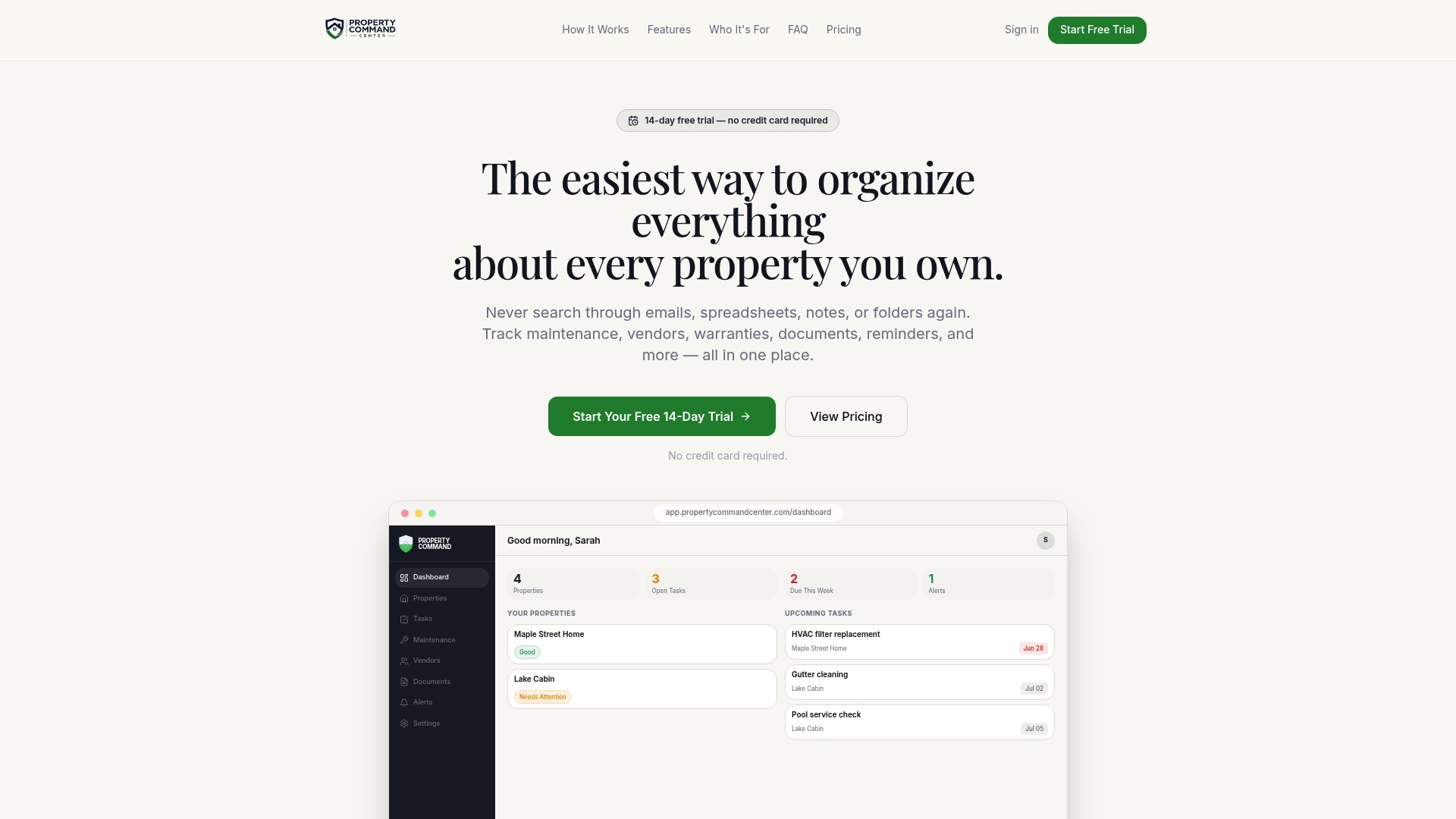
Property Command Center gives each home its own record with maintenance history, documents, vendors, tasks and reminders, plus a dashboard across all of them. It is designed for individual owners, families with several homes, vacation home owners and short-term rental hosts, not for property managers or rent collection.
Plans start at $19 per month for Starter, and Pro is $49 per month, with tiers based on the number of properties. Every plan begins with a 14-day free trial and no credit card is required. You can see the plans and pricing or start from the main site.
If you want to see how portfolio setup works for several homes, our guide to automating property tasks across multiple homes shows the workflow in a weekend.
FAQ
What should a vacation home dashboard include?
At minimum: systems and service history, a vendor directory with notes, documents and warranties, utility accounts, access details and shut-off locations, and dated reminders. If you rent the home out, add occupancy, nightly rate and RevPAR. Start with the first six and expand from there.
How is a vacation home dashboard different from rental management software?
Rental software centers on reservations, payments, guest messaging and revenue. A vacation home dashboard centers on the property: what was done, who did it, what is due and where the paperwork is. Many hosts use both, because they answer different questions.
How often should I update it?
Log work when it happens, ideally the day a vendor finishes, and do a short monthly review of open tasks and upcoming dates. Add a fuller seasonal review about six weeks before each season begins so you can book vendors early.
Can I build one in a spreadsheet?
Yes, for a single simple home it can work. As you add properties, caretakers or documents buried in email, a purpose-built tool saves the manual updating. Importing your existing files rather than retyping them is what keeps the record accurate.
Does a dashboard help with insurance?
It helps you keep the policy, the agent's contact and a dated record of maintenance and inspections together. Because many policies limit coverage for homes left unoccupied for 30 to 60 days or more, confirm your own policy's terms with your insurance agent.
Sources
- Managing Multiple Properties Without Losing Your Mind, Hubstone
- Property Management Dashboard: A Complete Guide for Hosts, ScanStay
- Owner reporting for vacation rentals, OmniVillas Journal
- Out-of-State Owner? How to Run a Michigan STR from Anywhere, ROAM Management
- When No One's Home: Understanding the Role of Vacancy Insurance, Triple-I