
A maintenance backlog is the list of repairs and upkeep you know about and have not done yet. For an owner of several properties, it usually sits in five places at once: a spreadsheet, a text thread with a handyman, an inspection PDF, a sticky note and your memory. You clear it by pulling those lists into one record per property, ranking the items by risk, and giving each a date. Property Command Center is built for that: it organizes the files, emails and spreadsheets you already have into a living record for each property.
TL;DR
- A backlog is work that should have been done by now and was put off. Routine upkeep, cosmetic wishes and upgrades are tracked separately.
- Rank every item by safety and consequence of failure, not by which property nags you most.
- Measure the backlog in dollars and as a share of what the building would cost to replace, so you can tell "annoying" from "urgent."
- Keep a service history for every property. It shows what recurs, who fixed it and what it cost.
- One shared record per property beats scattered files, and that is what we built Property Command Center to give you.
Table of Contents
- What counts as a maintenance backlog
- Why a backlog grows faster than you expect
- How to tell when it is getting unmanageable
- Step 1: Audit every property in one pass
- Step 2: Rank by risk, not by annoyance
- Step 3: Turn the list into a schedule and a budget
- Why a service history is the backlog's best defense
- Different owners, different backlogs
- Where Property Command Center fits
- Our perspective
- FAQ
- Sources
What counts as a maintenance backlog
The federal government has a precise definition, and it is a useful one. A Congressional Research Service report on civilian agencies describes deferred maintenance and repairs as work not performed when it should have been or was scheduled to be, and put off to a later period. It excludes work that expands a building's capacity or upgrades it for a different use.
Apply that to your own properties. Your backlog is the repair and replacement work you can see or have been told about that is overdue. A practical way to sort it follows the three tiers in one deferred maintenance calculation guide:
- Immediate repairs: things failing now, such as a leaking supply line or a dead GFCI outlet.
- Short-term replacements: systems approaching the end of their life within one to three years, such as a water heater at year 11.
- Long-term replacements: items beyond three years, such as a roof with a decade left.
The same guide says to leave out routine operating work (cleaning, filter changes, lamp replacements), aesthetic preferences, discretionary upgrades and anything a lease assigns to the tenant. That keeps the number honest. A kitchen you would like to modernize is a project, not a backlog.
Backlog versus a to-do list
A to-do list is what you plan to do. A backlog is what you already should have done. The distinction matters because a backlog carries risk: each item is a failure waiting for a bad day. Keep it as its own list so it does not get buried under this week's guest turnover or a tenant request.
Why a backlog grows faster than you expect
The government figures show the pattern at scale. In fiscal year 2022, federal civilian agencies reported an $80 billion deferred maintenance liability, up 57% over five years. The report points to chronic underfunding, aging assets, post-2019 inflation in labor and materials, and staff shortages.
Small owners face the same forces in miniature: older systems, pricier contractors, little spare time. Add the information problem. If the last HVAC service date lives in an email from two years ago, you cannot tell whether the unit is overdue. The work gets deferred not because you decided to skip it, but because you could not see it.
Deferral also costs money. A facilities-management practitioner told Facilities Net that running equipment to failure can make emergency repairs three to four times more expensive, often with overnighted parts and disruption for occupants. For a short-term rental, add a canceled booking and a review.
How to tell when it is getting unmanageable
Gut feel is unreliable. Two measures help.
Put a dollar figure on it
Add the estimated cost of every item on the list. Get a quote for anything over a few hundred dollars. A number you can see is easier to budget against than a vague worry.
Compare it to the property's value
Commercial engineers use the Facility Condition Index: deferred maintenance cost divided by the building's replacement value. One commonly used scale, described by an engineering firm, calls under 5% good, 5 to 10% fair, 10 to 30% poor and above 30% critical. The same source warns that a low overall index can still hide an urgent life-safety or code problem.
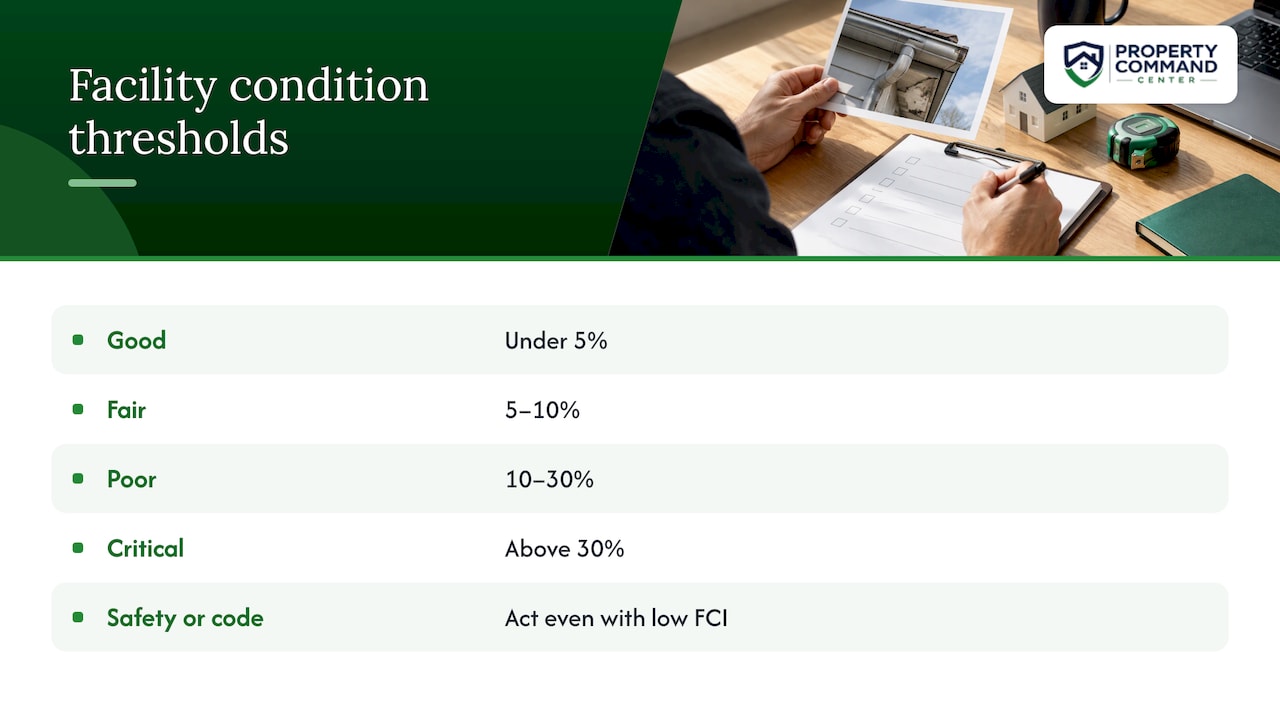
Here is a worked example with made-up numbers. A rental would cost $300,000 to rebuild. Your list totals $21,000: a $9,000 roof section, a $7,500 furnace, $3,000 of deck repairs and $1,500 of smaller items. That is 7%, in the "fair" band. But the deck railing is loose, and that is a safety issue no percentage excuses. Fix it first.
The scale was written for commercial buildings, so treat it as a rough gauge for houses and small multifamily, not a verdict.
Step 1: Audit every property in one pass
Start with a condition walk-through of each property. Write down what you see, then pull in what you already know from other places.
- Inspection reports and appraisals
- Texts and emails with vendors that mention "we should replace" or "next time"
- Tenant or guest repair requests that were never closed
- Warranty and insurance documents with expiration dates
- Your own notes and spreadsheets
This is where most owners stall, because the information is spread out. Property Command Center's Smart Setup is designed to extract and organize information from your existing files, emails and spreadsheets, and portfolio import tools let you bring in several properties without entering them one at a time. Instead of retyping a decade of notes, you start the audit from what you already have.
For each item, record: the property, the system or area, what is wrong, a cost estimate, who you would call and the date you first knew about it. That last field is the one people skip. It is how you see what has been waiting longest.
Step 2: Rank by risk, not by annoyance
HUD's public housing maintenance guide sets a priority order that works for any small owner: emergencies first, then vacancies, then planned work, then routine requests. It says a work order system must categorize tasks by priority so responses are timely and liability is limited. The guide dates from 1993, but the logic holds.
Translate it to your portfolio:
| Priority | What goes here | Example | Target |
|---|---|---|---|
| 1: Safety or damage in progress | Anything that can hurt someone or spread damage | Active leak, exposed wiring, no heat in winter | Same day or within days |
| 2: Turnover window | Work easiest to do while the unit is empty | Flooring, paint, appliance swaps between guests or tenants | Next vacancy |
| 3: Planned replacements | Systems nearing end of life | Water heater, HVAC, roof section | Budgeted this year |
| 4: Routine and cosmetic | Low-consequence items | Caulking, minor trim, touch-ups | Batched seasonally |
Facility managers add a second lens: prioritize by criticality and consequence of failure. A small leak under a bathroom sink and a failing furnace may cost the same to fix. Only one of them can freeze pipes. Our guide to a home repair priority list walks through which small problems cascade into big ones.
Keep a separate list for the old items
One facilities firm recommends moving items open beyond 30 days onto a distinct deferred maintenance list and reviewing the backlog weekly. For an owner, a weekly review is more than you need. A monthly 20-minute pass per property is realistic, and a quick glance every week at anything in Priority 1.
Step 3: Turn the list into a schedule and a budget
A ranked list still does not shrink on its own. Give every item a date and a cost.
- Pick a daily-use ceiling. Decide how many hours per month you will spend on maintenance coordination. That caps how many items you can run at once.
- Batch by vendor. If a plumber is coming for one item, add the others in the same trade. Keep a directory of who has worked at which property so you are not searching old texts for a name.
- Align with turnovers. Schedule interior work in vacancy windows and seasonal work (gutters, HVAC tune-ups, exterior sealing) ahead of the weather that punishes neglect.
- Reserve money by tier. Set aside funds for Priority 3 items before they fail. Our post on rental maintenance costs starts with a yearly budget baseline.
- Stop new items from joining the pile. Once the old work is scheduled, preventive maintenance keeps it from refilling. Our 90-day maintenance plan and maintenance calendar setup show how to start with two checks and build from there.
If you are weighing a refinance or a rehab loan to fund a big replacement, run the property's numbers first. A DSCR loan calculator shows how rental income covers debt payments, which tells you how much room the property has to carry the cost.
One caution on cost: a deferred item that you later fix may be a repair or an improvement for tax purposes, and the treatment differs. Ask your tax professional how to classify a large job before you do it, and keep the invoice either way.
Why a service history is the backlog's best defense
A backlog tells you what is wrong. A service history tells you what has happened. One real estate investment firm frames the difference as a stock versus a flow: the backlog is unresolved work while service is decisions and execution. It argues that a credible view of maintenance exposure needs a condition record (assets, condition, risk, cost to remedy) and a service record (the request, its category, who owned it, how long it stayed open, what was done, the cost and whether the problem came back).
For a small owner, that boils down to a short set of fields for every job:
- Date and property
- System or area
- What was done and by whom
- Cost and invoice or receipt
- Warranty, if any
- Whether it has happened before
That last field pays for the whole habit. If the same toilet has been repaired three times in two years, the item belongs in Priority 3 as a replacement, not Priority 4 as another repair. If you have a vacation home you visit four times a year, the history is also how you know what the caretaker did while you were away. Our guide to tracking service history with six fields gives a 90-day way to set it up, and the post on rental property maintenance schedules and recordkeeping covers the landlord side.
A history also settles disputes. When a tenant says the furnace never got serviced, or a vendor says they already replaced the part, a dated record ends the conversation.
Different owners, different backlogs
Self-managing landlords. Your backlog is partly driven by tenant requests, so categorize each request as it arrives and close it with a date. Know which jobs are yours under your lease and local rules; our landlord maintenance responsibilities plan lays out a 90-day approach.
Short-term rental hosts. Your windows are narrow. A repair that waits for a vacancy may never find one in peak season, so keep a standing list of low-impact items and a vendor who can work between checkout and check-in. Guest-reported issues go straight to Priority 1 or 2, depending on safety.
Vacation and second-home owners. Distance is your enemy. Problems start and grow while you are not there, so seasonal checks and a trusted local vendor matter most. Put every system's service date and warranty in a place a caretaker or family member can reach.
Small portfolio investors. Add the dollar and percentage view of your backlog per property and compare across the portfolio. The property with the highest percentage gets the next dollar, not the one you think about most. A written routine helps too: see our piece on property SOPs.
Where Property Command Center fits
The hard part of a backlog is rarely deciding what to fix. It is finding out what you already know. Property Command Center brings spreadsheets, emails, PDFs, maintenance records, vendor contacts, warranties, insurance documents, tasks and important dates into one place. Each property becomes a living record with its maintenance history, documents, vendors, tasks and reminders, so you can see what is coming due across the portfolio.
It is not rent collection or tenant screening software. It is for owners who want to remember what happened at each property, who did the work and where the paperwork is.
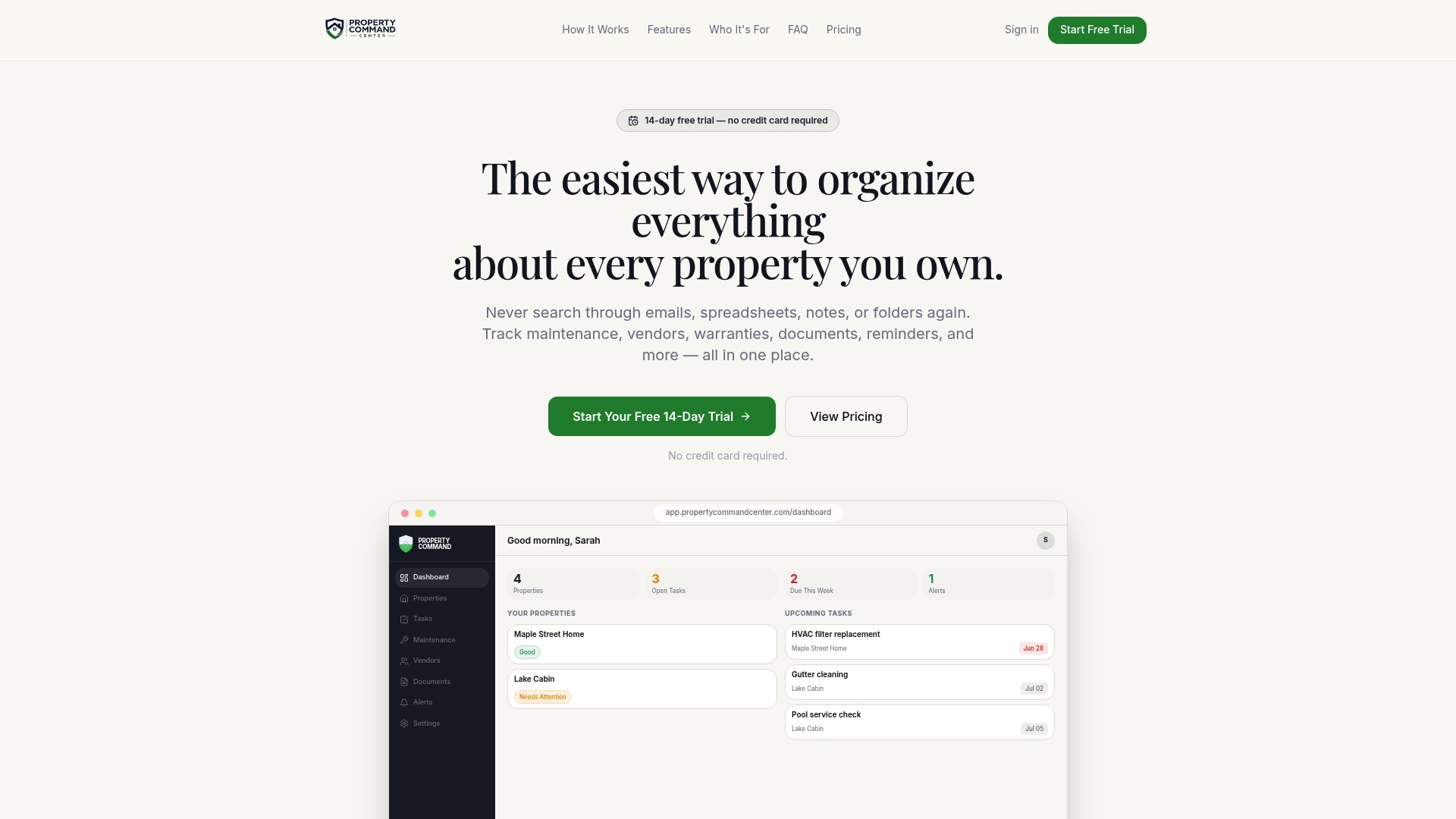
The Starter plan is $19 per month and Pro is $49 per month, with plans tiered by number of properties. There is a 14-day free trial with no credit card required. You can see the details on the pricing page, or look at the vendor directory to see where contractor contacts live.
Our perspective
Most owners we talk to think they have a motivation problem. They have a visibility problem. The roof quote is in one inbox, the water heater age is on a label nobody has photographed, and the plumber's number is in a text from 2023. Nothing is neglected on purpose. It is just invisible.
That is why we built Property Command Center around the record, not the rent roll. When every property has its own history, with documents, vendors, tasks and dates in one place, a backlog stops being a feeling and becomes a list you can rank and schedule. Smart Setup is designed to pull in what you already have, so you start from your existing files rather than a blank page.
Our advice is simple: put every known issue in one list per property, give it a priority and a date, and review it monthly. Do that for ninety days and the pile starts to shrink, because you stop rediscovering the same problems.
Francisco
FAQ
What is the difference between a maintenance backlog and deferred maintenance?
They are used almost interchangeably. Deferred maintenance is the work that was postponed past its due time, and the backlog is the running list of that work. A backlog can also include newly reported items that have not been scheduled yet.
Is a maintenance backlog always bad?
A short list of low-priority items is normal, since no owner finishes everything at once. It becomes a problem when safety items sit on it, when it grows month after month, or when the same failures keep repeating. Ranking by risk shows which case you are in.
How often should I review my backlog?
Review Priority 1 items weekly and the whole list monthly. Facilities teams often review weekly, but a small portfolio rarely needs that cadence for lower-priority work. Add a review after every vacancy or major storm.
What should a maintenance service history include?
Record the date, property, system, work performed, vendor, cost, receipt, warranty and whether the problem has occurred before. Those fields let you spot repeat failures, plan replacements and answer questions from tenants, insurers or your tax professional.
Sources
- Deferred Maintenance and Repair at Civilian Agencies, Congressional Research Service
- How to Calculate Deferred Maintenance Backlog
- Deferred Maintenance in Commercial Buildings: Risks
- Managing Maintenance in Public Housing, HUD
- Deferred Maintenance: Small Steps to Big Results, Facilities Net
- Six-step strategy for deferred maintenance
- From Maintenance Backlog to a Measurable Service System