
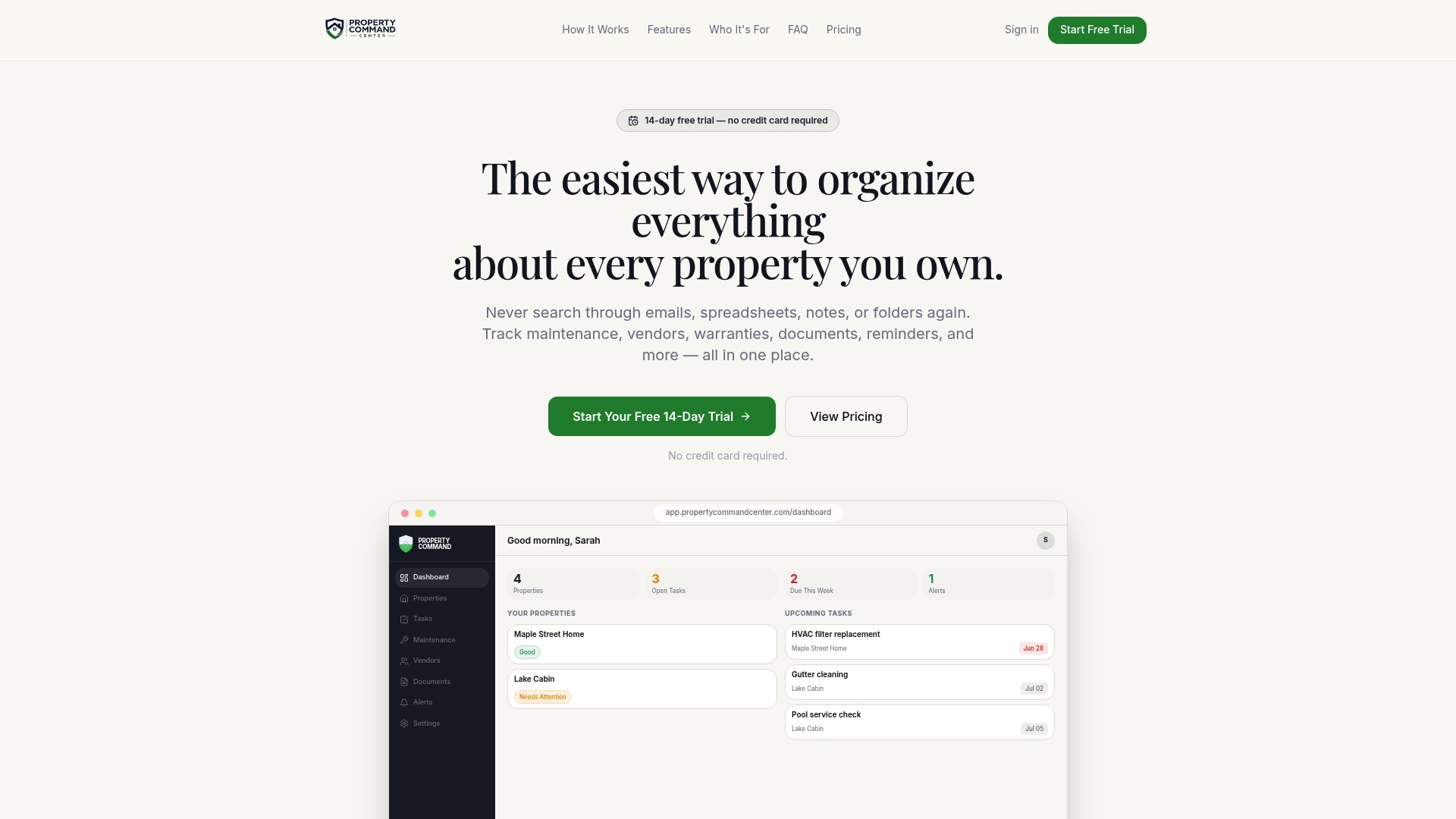
A property status dashboard is a single screen that shows the current condition of every property you own: what is open, what is overdue, what is coming due and where the paperwork lives. For owners of two or more homes, rentals or vacation properties, it replaces the hunt through spreadsheets, inboxes and folders with one view you can read in under a minute.
TL;DR
- A status dashboard answers three questions per property: what needs attention now, what is coming up, and where the proof is (invoices, warranties, policies).
- Start with a short list of fields: open tasks, next service dates, vendors, key documents and renewal dates. Add more only when you use them.
- Build it in layers: a portfolio view for a quick daily check, and a property view for the detail.
- Consistent status labels, named owners and due dates matter more than the tool you choose.
- Keep backups of your records and store copies somewhere other than the property itself.
Table of Contents
- What a property status dashboard is
- The problems it solves
- What to track for each property
- Build it in layers
- Step by step: set up your dashboard
- Spreadsheet, notes app or dedicated tool?
- Keep it current
- Organize documents so you can find them
- Protect your records
- A weekly rhythm that works
- Try it with your own properties
- FAQ
- Sources
What a property status dashboard is
Think of it as the front page of your portfolio. Each property gets a row or card with a status (fine, needs attention, overdue), and you click into it for the history behind the status.
Many of the dashboards you will find online are built for property managers and analysts. They chart occupancy, rent collected, market trends and investor returns. That is useful if you run a large operation with staff. It is not what most self-managing owners lose sleep over.
The owner's version is simpler and more practical. It answers questions like these:
- Did the HVAC service at the lake house happen this year, and who did it?
- When does the roof warranty on the rental expire?
- Which of my four properties has an open repair that nobody has followed up on?
- Where is the homeowner's policy for the property I bought last spring?
If you cannot answer those in a minute or two, a status dashboard will pay for itself quickly. For more layouts to borrow, see our property dashboard examples for owners with multiple properties.
The problems it solves
Owners rarely lose control of a property in one dramatic moment. They lose it in small gaps.
Information lives in too many places. The plumber's number is in a text thread, the warranty is a PDF in an email from three years ago, and the paint colors are in a note on your phone. Each piece exists, but none is findable when you need it.
Nobody owns the follow-up. A guest reports a slow drain at your short-term rental. You message a vendor, they say next week, and the thread goes quiet. Without a task with a name and a date attached, it simply disappears.
Maintenance becomes reactive. Recurring work such as filter changes, gutter cleaning and water heater flushes only happens when someone remembers. Skipped work tends to surface later as a bigger repair.
Records are missing when it matters. At claim time, at sale time or when a new contractor asks what was done before, the history either exists in one place or it does not.
A dashboard does not fix these by itself. It makes the gaps visible, which is the first step to closing them.

What to track for each property
Resist the urge to track everything. A dashboard crammed with fields becomes a chore, and chores stop getting done. Start with six groups of information.
1. Status and open work
The headline: a status label, a count of open tasks and a count of overdue ones. Use the same labels across every property so you can scan the portfolio quickly. Three or four is plenty, for example: Good, Needs attention, Overdue, Waiting on vendor.
2. Maintenance history and upcoming service
For each system or area (HVAC, roof, plumbing, appliances, exterior), record what was done, when, by whom and what it cost. Then record the next due date. History without a next date is an archive; history with one is a schedule.
If you need a starting list of recurring work, the Freddie Mac home maintenance checklist breaks tasks into monthly and seasonal groups. It includes items such as cleaning the furnace filter, testing smoke and carbon monoxide alarms, servicing cooling systems before summer and cleaning gutters. Treat it as a template, then adjust to each property's climate, age and equipment. Our guide to maintenance task tracking for small property portfolios goes deeper on setting up recurring tasks.
3. Vendors
One directory, linked to each property: who does what, how to reach them, what they charged last time and whether you would hire them again. For a vacation home you manage from a distance, this is the list that gets a pipe fixed while you are three states away.
4. Documents
Warranties, manuals, insurance policies, closing documents, permits, inspection reports and receipts. The dashboard should link each document to the property (and ideally the system) it belongs to. A few key dates belong on the dashboard itself: warranty expirations, policy renewals and inspection due dates.
5. Important dates
Policy renewals, property tax deadlines, license or permit renewals for short-term rentals, seasonal open and close tasks for second homes, and lease end dates if you rent the property out. Put them in one calendar view or list sorted by date across all properties.
6. Light financial context
Property-management reports often include cash balances, receivables, budget variances and collections. A self-managing owner usually needs less: the cost of repairs per property and per year, so you can spot a money pit early. Full accounting and rent collection can stay in your accounting tool. The dashboard's job is to hold what happened at the property.
Build it in layers
A good dashboard is not one overloaded screen. Design two layers.
Layer one: the portfolio check. One line per property showing status, overdue items, the next upcoming task and the next upcoming date. This is what you open on a Monday morning or before a trip. It should take under a minute.
Layer two: the property record. Click a property and see the full history: tasks, vendors, documents, notes and photos. This is where you go when something needs a decision.
If you later add financial reporting for each property, the same layered idea applies at larger scale. Industry data providers such as Bizminer's real estate property manager profiles show how financial benchmarks can be broken down from an industry overview into more detailed company-level figures, which is the same overview-to-detail pattern. For a deeper look at the portfolio layer, read our guide to a rental portfolio dashboard.
Step by step: set up your dashboard
- List your properties and give each a short, unique name. Use the street name or nickname, such as "Lakehouse" or "Oak St duplex." Keep it consistent everywhere.
- Choose your status labels. Three or four, used identically on every property.
- Gather what you already have. Pull together spreadsheets, email attachments, Drive folders, photos of paper files and notes. Do not clean up first. Collect, then sort.
- Create the property records. For each property, add the address, key systems, purchase or move-in date and insurance details.
- Load the last two or three years of maintenance. You do not need perfect history. Start with major items: roof, HVAC, water heater, appliances, major repairs.
- Add vendors. Attach each to the property or properties they serve.
- Attach documents. Warranties, manuals and policies first. Receipts can follow.
- Create recurring tasks with due dates and a named owner. Even if the owner is always you, naming it forces the question of who will act.
- Set reminders. Ahead of the due date, not on it. Give yourself time to book a vendor.
- Schedule a 15-minute weekly review. Clear overdue items and update statuses. A dashboard that is not reviewed drifts out of date within weeks.
The import step is where most people stall. Typing in properties one at a time is slow, and it is the reason many spreadsheet systems never get finished. Property Command Center's Smart Setup and portfolio import tools are designed to pull information from existing files, emails and spreadsheets so you are not starting from a blank page.
Spreadsheet, notes app or dedicated tool?
You can build a perfectly good status dashboard in a spreadsheet or a workspace app. Owners do it all the time, and for two properties it can work well. If you go that route, our Notion property management quick setup guide walks through a workable structure.
The weak points show up as the portfolio grows:
| Approach | Works well when | Common breaking point |
|---|---|---|
| Spreadsheet | One or two properties, one person, simple tasks | Reminders are manual, documents live elsewhere, versions multiply |
| Workspace or notes app | You enjoy building systems and have time to maintain them | Setup is yours to design and fix, and records stay only as good as your discipline |
| Rent and tenant software | You need rent collection, screening and leasing | Built around tenants and accounting, so property knowledge like warranties and service history is thin |
| Property organization platform | You own several properties and want records, tasks and reminders in one place | Fits owners, not property management companies with staff |
The question to ask is not which tool has the most features. It is which one you will still be updating in a year. For a wider comparison by type, see our overview of landlord software for owners who want a simple multi-property dashboard.
Keep it current
The most common failure is not a bad design. It is a dashboard that nobody updates. A few habits prevent this:
- Update at the moment of work. When a vendor finishes, log it right then: date, what was done, cost, a photo of the invoice.
- Use one intake path. Forward vendor emails and invoices to one place, or snap photos in the same app every time.
- Every task gets an owner and a date. Open-ended tasks rot.
- Review overdue items weekly. If something has been overdue for a month, either do it, reschedule it with a reason, or delete it.
- Do a yearly audit. Once a year, walk each property record and confirm the systems, vendors and documents are still right.
For short-term rentals, add a step after each turnover: a quick note of anything guests or cleaners flagged. That one habit catches many small problems before they become reviews or repair bills.
Organize documents so you can find them
A dashboard is only as helpful as the documents behind it. Two simple rules do most of the work.
Use a clear folder hierarchy. Organize by property first, then by category (insurance, warranties, maintenance, purchase and legal, taxes). If you own through separate entities such as LLCs, keep their records separate rather than blending them.
Standardize file names. A pattern like date, property, document type and vendor or provider makes files sort and search predictably. For example: 2026-03-14_OakSt_HVAC-service_ComfortPros.pdf. Our post on home file naming conventions for multi-property owners offers a full template, and how to store property documents for the long term covers storage choices.
Insurance records deserve their own folder. If you ever file a claim, you will want the policy, the declarations page, your agent's contact details and an inventory of belongings in one place. We cover this in our insurance document organizer for multi-property owners. A home inventory is also worth building, and this guide to building a home inventory for insurance explains how to make one that is useful at claim time.
Protect your records
A dashboard holds sensitive information: policy numbers, access details, financial documents. Treat it that way.
- Back up. Ready.gov's guidance on documenting your property recommends securing electronic copies with strong passwords and saving them on a flash or external drive, kept in a waterproof box or safe. It also suggests leaving copies of vital records with trusted relatives or friends.
- Keep a copy off site. A fire or flood that hits the property should not also take your records.
- Limit access. If you share the dashboard with a spouse, a house sitter or a handyman, give them only what they need.
- Use strong, unique passwords and two-step sign-in wherever your tool supports it.
- Keep the originals that matter. Some documents, such as deeds and titles, you should keep as originals in a safe place even if you hold scans. Ask your attorney or title company which ones apply to you.
A weekly rhythm that works
Here is what a lean routine looks like for an owner with four properties:
| When | What you do | Time |
|---|---|---|
| Monday | Open the portfolio view, scan overdue and upcoming items | 5 minutes |
| After any vendor visit | Log work, cost and invoice | 2 minutes |
| Monthly | Check seasonal tasks coming in the next 30 days and book vendors | 15 minutes |
| Quarterly | Review vendors and open repairs across all properties | 30 minutes |
| Yearly | Audit each property record, confirm policy renewals and warranties | 1 to 2 hours per property |
This is a rough guide, not a rule. Adjust it to your portfolio. The point is that regular small check-ins prevent the annual scramble.
Perspective
We built Property Command Center because the owners we talk to are not short on information. They are short on one place for it. The details are already in spreadsheets, Google Drive, Gmail, PDFs and phone notes. What is missing is a way to see them together.
Most landlord software starts with rent and tenants. That is a fine approach for some owners, but it leaves out the knowledge that makes a property easier to run: what happened there, who did the work, where the warranty is and what comes due next. We think that knowledge deserves its own home.
That is why we designed Smart Setup to help extract and organize information from files, emails and spreadsheets you already have, and why portfolio import exists so you are not entering properties one by one. Every property becomes a living record, and the dashboard shows the status of all of them together.
Our advice is the same whatever you use: keep the fields few, the labels consistent and the dates real. The best dashboard is the one that stays current.
Francisco
Try it with your own properties
Property Command Center is a subscription platform for owners of multiple homes, rentals and vacation properties. It brings your dashboard, tasks, maintenance schedules and reminders, vendor directory and document vault into one place. Plans are priced by number of properties: Starter is $19 per month and Pro is $49 per month, with a 14-day free trial and no credit card required. Compare them on the pricing page.
If you want to see how your existing files would come across, the onboarding page shows how to get started, and the vendors page shows how the contact directory works. Prefer to plan first? Read our guide to organizing multiple properties with a portfolio system, or see how owners manage from a distance in remote home management in 90 days.
FAQ
What is the difference between a property status dashboard and property management software?
Property management software usually centers on rent collection, tenant screening, leasing and accounting. A status dashboard centers on the property itself: condition, maintenance, vendors, documents and dates. Many owners use both, with accounting in one tool and property knowledge in another.
How many fields should a dashboard have?
Fewer than you think. Start with status, open tasks, next service date, vendors, key documents and renewal dates. If you find yourself not updating a field after a month, remove it. A short dashboard that is current beats a detailed one that is stale.
Can I build a property status dashboard in a spreadsheet?
Yes, and for one or two properties it can work well. The trade-off is that reminders, document links and recurring tasks are all manual. As your portfolio grows, owners often move to a tool that handles reminders and file storage together.
How often should I update it?
Log work as it happens, review overdue items weekly and audit each property once a year. Seasonal tasks, such as those on the Freddie Mac checklist, are a good prompt for monthly check-ins.
Is it safe to store insurance and property documents digitally?
It can be, with sensible habits: strong passwords, limited sharing and backups kept in more than one place. Ready.gov recommends secure electronic copies plus a backup on a drive stored safely, as noted above. Keep originals of legal documents such as deeds in a secure location.
Sources
- Home Maintenance Checklist, Freddie Mac My Home
- Document and Insure Your Property, Ready.gov
- Home Inventory for Insurance: How to Build One That Works
- Real Estate Property Managers, Bizminer