
Short-term rental operations come down to one thing: every property needs a single, current record of its calendar, tasks, vendors, documents and history, so each turnover, repair and renewal is routine instead of a scramble. Hosts who self-manage across two, five or ten properties rarely fail at hospitality. They fail at remembering: which cleaner covers which unit, when the water heater was last serviced, where the warranty PDF went. Property Command Center, our platform, exists to put that information in one place for owners who self-manage.
TL;DR
- Run each property on a repeating cycle: prepare, list, host, turn over, maintain, review. Write down who owns every step.
- Keep inspection separate from cleaning, and give every maintenance task one owner, one due date and one photo.
- Turn each repair into a structured work order (unit, issue, priority, vendor, status) instead of a text thread.
- Keep a living record per property: documents, warranties, vendors, service history and local permit details.
- Check your city's licensing, tax and zoning rules before listing, and again whenever you add a property. They change often.
Table of Contents
- What short-term rental operations actually include
- Build the weekly rhythm around the calendar
- Turnovers: separate cleaning from inspection
- Maintenance that actually gets done
- Vendors and service requests without the text thread
- The records every short-term rental should keep
- Local rules: check them before you list and when you expand
- Turn it into a repeatable process
- Where Property Command Center fits
- Our perspective
- FAQ
- Sources
What short-term rental operations actually include
Guest-facing work is the visible part: messaging, pricing, reviews. Behind it sits a quieter layer that decides whether the visible part goes well: cleaning schedules, inspections, maintenance, vendor coordination, supplies, permits, taxes and paperwork.
A useful way to see the whole job is as a cycle. A 2026 owner's checklist from a vacation rental company frames self-management as six stages: prepare, list, host, turn over, maintain and review. Before you launch it asks you to confirm the property's city and county permitting, zoning and tax requirements. During a stay it asks for a plan for guest questions and issues. After departure it asks for inspection and cleaning, plus a record of any damage or maintenance need before the next arrival.
That last point is where most owners lose information. A chipped tile noticed on Tuesday, mentioned in a text to a cleaner, is gone by Friday. Operations are mostly the discipline of capturing what you notice and routing it to someone who will act.
How much time self-managing takes
Estimates vary widely with the market, the number of bookings and how much is automated. One cabin-rental blog puts an actively booked property at 14 to 20 hours a week when done by hand, and far less with good automation. Treat any such figure as a range, not a promise. What holds across sources is where the hours go: guest messages, pricing, coordinating cleaners, and chasing maintenance. The last two are the ones a good system removes, because they are coordination work, not judgment work.
Build the weekly rhythm around the calendar
Your booking calendar is the engine. Every cleaning, inspection and restock follows from the gaps between stays, so build the task schedule from it, not the other way around.
A workable rhythm for a self-managing host:
- Check-in day before arrival: confirm access codes, confirm the cleaner is booked, and verify the property is clear of open maintenance items.
- Turnover day: cleaning, then a separate inspection, then restock.
- Weekly: review the next 14 days of arrivals against open tasks.
- Monthly: review what broke, what repeated and which vendor was slow.
- Quarterly and annually: seasonal maintenance, filter changes, safety device tests and document renewals.
We lay out the cleaning side of this in our five-stage Airbnb cleaning schedule, which starts with the calendar for exactly this reason. If your cleaners are the weak point, coordinating cleaning vendors covers how to stop gaps between checkout and check-in in a small portfolio.
Turnovers: separate cleaning from inspection
Turnover is the highest-volume task you have and the one guests judge you on every stay. The most common structural mistake is folding inspection into cleaning. The cleaner is rushing to finish, and anything wrong is discovered when a guest complains.
A cleaner and an inspector do different jobs:
- Cleaning restores the unit to guest-ready: linens, surfaces, floors, trash, supplies.
- Inspection checks function and condition: lights, locks, appliances, smoke and carbon monoxide detectors, leaks under sinks, damage, missing inventory.
Where you have one person doing both, make the inspection a distinct checklist with its own sign-off and photos. Where you can, have a different person do it, even if that is you on a quick visit or a video walkthrough. We cover the two-layer approach in our guide to vacation rental inspection for multi-unit owners and the timing in our rental inspection schedule.
For how to document what happens after a guest leaves and before the next one arrives, our rental turnover checklist and make-ready checklist give the sequence and the files to keep with it.
Define who may touch what
Write a boundary for every role. A practical split:
| Role | Handles | Reports with a photo |
|---|---|---|
| Cleaner | Look, press and swap checks: smoke detector button, light bulbs, filters, linens | Anything else they notice |
| Handyman | Caulk, small fixtures, ladder work, minor repairs | Anything needing a license |
| Licensed trade | Gas, electrical faults, water heaters, HVAC | Findings and invoice |
It prevents the two classic failures: a cleaner attempting a repair they should not, and a real problem sitting unreported because nobody thought it was their job.
Maintenance that actually gets done
Maintenance fails when it lives in your head or in a separate "maintenance day" that keeps slipping. Tie it to events that already happen.
Tie routine items to turns. Items that should happen every few stays, such as descaling a coffee machine or checking dryer vents, become a line on the turnover checklist with a photo field. The person is already in the unit, so it gets done.
Tie seasonal items to the calendar. HVAC service before summer and winter, gutters in fall, water shutoff and heating checks before cold snaps for a vacation home that sits empty.
Log every task the same way. A simple record has the date and property, the task and what triggered it, who did it, the result (passed, replaced, escalated), a photo and the next due date. Review it monthly for missed tasks, repeat failures and emergency calls you did not plan.

Owners with several properties often settle into a few cadences instead of one giant list. Our guide to four maintenance cadences for multi-property owners shows how to split them, and the vacation home checklist for remote owners covers the property you cannot visit weekly.
Set urgency tiers before something breaks
Decide in advance what counts as urgent. A leak, no heat in winter, a lockout, smoke or anything involving gas or safety goes straight to a person who can act, at any hour. A burnt-out bulb or a sticking drawer goes on the next turnover list. When the tiers are written down, your cleaner, your handyman and your guest messages all follow the same logic, and you stop making the same decision at 11 p.m.
Vendors and service requests without the text thread
With several properties, the owner quickly becomes the human dispatcher: relaying a message to a plumber, asking a cleaner for a photo, remembering who was promised a callback. A vendor-coordination guide published in May 2026 argues that the first step is turning every issue into a structured work order before trying to automate anything. A text message cannot be routed or tracked. A work order can.
A good work order has:
- the property and unit
- the category (plumbing, electrical, appliance, cosmetic)
- a priority
- a description with photos
- the assigned vendor
- a status: open, assigned, in progress, closed
- timestamps
Once requests look like that, patterns appear. You see that one property generates most plumbing calls, that one vendor takes three days to respond, that the same dishwasher has been "fixed" three times. That is the information you need to decide whether to replace instead of repair, or change vendors.
Keep a directory with each trade, their license and insurance details if you have them, which properties they serve, rates, and the history of what they did. A contractor you used two years ago for a one-time job should be findable in seconds, with their invoice attached.
The records every short-term rental should keep
This is the part most owners treat as an afterthought, and it costs the most when it is missing. A guest injury claim, a warranty dispute, an insurance renewal, a tax filing, a sale: all depend on documents you either can or cannot find.
For each property, keep:
- Ownership and purchase documents: closing statement, deed, survey, and the purchase price breakdown.
- Insurance: the policy, endorsements for short-term rental use, renewal date and the agent's contact.
- Permits and licenses: the local license or registration number, its expiry, tax account numbers and any inspection certificates.
- Warranties and manuals: for appliances, roofing, HVAC, water heaters, with purchase dates and serial numbers.
- Maintenance and repair history: what was done, when, by whom, at what cost, with invoices and photos.
- Vendor contacts: the directory described above.
- Capital improvements and receipts: the IRS explains in Publication 527 how rental property and its components, including appliances, are depreciated over set recovery periods, so purchase dates and costs matter at tax time. Ask your tax professional which records apply to your situation.
- Inventory: furniture and supplies per property, with photos of condition for damage claims.
Our rental document checklist walks through seven categories and how they tie into the turnover workflow.
The common thread is that the records are scattered. A warranty is in an email from 2023, the inspection photos are in a phone, the vendor list is in a spreadsheet nobody has updated. The fix is not a better filing habit. It is one place where each property's record lives and updates as work happens.
Local rules: check them before you list and when you expand
Rules for short-term rentals are set mostly by cities and counties, and they have been changing quickly. Permits, zoning, occupancy taxes, caps on number of units and local-contact requirements differ from one jurisdiction to the next, so a rule you learned in one city does not carry to another.
Austin, Texas shows how much can move in two years. Per the city's Development Services page, a February 2025 change made short-term rentals an accessory use in all zoning districts with a valid license. October 2025 changes made licenses valid for two years, allowed tenant operators with landlord permission, set caps by property type, and required a local contact in the Austin Metro Area. Local reporting adds that the city's September 2025 regulations require platforms to display license numbers and remove unlicensed listings when the city asks.
The lesson for any owner is practical:
- Before listing, look up your city or county's short-term rental page and confirm license, zoning and tax requirements.
- Record the license number, its renewal date and the local contact in the property's file.
- Put the renewal on a reminder well ahead of expiry.
- Recheck whenever you buy another property, since the rules may be different next door.
Our short-term rental compliance guide for owners covers the documents and dates to track. For anything about whether your use is legal in a specific location, confirm with your city's licensing office or a local attorney.
Turn it into a repeatable process
Once you have the pieces, the aim is a process you could hand to someone else: one you run the same way for property one and property six. A repeatable onboarding process is the model: document each step once, then follow it each time instead of reinventing it. For you, the "new property onboarding" routine should cover permits, insurance, document collection, vendor assignment, a first inspection, a maintenance baseline and a calendar of renewals.
This is also the moment where a tool is worth more than a better spreadsheet. A spreadsheet stores what you type. It does not read the PDF in your inbox, remind you of the warranty ending, or show every open task across properties on one screen.
Where Property Command Center fits
Property Command Center is built for owners who self-manage several properties and want their records organized, not another rent-collection tool. It brings the information you already have, spread across spreadsheets, Google Drive, Gmail, PDFs and notes, into one place. Each property becomes a living record with maintenance history, documents, vendors, tasks and reminders.
Smart Setup uses AI to extract and organize information from your existing files, emails and spreadsheets, and portfolio import lets you bring in multiple properties without entering them one at a time. The dashboard shows property status, tasks and repairs, maintenance schedules and reminders, a vendor directory, and a document vault for warranties, manuals and insurance, with smart alerts across homes, vacation rentals and short-term rentals.
Plans start with Starter at $19 per month, and Pro is $49 per month, with a 14-day free trial and no credit card required. You can see the plans and pricing or read how onboarding works.
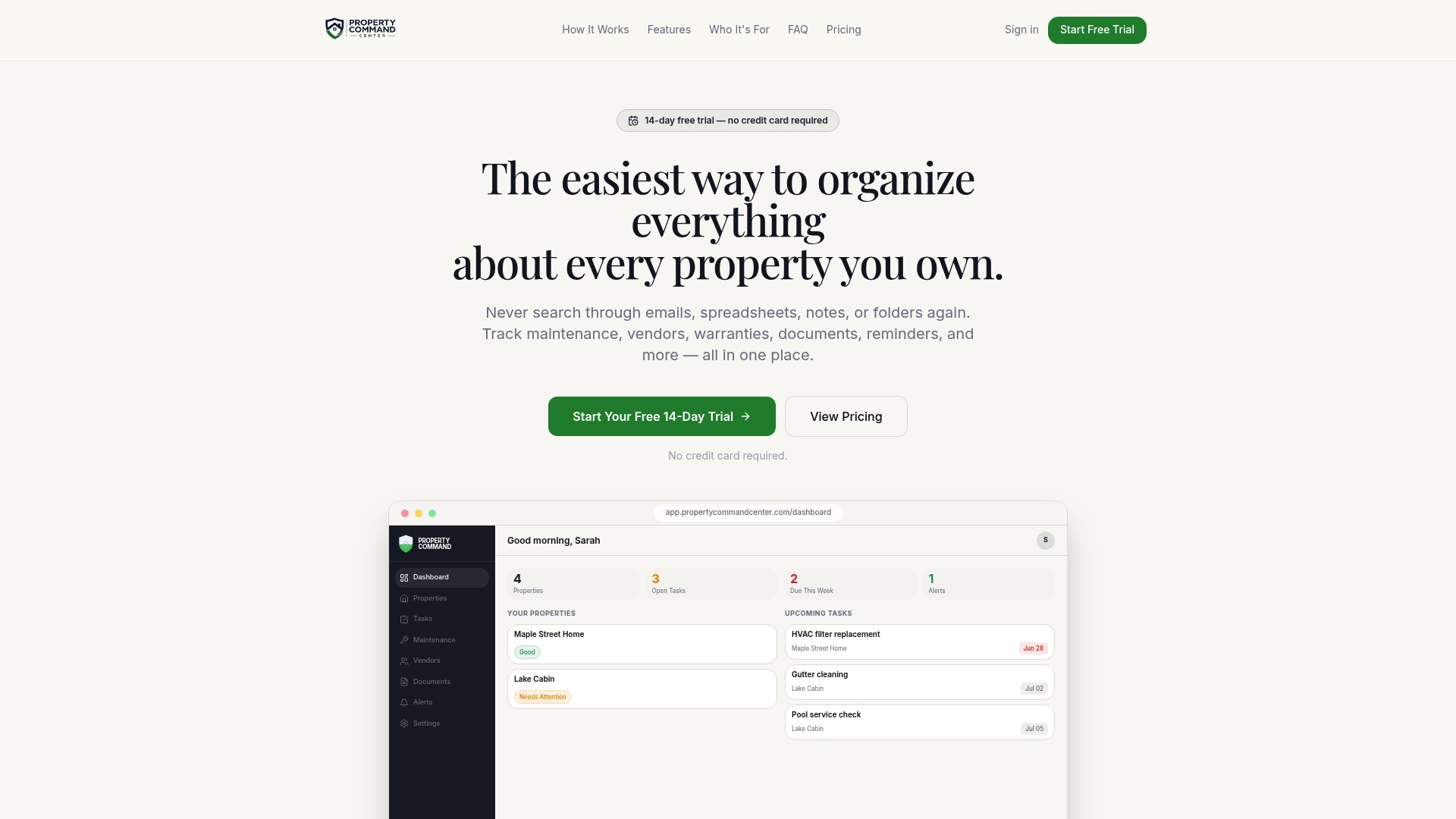
If you want to see what a property record looks like, the properties page is the place to start.
Our perspective
Most short-term rental trouble is a memory problem wearing a maintenance costume. The leak was reported, but in a text. The warranty existed, but in an email. The cleaner noticed the loose railing, but nobody wrote it down.
That is why we built Property Command Center around property knowledge instead of rent collection or accounting. Owners who self-manage already have the information. It is just in six places. We designed Smart Setup and portfolio import so that the first step is not data entry, it is bringing in what you have.
Our view is simple: a property should have one living record, and that record should tell you what happened, who did the work, where the paperwork is and what is due next. When that is true, turnovers get calmer, vendors get managed instead of chased, and adding another property does not double your workload.
Francisco
FAQ
Can I run a short-term rental on a spreadsheet?
For one property, often yes. It gets harder as you add properties, vendors and documents, because a spreadsheet will not remind you of a renewal or hold the PDF and photo behind each entry. Many owners move to a single property record once they pass two or three properties.
How often should I inspect a short-term rental?
Inspect at every turnover as a separate step from cleaning, then add a deeper seasonal check for systems like HVAC, plumbing and safety devices. Our inspection schedule guide breaks down timing by property type.
What should I do first when I add a new short-term rental?
Confirm your local license, zoning and tax requirements before listing. Then collect the property's documents, set up insurance for rental use, assign vendors and complete a baseline inspection. Record each of these in the property's file.
Do I need a different tool than rent-collection software?
Rent and tenant tools are built for leasing, screening and accounting. If your pain is scattered records, vendors and maintenance across properties, you need a tool built around property information. That is the job Property Command Center is designed to do.
Sources
- DIY vacation rental management checklist, 2026
- Self-managing a Smoky Mountain Airbnb
- Automate maintenance coordination for rentals
- IRS Publication 527, Residential Rental Property
- Short-Term Rentals, Austin Development Services
- Austin cracks down on short-term rental licenses
- Customer onboarding process